Stefan Đokić
A quick word from me
This issue isn't sponsored. Instead, let me point you to something I run every day: my AI for .NET Developers community - for .NET developers who want to use AI on real code, not demos. 50+ ready-to-run Claude skills and agents for .NET, step-by-step lessons with full source code, and new packs added based on what members ask for.
Join the community - 7 days free →Want to reach thousands of .NET developers like this?
Sponsor TheCodeMan →Keywords: agent skills in NuGet packages, agent skills NuGet, NuGet package skills, NuGet skills folder, SKILL.md, agent skills .NET, dotnet-package-skills, dotnet-inspect, project.assets.json, Claude Code skills, GitHub Copilot skills, Codex skills, .agents/skills, .claude/skills, ship skills with a NuGet package, Directory.Build.props, AI coding agent .NET library, Agent Skills specification, agentskills.io
What Are Agent Skills in NuGet Packages?
Agent skills in NuGet packages are SKILL.md files that a .NET library ships inside its .nupkg, one folder per skill under skills/. dotnet restore extracts them into the NuGet global packages folder and lists them in obj/project.assets.json, and the dotnet-package-skills tool copies them into the folder a coding agent reads, such as .claude/skills or .agents/skills. Because the skill ships with the package, the agent gets instructions that match the library version the project uses.
An agent skill is a Markdown file named SKILL.md with a short YAML header. It tells a coding agent how to do a specific task, and the agent loads it only when the task comes up. Most skills today are shared through git repositories: either committed next to the code, or installed from a marketplace repo such as dotnet/skills.
On November 3, Richard Lander published Delivering Skills in NuGet packages on the .NET Blog. The idea is that a library carries its own skills inside the .nupkg, so every package version ships the instructions that match its binaries. Once the skill is in a folder the agent reads, the agent can follow the rules you wrote for that exact version instead of guessing from training data or reflecting over the assembly.
In this post I build two small packages that carry agent skills in their NuGet packages, consume them in an ASP.NET Core API, and go through the tools that move the skills from the NuGet cache into a folder an agent reads. Everything below ran on .NET SDK 10.0.403 with dotnet-inspect 0.27.0 and dotnet-package-skills 0.1.0-beta.26530.1. The outputs are copied from those runs.
How a Skill Gets From a Package to Your Agent
There are four steps, and only the last one needs a new tool:
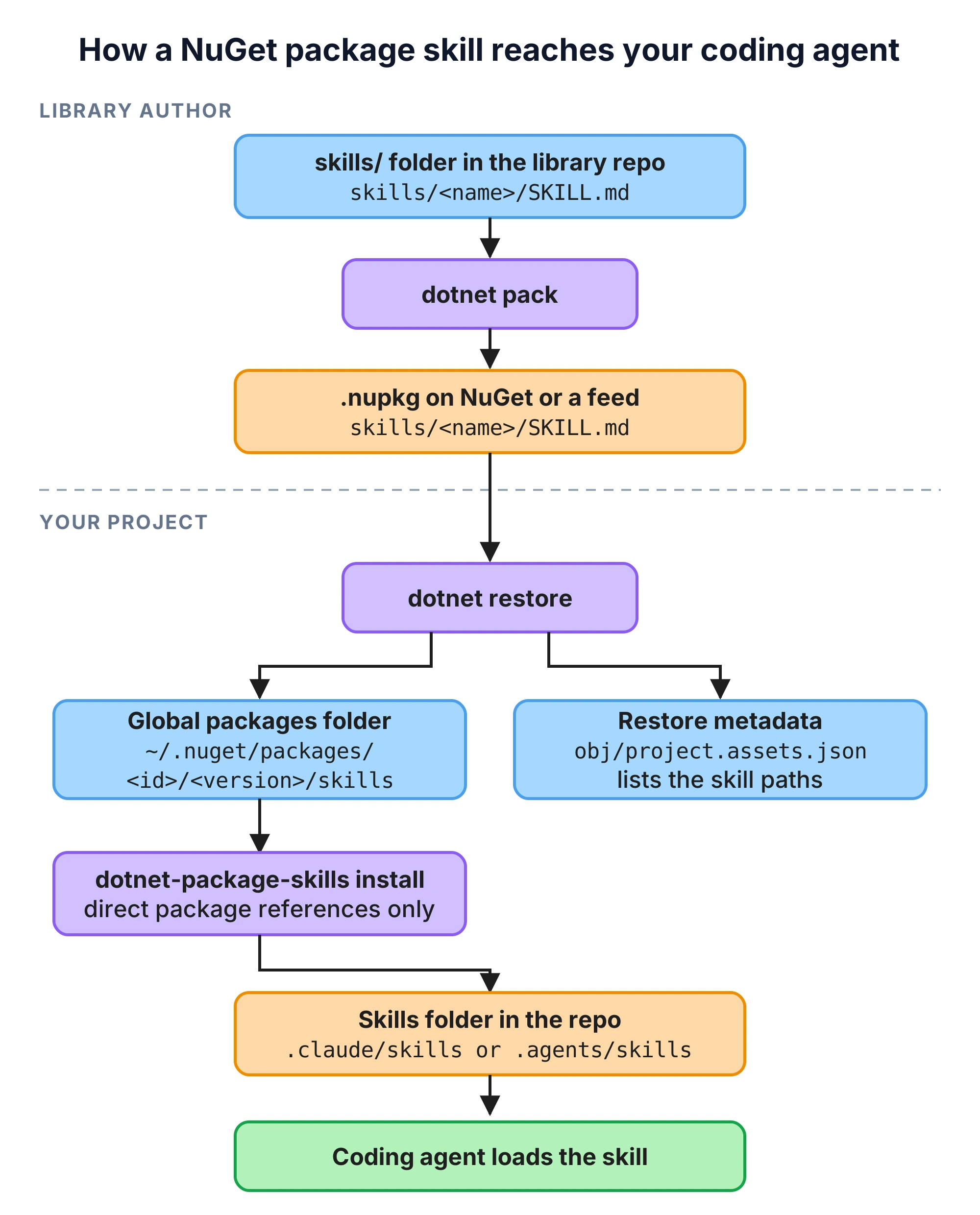
- The library author keeps skills in a
skills/folder and packs them into the package. dotnet restoreextracts the package, skills included, into the NuGet global packages folder.- Restore also writes every file of every package, including the
SKILL.mdpaths, intoobj/project.assets.json. - A coding agent only scans skill folders inside the repository, so something has to copy the skills there. That is what
dotnet-package-skillsdoes.
The Demo Library
I used two packages so I could also test a package that depends on another one:
- CodeMan.Results
- a
Result<T>andErrortype, the same idea as in my Result object error handling post.
- a
- CodeMan.Results.AspNetCore
- one extension method,
ToHttpResult(), that turns aResult<T>into a 200 or a ProblemDetails response. It depends on CodeMan.Results.
- one extension method,
The library code is short:
namespace CodeMan.Results; public sealed record Error(string Code, string Description, ErrorType Type){ public static Error Validation(string code, string description) => new(code, description, ErrorType.Validation); public static Error NotFound(string code, string description) => new(code, description, ErrorType.NotFound); /* Conflict and Failure follow the same shape */} public sealed class Result<T>{ /* private constructors, Success, Failure, IsSuccess, Error, Value */ public static implicit operator Result<T>(T value) => Success(value); public static implicit operator Result<T>(Error error) => Failure(error); public TOut Match<TOut>(Func<T, TOut> onSuccess, Func<Error, TOut> onFailure) => IsSuccess ? onSuccess(_value!) : onFailure(Error!);}
A library like this is a good candidate for a skill. The API is small, but it comes with rules that the types alone don't tell an agent: don't throw for expected failures, create errors only through the factory methods, don't map errors to status codes by hand in every endpoint. An agent that doesn't know these rules writes code that compiles and still ignores how the team uses the library.
Writing a SKILL.md File: Name and Description Rules
Each skill lives in its own folder under skills/. This is the layout of the CodeMan.Results project:
CodeMan.Results/├── CodeMan.Results.csproj├── Error.cs├── Result.cs└── skills/ └── codeman-results-usage/ ├── SKILL.md └── references/ └── error-codes.md
And the skill itself:
---name: codeman-results-usagedescription: >- Rules for returning and handling Result<T> and Error from CodeMan.Results. Use when writing or reviewing service methods that can fail, when adding a new error, or when mapping a result to an HTTP response.--- # Using CodeMan.Results - Return `Result<T>` from application services for expected failures (validation, not found, conflict). Do not throw exceptions for these cases.- Create errors only through the factory methods: `Error.Validation`, `Error.NotFound`, `Error.Conflict`, `Error.Failure`. Never call the `Error` constructor directly.- Error codes use the format `<Entity>.<Reason>`, for example `Order.NotFound`. See [references/error-codes.md](references/error-codes.md) for the codes that already exist.- Do not read `.Value` before checking `IsSuccess`. Prefer `Match`.- Use the implicit conversions: `return order;` and `return OrderErrors.NotFound(id);`.- In ASP.NET Core endpoints, call `ToHttpResult()` from the `CodeMan.Results.AspNetCore` package. Do not map errors to status codes by hand.- Do not add another Result type to the solution.
A few things about the format, from the Agent Skills specification. If you haven't written a skill before, my Claude Code for .NET post shows how skills fit next to CLAUDE.md and agents.
nameanddescriptionare required. The agent reads only these two fields up front and decides from the description whether to load the rest, so the description has to say when to use the skill, not only what it covers.- The body loads when the skill is activated. Files in
references/load only when the body points to them. Keep the main file short and move tables and long examples there. - The
namemust match the folder name and may contain only lowercase letters, numbers and hyphens.
That last rule matters for .NET package IDs. The dotnet-package-skills README recommends prefixing every skill folder with the lowercased package ID, so skills from different packages don't collide. For CodeMan.Results that would be codeman.results-usage, and the dot makes the name invalid under the specification. The VS Code documentation says a skill with an invalid name silently fails to load. I replace the dots with hyphens and use codeman-results-usage.
The second package has its own skill, codeman-results-aspnetcore, which tells the agent to end endpoints with result.ToHttpResult() and lists the status code for each error type.
How to Pack Agent Skills Into a NuGet Package
Neither the .NET Blog post nor the dotnet-package-skills README uses a special MSBuild property for skills. A skill is a file at a known path inside the package, so a normal None item with Pack="true" is enough:
<Project Sdk="Microsoft.NET.Sdk"> <PropertyGroup> <TargetFramework>net10.0</TargetFramework> <ImplicitUsings>enable</ImplicitUsings> <Nullable>enable</Nullable> <PackageId>CodeMan.Results</PackageId> <Version>1.0.0</Version> <Authors>Stefan Djokic</Authors> <Description>Result and Error types for .NET services.</Description> </PropertyGroup> <ItemGroup> <None Include="skills/**/*" Pack="true" PackagePath="skills/" /> </ItemGroup> </Project>
dotnet pack -c Release -o ./feed and a look inside the package:
$ unzip -l feed/CodeMan.Results.1.0.0.nupkg 7680 lib/net10.0/CodeMan.Results.dll 1132 skills/codeman-results-usage/SKILL.md 349 skills/codeman-results-usage/references/error-codes.md
The subfolder structure is kept. The dotnet-package-skills README uses PackagePath="skills/%(RecursiveDir)%(Filename)%(Extension)" and warns that without %(RecursiveDir) all files collapse into one folder. That happens if you spell out the file name and leave %(RecursiveDir) out: with PackagePath="skills/%(Filename)%(Extension)" my package ended up with skills/SKILL.md and skills/error-codes.md, and the skill folder was gone. With a folder path like skills/, NuGet keeps the relative path, and I got the same layout as with the README's form.
One rule from the README that the pack step won't check for you: every skill needs its own subfolder. A lone skills/SKILL.md is not discovered.
If the repository builds several packages, you don't need the item in every .csproj. I moved it to a Directory.Build.props in the repository root:
<Project> <ItemGroup Condition="'$(IsPackable)' != 'false'"> <None Include="skills/**/*" Pack="true" PackagePath="skills/" /> </ItemGroup></Project>
The skills/**/* path is resolved per project, so each package picked up its own skills/ folder and nothing else. Test projects usually set IsPackable to false, and the condition skips them. More on how these files are imported in my Directory.Build.props post.
What dotnet restore Does With Package Skills
On the consuming side nothing changes. I added both packages to a new web project from a local feed:
dotnet add package CodeMan.Results.AspNetCore --version 1.0.0
Restore extracts the package into the global packages folder, and the skills come with it:
~/.nuget/packages/codeman.results/1.0.0/├── codeman.results.1.0.0.nupkg├── codeman.results.nuspec├── lib/net10.0/CodeMan.Results.dll└── skills/codeman-results-usage/ ├── SKILL.md └── references/error-codes.md
It also records the files in obj/project.assets.json. This is the entry for CodeMan.Results, which the project only gets through CodeMan.Results.AspNetCore:
"CodeMan.Results/1.0.0": { "type": "package", "path": "codeman.results/1.0.0", "files": [ ".nupkg.metadata", "codeman.results.1.0.0.nupkg.sha512", "codeman.results.nuspec", "lib/net10.0/CodeMan.Results.dll", "skills/codeman-results-usage/SKILL.md", "skills/codeman-results-usage/references/error-codes.md" ]}
So after restore, a project knows about every skill in its package graph, transitive packages included. The skills are on disk, but in a folder outside the repository that every project on the machine shares, and that is not where coding agents look.
Listing Package Skills with dotnet-inspect
dotnet-inspect is a CLI from Richard Lander for inspecting packages and assemblies. It can show the skills of a single package:
dotnet tool install --global dotnet-inspectdotnet-inspect package Markout@0.40.1 -S Skills
path sizeskills/markout-built-in-shapes/SKILL.md 9457skills/markout-composite-cells-cards/SKILL.md 6764skills/markout-conditional-composition/SKILL.md 4978skills/markout-output-formats/SKILL.md 7744skills/markout/SKILL.md 8551
Markout is the package from the .NET Blog post. I pinned 0.40.1 because the latest version on NuGet when I ran this, 10.0.2, has no skills/ folder. You can also pass a .nupkg path instead of a package ID, which is useful for checking your own package before you publish it.
For a restored project, dotnet-inspect project reads project.assets.json:
dotnet-inspect project OrdersApi.csproj -S Skills
## Skills Valid Agent Skills documents from direct package dependencies. | Package | Version | Path | Size | Name | Description || ------- | ------- | ---- | ---- | ---- | ----------- || CodeMan.Results.AspNetCore | 1.0.0 | skills/codeman-results-aspnetcore/SKILL.md | 771 | codeman-results-aspnetcore | How to return CodeMan.Results Result<T> values from ASP.NET Core Minimal API endpoints and controllers. Use when an endpoint calls a service that returns Result<T>. |
Two things in that output. The heading says "direct package dependencies", and the CodeMan.Results skill is missing even though project.assets.json lists it. And it says "Valid", which means the tool checks each skill against the specification. To see what happens with an invalid skill, I packed a test package with one bad skill at a time (a name with a dot, an uppercase name, a missing description) and referenced each version. The command never skipped the bad skill. Each time it stopped with an error for the whole project, and no table. These are the messages from the dotted name and from the missing description:
Error: A restored package skill must declare an Agent Skills-compliant name that matches its containing directory.Error: A restored package skill must declare an Agent Skills-compliant description of 1 to 1024 characters.
If you ship skills, run dotnet-inspect package <your .nupkg> -S Skills before you publish. One invalid skill in your package breaks this command for every project that references it directly.
Copying Skills Into the Repository with dotnet-package-skills
dotnet-package-skills does the last step. It reads the project's packages, finds each one in the global packages folder and copies its skills into the repository. All published versions are prereleases, so the install command from the README fails without --prerelease:
dotnet tool install --global dotnet-package-skills# dotnet-package-skills is not found in NuGet feeds https://api.nuget.org/v3/index.json. dotnet tool install --global dotnet-package-skills --prerelease
Run it from the repository root:
$ dotnet-package-skills installSource: ~/src/orders-api/OrdersApi/OrdersApi.csprojNuGet global-packages directory: ~/.nuget/packages/Destination: ~/src/orders-api/.agents/skillsScanned 1 package (direct). Copied 1 skill: codeman-results-aspnetcore (CodeMan.Results.AspNetCore 1.0.0) These skills are instructions written by the package authors, and your coding agent will follow them. Review them before relying on them.
The default destination is .agents/skills. Next to the skill folders the tool writes .dotnet-package-skills.json, which records which package and version each skill came from:
{ "version": 1, "packages": { "codeman.results.aspnetcore": { "versions": { "1.0.0": { "skills": [ "codeman-results-aspnetcore" ] } } } }}
The tool uses this manifest to update and remove only the skills it copied. The README says a folder you wrote yourself in the same destination is never overwritten, and a refresh replaces the whole folder of a copied skill. Don't edit the copies. Put your own guidance in a separate skill folder.
Skills From Transitive Packages Are Not Copied
"Scanned 1 package (direct)" is the same limit as in dotnet-inspect. The tool runs dotnet list package and only looks at direct references, so the CodeMan.Results skill was not copied, although it is in the global packages folder and in project.assets.json.
You can name the package explicitly:
dotnet-package-skills install --package CodeMan.Results@1.0.0
That copies the skill, but the next plain install reports it as stale, because the project doesn't reference CodeMan.Results:
1 installed skill belongs to a package that the target no longer references: codeman-results-usage (codeman.results 1.0.0)Use uninstall with --stale to remove skills that no longer match the project.
Running uninstall --stale in CI would then delete it. The fix that holds up is a direct PackageReference to the base package. After dotnet add package CodeMan.Results --version 1.0.0, the output changed to "Scanned 2 packages (direct)" and both skills were copied.
For library authors this means the skill should live in the package your users reference. If most users only install the ASP.NET Core package, the rules they need should be in that package's skill too.
Which Skills Folder Claude Code, Copilot and Codex Read
The default .agents/skills destination is vendor-neutral, but not every agent reads it. According to each tool's documentation:
| Tool | Project skill folders it reads |
|---|---|
| Claude Code | .claude/skills |
| GitHub Copilot (VS Code, Copilot CLI, cloud agent) | .github/skills, .claude/skills, .agents/skills |
| Visual Studio | .github/skills, .claude/skills, .agents/skills |
| Codex | .agents/skills |
The Claude Code skills documentation lists only .claude/skills for project skills. Support for .agents/skills has been requested, and the docs don't list it yet. If anyone on the team uses Claude Code, copy the skills there:
dotnet-package-skills install --destination .claude/skills
According to the GitHub and Visual Studio documentation, Copilot and Visual Studio read .claude/skills as well, so that one destination covers Claude Code, Copilot and Visual Studio. Codex reads only .agents/skills, so a team that also uses Codex has to run the tool twice, once per destination. uninstall needs the same --destination, because it only looks where you point it.
Upgrading a Package Updates Its Skill
A skill in a separate git repo doesn't give you this: here the skill version follows the package version. I added an Unauthorized error type to CodeMan.Results, updated the skill, and packed version 1.1.0:
- Create errors only through the factory methods: `Error.Validation`, `Error.NotFound`,- `Error.Conflict`, `Error.Failure`. Never call the `Error` constructor directly.+ `Error.Conflict`, `Error.Unauthorized`, `Error.Failure`. Never call the `Error` constructor+ directly.+- Use `Error.Unauthorized` when the caller is not allowed to touch the resource. It is new in+ 1.1.0. Do not use `Error.Failure` for permission problems.
In the consuming project:
$ dotnet add package CodeMan.Results --version 1.1.0$ dotnet-package-skills install --destination .claude/skillsSource: ~/src/orders-api/OrdersApi/OrdersApi.csprojNuGet global-packages directory: ~/.nuget/packages/Destination: ~/src/orders-api/.claude/skillsScanned 2 packages (direct). Copied 2 skills: codeman-results-aspnetcore (CodeMan.Results.AspNetCore 1.0.0) codeman-results-usage (CodeMan.Results 1.1.0)
The manifest now records 1.1.0 for codeman-results-usage, and the copied SKILL.md mentions Error.Unauthorized. The agent gets the instructions for the version the project compiles against. According to the README, if a new version drops a skill, install removes it, and if a package leaves the project, its skills stay and are reported as stale until you run uninstall --stale.
Keeping Package Skills in Sync in CI
The README leaves the choice to you: commit the skills folder, or add it to .gitignore and let every machine run the tool. I prefer committing it. Everyone on the team and every agent session in CI gets the same skills without running anything, and a skill change shows up in the pull request diff, where someone can read it.
If you commit it, someone will upgrade a package and forget to refresh the skills. A CI step can catch that. If the repository doesn't have a CI workflow yet, my Bullet-Proof .NET CI on GitHub post sets one up. First pin the tool in a local tool manifest, so CI runs the same prerelease version you tested:
dotnet new tool-manifestdotnet tool install dotnet-package-skills --prerelease
On .NET SDK 10.0.403 this creates dotnet-tools.json in the repository root. Then the check, for a repository with a solution file in the root:
- name: Check package skills are up to date run: | dotnet tool restore dotnet restore dotnet tool run dotnet-package-skills install --destination .claude/skills git status --porcelain -- .claude/skills test -z "$(git status --porcelain -- .claude/skills)"
I first used git diff --exit-code for the last step and dropped it. git diff doesn't show untracked files, so when a new package brings new skill folders, only the manifest change shows up, and in a repository where the manifest isn't committed yet the check passes. git status --porcelain lists both.
I ran these commands locally, not in GitHub Actions. With the committed skills matching the project, the check printed nothing and returned 0. After I changed the CodeMan.Results version in the .csproj from 1.1.0 to 1.0.0 without running the tool, it returned 1:
M .claude/skills/.dotnet-package-skills.json M .claude/skills/codeman-results-usage/SKILL.md
After I added Markout 0.40.1 without running the tool, it also returned 1, and this time the new folders are listed:
M .claude/skills/.dotnet-package-skills.json?? .claude/skills/markout-built-in-shapes/?? .claude/skills/markout-composite-cells-cards/?? .claude/skills/markout-conditional-composition/?? .claude/skills/markout-output-formats/?? .claude/skills/markout/
Plain dotnet restore needs a solution or project file in the folder it runs in. Without one it fails, and the step fails before the diff, so point it at your .sln or .slnx if it isn't in the root.
Listing Transitive Skills From project.assets.json
Both tools skip transitive packages, but project.assets.json has the full list. When I want to see every skill a project could use, I run this small file-based app (dotnet run on a single .cs file works since .NET 10):
// Lists every package skill in a restored project, including transitive packages.// Usage: dotnet run list-skills.cs -- path/to/obj/project.assets.jsonusing System.Text.Json; var assetsPath = args.Length > 0 ? args[0] : "obj/project.assets.json";using var doc = JsonDocument.Parse(File.ReadAllText(assetsPath));var root = doc.RootElement; var packagesFolder = root.GetProperty("packageFolders").EnumerateObject().First().Name; var directIds = root.GetProperty("project").GetProperty("frameworks") .EnumerateObject() .SelectMany(tfm => tfm.Value.TryGetProperty("dependencies", out var deps) ? deps.EnumerateObject().Select(d => d.Name) : []) .ToHashSet(StringComparer.OrdinalIgnoreCase); foreach (var library in root.GetProperty("libraries").EnumerateObject()){ if (library.Value.GetProperty("type").GetString() != "package") { continue; } var packageId = library.Name.Split('/')[0]; var packagePath = library.Value.GetProperty("path").GetString()!; var kind = directIds.Contains(packageId) ? "direct" : "transitive"; var skillFiles = library.Value.GetProperty("files").EnumerateArray() .Select(f => f.GetString()!) .Where(f => f.Split('/') is ["skills", _, "SKILL.md"]); foreach (var skillFile in skillFiles) { Console.WriteLine($"{library.Name,-34} {kind,-11} {Path.Combine(packagesFolder, packagePath, skillFile)}"); }}
The list pattern ["skills", _, "SKILL.md"] matches only a SKILL.md directly inside a skill folder, the same rule the tools use. On a project that references only CodeMan.Results.AspNetCore:
CodeMan.Results/1.0.0 transitive ~/.nuget/packages/codeman.results/1.0.0/skills/codeman-results-usage/SKILL.mdCodeMan.Results.AspNetCore/1.0.0 direct ~/.nuget/packages/codeman.results.aspnetcore/1.0.0/skills/codeman-results-aspnetcore/SKILL.md
Every "transitive" row is a skill that dotnet-package-skills install won't copy until you add a direct reference.
Package Skills Are Part of Your Supply Chain
Unlike an MSBuild .targets file in a package, a skill doesn't run anything during restore or build. The agent reads it and follows it. A skill can tell the agent to run a command, add a package, change a configuration file or run a script that ships in the skill folder, and an agent with shell access may do it. The dotnet-package-skills README says it directly: treat a new skill the way you would treat any new dependency. Richard Lander's post repeats the old advice to use packages only from maintainers you trust.
In practice:
- Read the skills before you commit them. The tool prints every skill it copies, and the files are small.
- Commit the copied folder, so a changed skill goes through code review like any other change.
- Keep the agent's permissions tight. If you use Claude Code, hooks can block commands you never want an agent to run. I showed how in my Claude Code hooks post.
What Is Still Missing
This is early. The .NET Blog post describes the packaging convention and the first tools, and it says a follow-up will show how agents use package skills. As of today:
- No agent that I found in the documentation reads skills from the NuGet global packages folder. You need the copy step.
dotnet-package-skillsis a prerelease tool, and its README says install and uninstall are not transactional yet.- The NuGet MCP server does not support skills yet, according to the .NET Blog post. The team plans to add it.
- Neither tool covers transitive packages.
FAQ
Do coding agents read skills from NuGet packages automatically?
Not from the NuGet cache. Restore puts package skills in the global packages folder, outside the repository, and agents scan skill folders inside the repository. Copy them with dotnet-package-skills install, into .claude/skills for Claude Code or .agents/skills for Copilot and Codex.
Where do I put agent skills in my NuGet package?
Put each skill in its own folder under skills/, for example skills/codeman-results-usage/SKILL.md, and pack the folder with <None Include="skills/**/*" Pack="true" PackagePath="skills/" />. The name in the YAML header must match the folder name and use only lowercase letters, numbers and hyphens, so replace the dots in your package ID with hyphens.
Does dotnet-package-skills copy skills from transitive dependencies?
No. It only scans packages the project references directly. Add a direct PackageReference to the package that ships the skill. Naming it with --package Id@Version works once, but the next plain install reports it as stale.
Should I commit the copied skills folder to git?
The dotnet-package-skills README treats both options as reasonable. Committing it gives the whole team and CI the same skills, and skill changes show up in pull requests. If you commit it, add a CI step that runs install and fails when git status --porcelain shows changes in the skills folder.
How do I see which NuGet packages in my project ship agent skills?
Run dotnet-package-skills list from the repository root, or dotnet-inspect project <path to .csproj> -S Skills. Both list skills from direct package references only. For transitive packages, read obj/project.assets.json, which lists every file of every restored package.
What is the difference between a package skill and a README?
A README is written for people and agents read it only if they decide to look for it. A skill has a description that the agent sees up front and uses to decide when to load the instructions, and it carries rules for one task. Package skills also match the package version, so they change when you upgrade.
Wrapping Up
Agent skills in NuGet packages use the NuGet tooling .NET developers already have. The author adds a skills/ folder and one None item to the .csproj, dotnet restore delivers the skills with the binaries, and project.assets.json lists them. The missing piece is the copy into the repository, which dotnet-package-skills install does today, as long as you reference the package directly and pick a destination your agent reads.
If you maintain a library, write one short skill for the rules people get wrong most often and check it with dotnet-inspect before you publish. If you consume libraries, run dotnet-package-skills list on your solution to see whether any package already ships one. For building the other half of the agent setup in .NET, see my post on building an MCP server in .NET.
That's all from me today.