Stefan Đokić
A quick word from me
This issue isn't sponsored. Instead, let me point you to something I run every day: my AI for Developers community, for developers who want to use AI on real code. 50+ ready-to-run skills and agents, with a deep .NET Pack, and the room to figure it out together.
Join the community - 7 days free →Want to reach thousands of .NET developers like this?
Sponsor TheCodeMan →Keywords: AI in C#, C# AI, getting started with AI in .NET, Microsoft.Extensions.AI, IChatClient, IChatClient C#, Microsoft.Extensions.AI.OpenAI, OllamaSharp, C# OpenAI, C# Ollama, .NET AI development, AddChatClient, ChatClientBuilder, AIFunctionFactory, tool calling C#, streaming LLM response C#
How Do You Get Started with AI in C#?
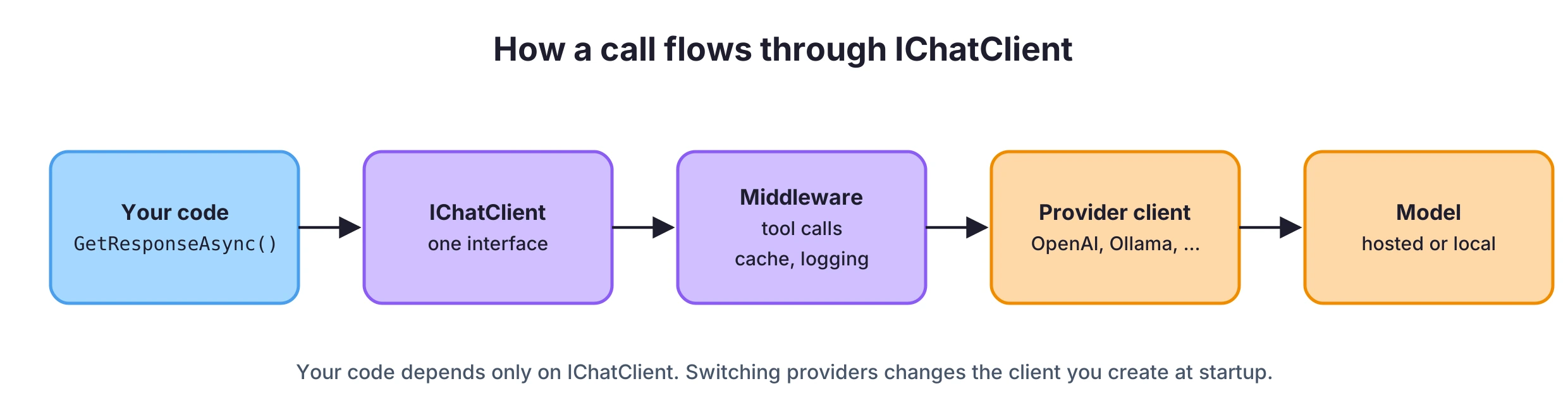
To get started with AI in C#, install Microsoft.Extensions.AI and a provider package, create an IChatClient, and call GetResponseAsync with your prompt. IChatClient is one interface for every model provider: OpenAI, Azure OpenAI, a local model in Ollama and others. The rest of your code depends on the interface, so switching providers means changing the line that creates the client.
This post starts from an empty console app. It covers the first model call, a local model with Ollama, chat history, streaming, registering IChatClient in ASP.NET Core with caching and logging, and letting the model call your own C# methods.
The code uses Microsoft.Extensions.AI 11.0.0, OllamaSharp 5.5.2 and .NET 10.
The Problem: Every Provider Has Its Own SDK
Each AI provider ships its own .NET SDK. The OpenAI SDK has a ChatClient with CompleteChatAsync. Ollama has its own client with its own request types. Other providers have theirs. If your application calls one of them directly, the provider's types end up in your services, your tests and your DI setup.
That makes a few ordinary things harder than they should be:
- Running a local model in development and a hosted model in production.
- Trying a second provider to compare quality or cost.
- Adding the same logging, caching or telemetry around every model call.
- Writing a unit test without a real model.
Microsoft.Extensions.AI solves this the same way ILogger did for logging. It defines a small set of interfaces, and each provider implements them.
What Microsoft.Extensions.AI Gives You
There are three kinds of packages:
| Package | What it contains |
|---|---|
Microsoft.Extensions.AI.Abstractions | The interfaces: IChatClient, IEmbeddingGenerator, and types like ChatMessage, ChatResponse, ChatOptions |
Microsoft.Extensions.AI | Middleware for tool calling, caching, logging and OpenTelemetry, plus ChatClientBuilder and DI helpers like AddChatClient |
| Provider packages | Implementations: Microsoft.Extensions.AI.OpenAI for OpenAI and Azure OpenAI, OllamaSharp for Ollama, and others |
IChatClient has two methods you use every day: GetResponseAsync returns the full answer, and GetStreamingResponseAsync returns it piece by piece. The middleware wraps an IChatClient in another IChatClient, so a call goes through a small pipeline before it reaches the provider:
The Microsoft.Extensions.AI documentation has the full API reference and more examples.
Your First Model Call in C#
Create a console app and add the packages. For OpenAI, the provider package is Microsoft.Extensions.AI.OpenAI, which brings the official OpenAI SDK with it:
dotnet new console -n FirstAicd FirstAidotnet add package Microsoft.Extensions.AIdotnet add package Microsoft.Extensions.AI.OpenAI
Keep the API key and the model name out of the code. In a console app, environment variables are enough:
# PowerShell$env:OPENAI_API_KEY = "sk-..."$env:OPENAI_MODEL = "<a chat model your account can use>"
Model names change often, so the code reads the name from configuration instead of hardcoding one. Here's Program.cs:
using Microsoft.Extensions.AI;using OpenAI; var apiKey = Environment.GetEnvironmentVariable("OPENAI_API_KEY")!;var model = Environment.GetEnvironmentVariable("OPENAI_MODEL")!; IChatClient client = new OpenAIClient(apiKey) .GetChatClient(model) .AsIChatClient(); ChatResponse response = await client.GetResponseAsync( "What is dependency injection in .NET? Answer in two sentences."); Console.WriteLine(response.Text);Console.WriteLine($"Tokens used: {response.Usage?.TotalTokenCount}");
AsIChatClient() is the adapter. It takes the OpenAI SDK's ChatClient and returns an IChatClient. From that line on, nothing in the code knows it is talking to OpenAI.
response.Text is the model's answer. response.Usage holds the token counts the provider reported, which is what you pay for. It's worth logging from the start so you know what each feature costs.
Run the Same Code Against a Local Model with Ollama
Ollama runs models on your own machine. It's useful for development, for working offline, and for data you don't want to send to a hosted provider. Install Ollama, pull a model, and add the OllamaSharp package:
ollama pull llama3.2dotnet add package OllamaSharp
OllamaApiClient implements IChatClient directly, so the only change is the line that creates the client:
using Microsoft.Extensions.AI;using OllamaSharp; IChatClient client = new OllamaApiClient(new Uri("http://localhost:11434"), "llama3.2"); ChatResponse response = await client.GetResponseAsync( "What is dependency injection in .NET? Answer in two sentences."); Console.WriteLine(response.Text);
You may see older tutorials use a Microsoft.Extensions.AI.Ollama package. That was a preview package and is no longer updated. OllamaSharp is the implementation to use now.
The interface is the same, but the models aren't. A small local model gives shorter and less reliable answers than a large hosted one, so test your prompts on the model you plan to ship with.
Keep a Conversation: Chat History
A model doesn't remember earlier calls. Every request has to include the conversation so far. In Microsoft.Extensions.AI, a conversation is a List<ChatMessage>, and each message has a role:
ChatRole.System- instructions for the model: who it is, how to answer.ChatRole.User- what the user typed.ChatRole.Assistant- what the model answered before.
List<ChatMessage> history =[ new(ChatRole.System, "You are a senior .NET developer. Answer briefly and show C# when it helps.")]; while (true){ Console.Write("> "); var input = Console.ReadLine(); if (string.IsNullOrWhiteSpace(input)) break; history.Add(new ChatMessage(ChatRole.User, input)); ChatResponse response = await client.GetResponseAsync(history); Console.WriteLine(response.Text); history.AddMessages(response);}
AddMessages(response) appends the model's reply to the history, so the next question can refer to it ("and how do I do that in a Minimal API?"). The history grows with every turn, and every turn sends all of it again, so long conversations get slower and more expensive. For a real application, decide how many messages you keep.
Stream the Answer
GetResponseAsync waits for the whole answer. For a chat UI, that means the user looks at nothing for several seconds. GetStreamingResponseAsync returns the answer in small updates as the model generates it:
history.Add(new ChatMessage(ChatRole.User, "Explain IAsyncEnumerable in two sentences.")); List<ChatResponseUpdate> updates = [];await foreach (ChatResponseUpdate update in client.GetStreamingResponseAsync(history)){ Console.Write(update.Text); updates.Add(update);} history.AddMessages(updates);
It returns an IAsyncEnumerable, so await foreach is all you need. Collect the updates if you want to add the full answer to the history afterwards; AddMessages has an overload for that.
ChatOptions controls the request itself. It's the optional second parameter of both methods:
var options = new ChatOptions{ Temperature = 0.2f, // lower = more predictable answers MaxOutputTokens = 500 // upper limit for the answer length}; ChatResponse response = await client.GetResponseAsync(history, options);
Not every provider supports every option, so check what your provider does with them.
Register IChatClient in ASP.NET Core
In a web application, you register IChatClient once and inject it where you need it. AddChatClient registers the client and returns a builder for the middleware:
dotnet new web -n AiApicd AiApidotnet add package Microsoft.Extensions.AIdotnet add package Microsoft.Extensions.AI.OpenAIdotnet user-secrets initdotnet user-secrets set "OpenAI:ApiKey" "sk-..."dotnet user-secrets set "OpenAI:Model" "<a chat model your account can use>"
using Microsoft.Extensions.AI;using OpenAI; var builder = WebApplication.CreateBuilder(args); var apiKey = builder.Configuration["OpenAI:ApiKey"] ?? throw new InvalidOperationException("OpenAI:ApiKey is missing.");var model = builder.Configuration["OpenAI:Model"] ?? throw new InvalidOperationException("OpenAI:Model is missing."); builder.Services.AddDistributedMemoryCache(); builder.Services .AddChatClient(new OpenAIClient(apiKey).GetChatClient(model).AsIChatClient()) .UseDistributedCache() .UseLogging(); var app = builder.Build(); app.MapPost("/summarize", async (SummarizeRequest request, IChatClient chat, CancellationToken ct) =>{ ChatResponse response = await chat.GetResponseAsync( [ new ChatMessage(ChatRole.System, "Summarize the text in three short bullet points."), new ChatMessage(ChatRole.User, request.Text) ], cancellationToken: ct); return Results.Ok(new { summary = response.Text });}); app.Run(); public record SummarizeRequest(string Text);
Two pieces of middleware are added here:
UseDistributedCache()stores responses inIDistributedCache. When the same messages and options come in again, it returns the stored response without calling the model. That fits repeated, deterministic work like summarizing the same document. It doesn't fit a chat where the user expects a new answer each time. Here it uses the in-memory cache; in production you'd register Redis or anotherIDistributedCache.UseLogging()logs each call through the app'sILogger. If you use OpenTelemetry,UseOpenTelemetry()adds traces and metrics for the calls.
The endpoint passes the request's CancellationToken to the model call. When the client disconnects, the request to the provider is cancelled too, instead of running to the end for nobody.
Let the Model Call Your C# Methods
A model only knows what was in its training data and what you put in the prompt. To answer "what's the status of order 42?", it needs your data. Tool calling lets the model ask your code to run a method and use the result in its answer.
You describe a C# method as a tool, and the UseFunctionInvocation() middleware runs it when the model asks for it:
using System.ComponentModel;using Microsoft.Extensions.AI; IChatClient client = new ChatClientBuilder(baseClient) // the OpenAI or Ollama client from earlier .UseFunctionInvocation() .Build(); var options = new ChatOptions{ Tools = [AIFunctionFactory.Create(GetOrderStatus, name: "get_order_status")]}; ChatResponse response = await client.GetResponseAsync("What's the status of order 42?", options);Console.WriteLine(response.Text); [Description("Gets the shipping status of an order by its id.")]static string GetOrderStatus([Description("The order id")] int orderId) => orderId == 42 ? "Shipped" : "Not found";
The flow is:
- The request goes to the model with the tool's name, description and parameter schema.
- The model answers with a request to call
get_order_statuswithorderId = 42. UseFunctionInvocation()runsGetOrderStatus(42)and sends the result back to the model.- The model writes the final answer using that result.
The Description attributes are what the model reads to decide when to call the tool and what to pass, so write them for the model. Tool calling also needs a model that supports it, so check that before you pick a local model.
One detail about the name: if you leave out name: and pass a local function from top-level statements, the tool gets the compiler-generated method name, something like _Main_g_GetOrderStatus_0_0. Pass a name explicitly, or use a method on a regular class.
For more than one or two tools, a conversation that needs to survive between requests, or tools that need human approval, use an agent. That's the next step: Build an AI agent in C# with Microsoft Agent Framework.
Practical Rules for AI Features in .NET
- Keep the API key and the model name in configuration. User secrets locally, a secret store in production. Model names get replaced, and you don't want a redeploy for that.
- Depend on
IChatClient, not on the provider's SDK. Create the provider client in one place, at startup. - Pass the
CancellationTokento every model call. - Log token usage (
response.Usage) per feature, so cost is visible early. - Stream in UIs, don't stream in background jobs. Streaming improves how fast the answer appears to a user. A background job only needs the final result.
- Don't send secrets or personal data you aren't allowed to share with a hosted model. Use a local model or remove that data from the prompt.
- Test the prompt on the model you'll ship with. The interface is the same for every provider; the quality of the answers isn't.
- Write unit tests against
IChatClient. It's an interface, so a test can pass a fake implementation that returns a fixedChatResponse.
Where to Go Next
IChatClient is the base for the rest of AI in .NET:
- Agents: Build an AI agent in C# with Microsoft Agent Framework turns an
IChatClientinto an agent with tools, a session and approvals. - Your own data: Semantic search in C# uses
IEmbeddingGenerator, the second interface from Microsoft.Extensions.AI, and RAG in C# passes the search results to the model. - Tools for other clients: How to build an MCP server in C# exposes your methods to Claude, GitHub Copilot and other MCP clients instead of your own app.
Wrapping Up
Getting started with AI in C# comes down to one interface. IChatClient from Microsoft.Extensions.AI gives you the same API for OpenAI, a local Ollama model and other providers. You call GetResponseAsync or GetStreamingResponseAsync, keep the conversation in a List<ChatMessage>, and register the client in DI with AddChatClient. Caching, logging and tool calling are middleware you add in the same place.
Start with one small feature in an application you already have, such as summarizing a text field or drafting a reply, and add tool calling when the model needs your data.
This post is part of the free AI for .NET Developers guide, where every AI tutorial on the site is grouped by topic.
That's all from me today.