Stefan Đokić
A quick word from me
This issue isn't sponsored. Instead, let me point you to something I run every day: my AI for Developers community, for developers who want to use AI on real code. 50+ ready-to-run skills and agents, with a deep .NET Pack, and the room to figure it out together.
Join the community - 7 days free →Want to reach thousands of .NET developers like this?
Sponsor TheCodeMan →Keywords: .NET skills, dotnet skills, dotnet/skills, .NET agent skills, C# AI skills, Claude Code .NET skills, GitHub Copilot .NET skills, SKILL.md, agent skills C#, dotnet-agent-skills, .NET skills plugin, Claude Code C# LSP, roslyn-language-server, write a SKILL.md, .claude/skills
What Are .NET Skills?
.NET skills are agent skills - SKILL.md files with instructions for a specific task - written for .NET development. The main collection is dotnet/skills, a repository from the .NET team at Microsoft. It groups the skills into 16 plugins, such as dotnet, dotnet-data, dotnet-test and dotnet-upgrade, and you install them into Claude Code, GitHub Copilot CLI, VS Code, Cursor or Codex. When you ask the agent to do something a skill covers, such as reviewing EF Core queries or upgrading a project to .NET 11, the agent loads that skill and follows it.
Microsoft announced the repository in March 2026 and included .NET Skills in the .NET 11 launch on November 10, 2026. This post covers what's in it, how to install it, and how to write your own SKILL.md for a .NET repository. The plugin and skill lists below are from the repository as of November 11, 2026; it changes often.
The Problem: Coding Agents Don't Know Your .NET Version or Your Rules
A coding agent writes C# from what it learned during training plus what's in your repository. That leaves two gaps.
The first is the platform. The model was trained before the newest .NET release, so it doesn't know new APIs, breaking changes or the current recommendation for things that changed recently. It also tends to give generic advice, like "add AsNoTracking", without checking whether it applies to the code in front of it.
The second is your project. The agent doesn't know how your team adds an endpoint, which test framework you use, or which commands prove a change works, unless you tell it.
Skills help with both. dotnet/skills covers the first gap, and skills you write for your repository cover the second.
How an Agent Skill Works
A skill is a folder with a SKILL.md file. The file starts with a short YAML header:
---name: optimizing-ef-core-queriesdescription: "Review and optimize application data access that uses Entity Framework Core (EF Core). Use for EF Core performance and correctness reviews of services, repositories, imports, and background jobs: ..."license: MIT---
That's the beginning of a real skill from the dotnet-data plugin. The agent reads only the name and description of every installed skill up front. When your request matches a description, it loads the rest of the file. Larger material sits in a references/ folder next to SKILL.md and is loaded only when the skill points to it, and some skills have a scripts/ folder with scripts the agent can run.
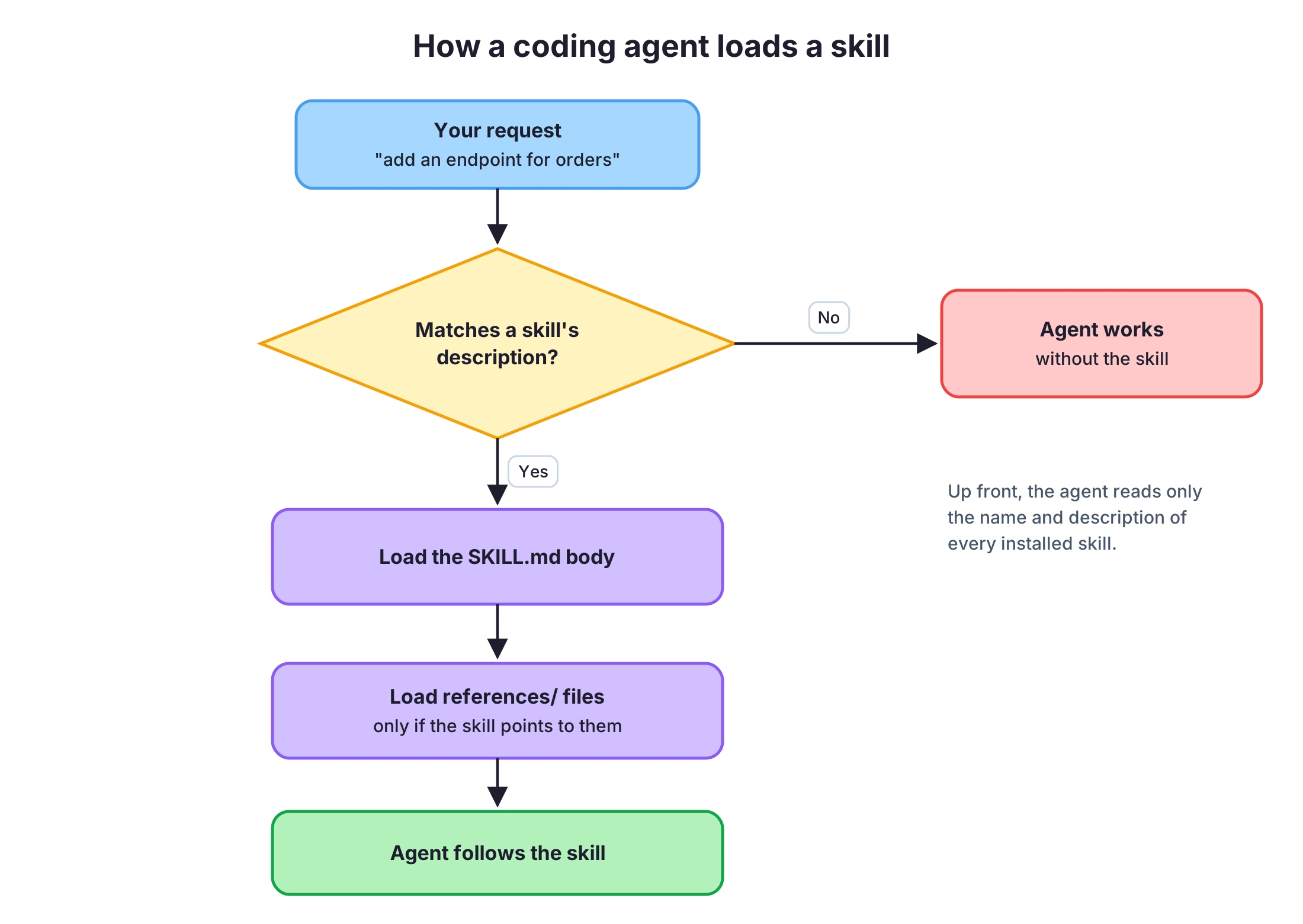
This is why the description matters more than anything else in the file. It has to say when to use the skill, not only what it's about. The format is the Agent Skills specification, which is why the same skill works in Claude Code, GitHub Copilot and other agents. I covered the name and description rules in more detail in Agent skills in NuGet packages.
What's in dotnet/skills
The 16 plugins, with the number of skills in each and a few examples:
| Plugin | Skills | Examples |
|---|---|---|
dotnet | 5 | csharp-expert, csharp-refactoring, dotnet-breaking-changes, msbuild, plus the C# language server |
dotnet-data | 2 | optimizing-ef-core-queries, create-datadriven-aspnetcore |
dotnet-test | 24 | assertion-quality, code-testing, coverage-analysis |
dotnet-msbuild | 21 | binlog-failure-analysis, build-perf-diagnostics, build-parallelism |
dotnet-blazor | 10 | author-component, configure-auth, create-blazor-project |
dotnet-maui | 8 | dotnet-maui-doctor, maui-collectionview, maui-data-binding |
dotnet-diag | 7 | analyzing-dotnet-performance, dump-collect, dotnet-trace-collect, microbenchmarking |
dotnet-upgrade | 6 | migrate-dotnet10-to-dotnet11, migrate-dotnet9-to-dotnet10, migrate-nullable-references |
dotnet-test-migration | 6 | migrate-xunit-to-xunit-v3, migrate-vstest-to-mtp, migrate-mstest-v3-to-v4 |
dotnet-template-engine | 6 | template-authoring, template-discovery, template-validation |
dotnet-advanced | 4 | csharp-scripts, dotnet-pinvoke, nuget-trusted-publishing, vectorization |
dotnet-aspnetcore | 2 | dotnet-webapi, convert-blazor-server-to-webapp |
dotnet11 | 2 | process-api-net11, system-text-json-net11 |
dotnet-ai | 1 | technology-selection |
dotnet-nuget | 1 | convert-to-cpm |
dotnet-winforms | 1 | winforms-expert |
Some plugins also include custom agents for GitHub Copilot, in files named *.agent.md.
A Look Inside One Skill
The optimizing-ef-core-queries skill shows what a good skill looks like. It's not a list of EF Core tips. It's a review procedure:
- A When to Use list (N+1 queries, row explosion from multiple
Includes, deep paging, a hot query that pays the LINQ translation cost every time) and a When Not to Use section that tells the agent to stay away from EF Core advice when the code uses Dapper or raw ADO.NET. - A source review workflow: find the EF Core boundary, trace each query to where it actually executes, count the database round-trips, and report findings with locations and impact.
- A rule to separate proven problems from guesses. For example, a missing
HasIndexcall in one file doesn't prove the database has no index, andAsNoTrackingonly matters for entity results that are actually read-only. If everything looks fine, the agent should say so instead of inventing a finding.
That last part is the most useful thing to copy into your own skills. An agent without it tends to always find something.
The C# Language Server in the dotnet Plugin
The dotnet plugin includes more than skills. It configures a C# language server for hosts that support LSP plugins, such as Claude Code. The configuration starts the Roslyn language server through dotnet dnx:
{ "csharp": { "command": "dotnet", "args": ["dnx", "roslyn-language-server", "--yes", "--prerelease", "--", "--stdio", "--daemon-mode", "--autoLoadProjects"], "extensionToLanguage": { ".cs": "csharp", ".razor": "aspnetcorerazor", ".cshtml": "aspnetcorerazor" } }}
With a language server, the agent gets compiler diagnostics after an edit and can navigate by symbol, instead of searching text. dotnet dnx is part of the .NET 10 SDK, so you need .NET 10 or later installed for this part.
Install .NET Skills in Claude Code and GitHub Copilot CLI
Claude Code and GitHub Copilot CLI use the same commands. Add the marketplace once, then install the plugins you want:
/plugin marketplace add dotnet/skills/plugin install dotnet@dotnet-agent-skills/plugin install dotnet-data@dotnet-agent-skills
dotnet-agent-skills is the marketplace name. Restart the agent after installing, then use /skills to list the installed skills and /agents to list agents. To update a plugin later:
/plugin update dotnet-data@dotnet-agent-skills
Install .NET Skills in VS Code
In VS Code, plugin support for Copilot Chat is a preview feature. Add the marketplace to settings.json:
{ "chat.plugins.enabled": true, "chat.plugins.marketplaces": ["dotnet/skills"]}
Then type /plugins in Copilot Chat, or filter the Extensions view with @agentPlugins, and install from there.
The repository also documents Cursor (search the marketplace for ".NET") and Codex (codex plugin marketplace add dotnet/skills, then the dotnet-agent-skills tab in /plugins).
Which .NET Skill Plugins to Install
Don't install all 16. Every installed skill adds its name and description to the agent's context, and a description that matches by accident can pull a skill into a task where it doesn't belong.
A reasonable start:
dotnetfor every .NET repository: the general C# skills and the language server.- The plugin for the work you do now.
dotnet-datafor EF Core,dotnet-testfor tests,dotnet-aspnetcoreordotnet-blazorfor web apps. dotnet-upgradebefore a migration, such as moving from .NET 10 to .NET 11, and remove it afterwards if you don't need it.
Microsoft publishes how the skills perform. The Skill Value dashboard shows token use, elapsed time, how often a skill activates and how often the result doesn't pass, filtered by plugin, skill and model. It's worth a look before you rely on a skill for something important.
Write Your Own SKILL.md for a .NET Repository
dotnet/skills knows .NET. It doesn't know your repository. For that, write your own skills and commit them with the code.
Pick a task the agent does often in your repository and gets wrong in the same way. A common one is adding a new API endpoint: the agent doesn't know your folder structure, your validation approach or which tests to add. Here's a skill for that, written for a repository that uses vertical slices with Minimal APIs and FluentValidation. Adjust the rules to how your repository actually works.
.claude/└── skills/ └── add-api-endpoint/ ├── SKILL.md └── references/ └── example-feature.md
---name: add-api-endpointdescription: >- How to add a new HTTP endpoint to this repository. Use when asked to add, create or expose an API endpoint, a route, or a new feature that needs one. Not for changes to existing endpoints.--- # Add an API endpoint ## When not to use- The change only modifies an existing endpoint. Edit it in place instead. ## Steps1. Create a folder under `src/Api/Features/<Area>/<FeatureName>/`.2. Add one file per piece: `<FeatureName>Endpoint.cs`, `<FeatureName>Request.cs`, `<FeatureName>Validator.cs`, `<FeatureName>Handler.cs`.3. Map the endpoint in the area's `Map<Area>Endpoints` method. Do not add routes in Program.cs.4. Validate the request with FluentValidation. Do not validate inside the handler.5. Return `TypedResults`. Use `Results<Ok<T>, NotFound, ValidationProblem>` for the return type.6. Add an integration test in `tests/Api.IntegrationTests/<Area>/` that calls the endpoint through `WebApplicationFactory`. See [references/example-feature.md](references/example-feature.md) for a complete feature. ## Done means- `dotnet build` has no new warnings.- `dotnet test tests/Api.IntegrationTests` passes.- Report which files you created and which test covers the new endpoint.
A few rules for writing skills like this:
- The
namemust match the folder name and use only lowercase letters, numbers and hyphens. A skill with an invalid name may not load at all. - Write the description as "when to use". "How to add a new HTTP endpoint. Use when asked to add, create or expose an endpoint" matches the requests people actually type. "Endpoint conventions" doesn't.
- Say when not to use it. The dotnet/skills authors do this in almost every skill, and it stops the skill from loading for the wrong task.
- End with a check the agent can run. A "done means" section with real commands turns "I think it works" into a build and a test run.
- Keep the main file short. Move a full example or a long table into
references/, so it's loaded only when needed.
For Claude Code, project skills go in .claude/skills. GitHub Copilot and Visual Studio read .claude/skills too, along with .github/skills, so one folder covers all three. If you maintain a library and want the skill to ship with it, you can also put skills in a NuGet package.
Skills, CLAUDE.md and Agents: Which One to Use
CLAUDE.md(or Copilot's instructions file) is loaded in every session. Put short facts there: the stack, the build and test commands, rules that apply to every change.- A skill is loaded only when the task matches. Put task-specific procedures there: adding an endpoint, writing a migration, reviewing queries.
- An agent is a separate assistant with its own instructions, used for a bigger job you hand off, such as a full security review.
If a rule applies to every change, it goes in CLAUDE.md. If it applies to one kind of task, it's a skill. My Claude Code for .NET guide shows how the three fit together in one repository.
Wrapping Up
.NET skills give coding agents instructions they don't get from training data. Microsoft's dotnet/skills covers the platform: C# and refactoring, EF Core, tests, MSBuild, diagnostics and upgrades, plus a C# language server in the dotnet plugin. Install dotnet and the one or two plugins that match your work with /plugin install <plugin>@dotnet-agent-skills.
For your own repository, write a SKILL.md for one task the agent keeps getting wrong. Give it a "when to use" description, a "when not to use" section and a check the agent can run, and commit it in .claude/skills.
This post is part of the free AI for .NET Developers guide, where every AI tutorial on the site is grouped by topic.
That's all from me today.