Stefan Đokić
A quick word from me
This issue isn't sponsored. Instead, let me point you to something I run every day: my AI for Developers community, for developers who want to use AI on real code. 50+ ready-to-run skills and agents, with a deep .NET Pack, and the room to figure it out together.
Join the community - 7 days free →Want to reach thousands of .NET developers like this?
Sponsor TheCodeMan →Keywords: C# AI agent, AI agent in C#, .NET AI agent, Microsoft Agent Framework, Microsoft Agent Framework C#, Microsoft.Agents.AI, AsAIAgent, ChatClientAgent, AgentSession, AI agent tools C#, ApprovalRequiredAIFunction, human in the loop, AI agent ASP.NET Core, Semantic Kernel vs Microsoft Agent Framework
What Is an AI Agent in C#?
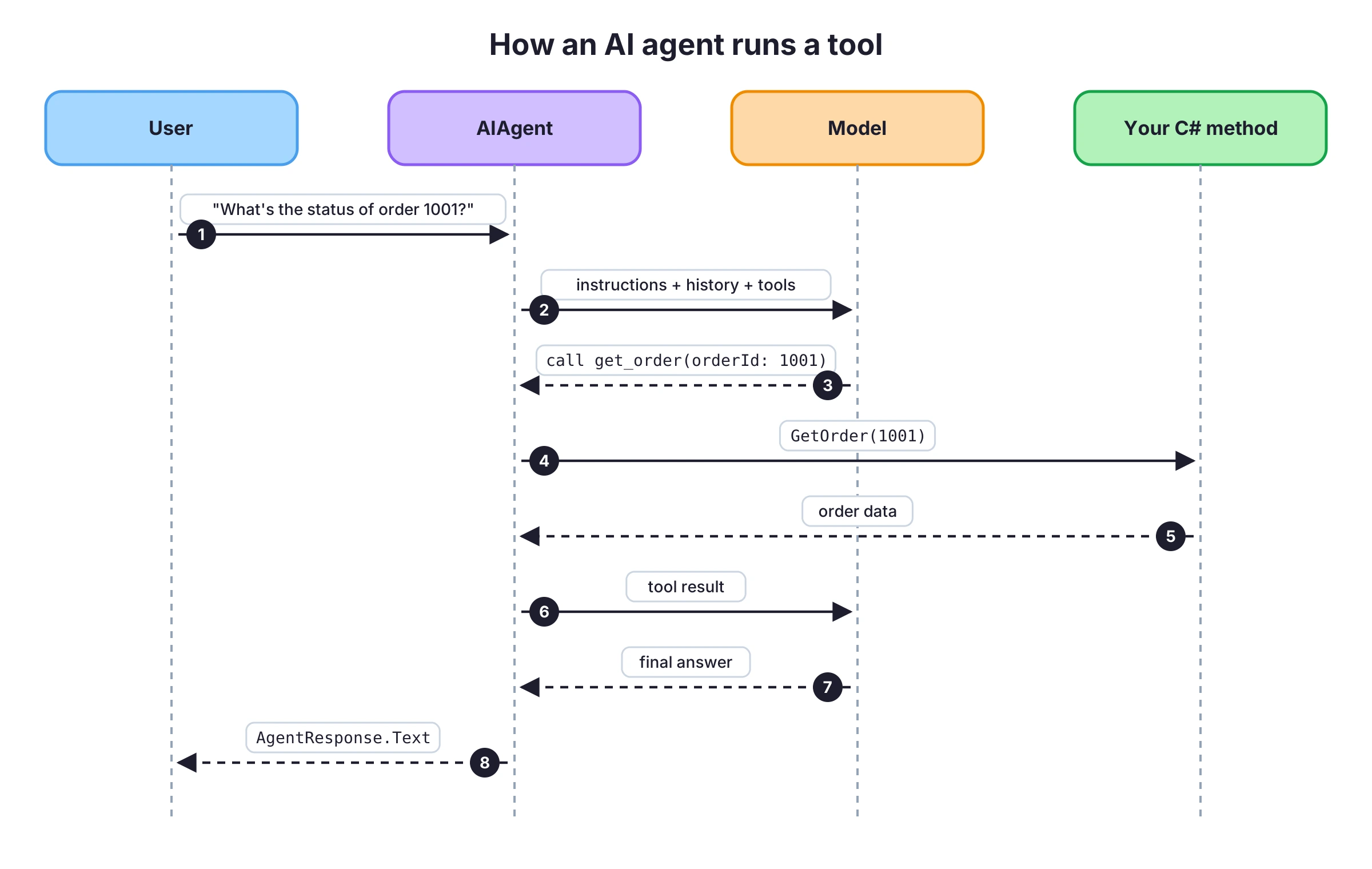
An AI agent in C# is a model with instructions and a set of tools it can call over several steps to finish a task. In C#, you build one with Microsoft Agent Framework: create an IChatClient, call AsAIAgent with the instructions and your C# methods as tools, and run it with RunAsync. The framework handles the loop: the model asks for a tool, the agent runs your method, sends the result back, and repeats until the model has an answer.
Microsoft Agent Framework reached version 1.0 in April 2026. It's the library Microsoft recommends for agents in .NET, and it replaces Semantic Kernel for new projects. It's built on Microsoft.Extensions.AI, so if you've used IChatClient, most of it will look familiar. If you haven't, start with Getting started with AI in C#.
This post builds an order support agent step by step: tools, a conversation that continues across messages, streaming, an approval step before the agent cancels an order, saving the conversation, an ASP.NET Core endpoint, and a test that runs without a real model.
The code uses Microsoft.Agents.AI 1.28.0, Microsoft.Extensions.AI 11.0.0 and .NET 10.
When You Need an Agent Instead of IChatClient
IChatClient with the UseFunctionInvocation() middleware can already call your methods. For one question and one or two tools, that's enough. An agent adds the pieces you'd otherwise write yourself:
- One object with instructions and tools. You create the agent once and run it from anywhere, instead of passing the system message and
ChatOptions.Toolson every call. - Sessions. An
AgentSessionkeeps the conversation, and you can serialize it to continue later, in another request or on another server. - Approvals. A tool can require a human to approve the call before it runs.
- Workflows. Several agents and your own code can be combined into one process with sequential, concurrent and hand-off steps.
The Example: An Order Support Agent
The agent answers questions about orders and can cancel an order that hasn't shipped. The data is an in-memory list so the example runs on its own. In your application, OrderService would use EF Core or call another service.
public record Order(int Id, string CustomerEmail, string Status, decimal Total); public class OrderService{ private readonly List<Order> _orders = [ new(1001, "ana@example.com", "Shipped", 129.90m), new(1002, "ana@example.com", "Processing", 49.00m), new(1003, "marko@example.com", "Delivered", 15.50m), ]; public Order? GetById(int id) => _orders.FirstOrDefault(o => o.Id == id); public IReadOnlyList<Order> GetByCustomer(string email) => _orders.Where(o => o.CustomerEmail.Equals(email, StringComparison.OrdinalIgnoreCase)).ToList(); public bool Cancel(int id) { var index = _orders.FindIndex(o => o.Id == id && o.Status == "Processing"); if (index < 0) return false; _orders[index] = _orders[index] with { Status = "Cancelled" }; return true; }}
The tools are methods on a class that receives OrderService. Each method and parameter has a Description, because that's what the model reads to decide which tool to call and what to pass:
using System.ComponentModel; public class OrderTools(OrderService orders){ [Description("Gets one order by its numeric id. Returns status, customer email and total.")] public string GetOrder([Description("The order id, for example 1001")] int orderId) { var order = orders.GetById(orderId); return order is null ? $"No order with id {orderId}." : order.ToString(); } [Description("Lists all orders for a customer email address.")] public string GetOrdersForCustomer([Description("The customer's email address")] string email) { var result = orders.GetByCustomer(email); return result.Count == 0 ? $"No orders for {email}." : string.Join("\n", result); } [Description("Cancels an order that is still in Processing status.")] public string CancelOrder([Description("The id of the order to cancel")] int orderId) => orders.Cancel(orderId) ? $"Order {orderId} was cancelled." : $"Order {orderId} can't be cancelled. Only orders in Processing status can be cancelled.";}
Each tool returns a plain string, including for the "not found" and "can't cancel" cases. The model handles a clear message better than an exception or an empty result.
Install Microsoft Agent Framework
The core package is Microsoft.Agents.AI. For the model, use any IChatClient provider. This example uses OpenAI:
dotnet new console -n OrderAgentcd OrderAgentdotnet add package Microsoft.Agents.AIdotnet add package Microsoft.Extensions.AI.OpenAI
There's also a Microsoft.Agents.AI.OpenAI package with extension methods directly on the OpenAI SDK's clients, but you don't need it when you start from IChatClient.
Create the Agent
AsAIAgent is an extension method on IChatClient. It returns an AIAgent with the name, instructions and tools you pass:
using Microsoft.Agents.AI;using Microsoft.Extensions.AI;using OpenAI; IChatClient chatClient = new OpenAIClient(Environment.GetEnvironmentVariable("OPENAI_API_KEY")!) .GetChatClient(Environment.GetEnvironmentVariable("OPENAI_MODEL")!) .AsIChatClient(); var orderTools = new OrderTools(new OrderService()); AIAgent agent = chatClient.AsAIAgent( name: "OrderSupport", instructions: """ You help customers with questions about their orders. Use the tools to look up real order data. Never guess an order status. If the order or customer is not found, say so. """, tools: [ AIFunctionFactory.Create(orderTools.GetOrder, name: "get_order"), AIFunctionFactory.Create(orderTools.GetOrdersForCustomer, name: "get_orders_for_customer"), new ApprovalRequiredAIFunction( AIFunctionFactory.Create(orderTools.CancelOrder, name: "cancel_order")), ]);
AIFunctionFactory.Create turns a method into a tool. It builds the JSON schema for the parameters from the method signature and the Description attributes. The explicit name: keeps the tool names short and stable.
The third tool is wrapped in ApprovalRequiredAIFunction. The agent won't run it on its own; it asks first. More on that below.
The instructions say "never guess an order status". Instructions like this matter: without a tool result, a model will often produce a plausible answer anyway.
Run the Agent
AgentResponse response = await agent.RunAsync("What's the status of order 1001?");Console.WriteLine(response.Text);
For this question, the model asks for get_order with orderId = 1001, the agent runs OrderTools.GetOrder(1001), sends the result back, and the model writes the answer from it. response.Text is that final answer. response.Messages has every message from the run, including the tool call and the tool result, which is useful for logging and debugging.
Keep a Conversation with AgentSession
RunAsync without a session is a single, independent question. For a conversation, create an AgentSession and pass it to every run:
AgentSession session = await agent.CreateSessionAsync(); AgentResponse first = await agent.RunAsync("Which orders does ana@example.com have?", session);Console.WriteLine(first.Text); AgentResponse second = await agent.RunAsync("Which of those is not shipped yet?", session);Console.WriteLine(second.Text);
The second question only makes sense with the first one. The session stores the messages from both runs, including the tool results, and sends them with the next request. You don't manage a List<ChatMessage> yourself.
Stream the Agent's Answer
RunStreamingAsync works like GetStreamingResponseAsync on IChatClient. It returns updates as the model generates them:
await foreach (AgentResponseUpdate update in agent.RunStreamingAsync("Summarize order 1003 in one sentence.", session)){ Console.Write(update.Text);}
Tool calls still happen during a streamed run. The text you print is the model's answer after the tool results come back.
Ask for Approval Before Risky Tools
Reading an order is harmless. Cancelling one changes data. ApprovalRequiredAIFunction makes the agent stop before it runs a tool and return an approval request instead of the result:
AgentResponse response = await agent.RunAsync("Please cancel order 1002.", session); var approvalRequests = response.Messages .SelectMany(m => m.Contents) .OfType<ToolApprovalRequestContent>() .ToList(); foreach (var request in approvalRequests){ var call = (FunctionCallContent)request.ToolCall; Console.WriteLine($"The agent wants to call {call.Name} with {string.Join(", ", call.Arguments!)}."); Console.Write("Approve? (y/n) "); bool approved = Console.ReadLine() == "y"; var answer = new ChatMessage(ChatRole.User, [request.CreateResponse(approved)]); response = await agent.RunAsync(answer, session);} Console.WriteLine(response.Text);
The flow:
- The model asks for
cancel_orderwithorderId = 1002. - Because the tool requires approval, the agent doesn't call
CancelOrder. The response contains aToolApprovalRequestContentwith the tool name and arguments. - Your code shows that to a person.
request.CreateResponse(approved)builds the answer. - You run the agent again with that answer and the same session. If it was approved, the agent calls
CancelOrderand the model writes the final answer. If not, the model is told the call was rejected.
In a web application, step 3 is a confirmation in the UI. Keep the session between the two requests, which is the next section.
Save and Restore an Agent Session
A session lives in memory. To continue a conversation in another request, after a restart or on another server, serialize it:
using System.Text.Json; JsonElement state = await agent.SerializeSessionAsync(session);string json = state.GetRawText(); // store this: cache, database, blob // laterAgentSession restored = await agent.DeserializeSessionAsync( JsonSerializer.Deserialize<JsonElement>(json)); AgentResponse next = await agent.RunAsync("And what about order 1001?", restored);
The JSON contains the conversation, including tool calls and results. Treat it like any other user data: it can contain whatever the customer typed and whatever your tools returned.
Run the Agent Behind an ASP.NET Core Endpoint
In a web app, register the agent once and keep one session per conversation. This example stores the serialized session in IDistributedCache, keyed by a conversation id:
using System.Text.Json;using Microsoft.Agents.AI;using Microsoft.Extensions.AI;using Microsoft.Extensions.Caching.Distributed;using OpenAI; var builder = WebApplication.CreateBuilder(args); builder.Services.AddDistributedMemoryCache();builder.Services.AddSingleton<OrderService>();builder.Services.AddSingleton<OrderTools>(); builder.Services.AddSingleton<IChatClient>(_ => new OpenAIClient(builder.Configuration["OpenAI:ApiKey"]!) .GetChatClient(builder.Configuration["OpenAI:Model"]!) .AsIChatClient()); builder.Services.AddSingleton<AIAgent>(sp =>{ var tools = sp.GetRequiredService<OrderTools>(); return sp.GetRequiredService<IChatClient>().AsAIAgent( name: "OrderSupport", instructions: "You help customers with questions about their orders. Use the tools. Never guess an order status.", tools: [ AIFunctionFactory.Create(tools.GetOrder, name: "get_order"), AIFunctionFactory.Create(tools.GetOrdersForCustomer, name: "get_orders_for_customer"), ]);}); var app = builder.Build(); app.MapPost("/support/{conversationId}", async ( string conversationId, SupportRequest request, AIAgent agent, IDistributedCache cache, CancellationToken ct) =>{ // Load the conversation for this id, or start a new one. string? saved = await cache.GetStringAsync(conversationId, ct); AgentSession session = saved is null ? await agent.CreateSessionAsync(ct) : await agent.DeserializeSessionAsync(JsonSerializer.Deserialize<JsonElement>(saved), cancellationToken: ct); AgentResponse response = await agent.RunAsync(request.Message, session, cancellationToken: ct); // Save the updated conversation for the next request. JsonElement state = await agent.SerializeSessionAsync(session, cancellationToken: ct); await cache.SetStringAsync(conversationId, state.GetRawText(), new DistributedCacheEntryOptions { SlidingExpiration = TimeSpan.FromHours(1) }, ct); return Results.Ok(new { answer = response.Text });}); app.Run(); public record SupportRequest(string Message);
Two requests to /support/c1 now form one conversation: the second request loads what the first one saved.
One thing this example doesn't do, and a real one must: check who is asking. get_orders_for_customer returns the orders for whatever email the model passes. In a real application, take the customer's identity from the authenticated user and use it inside the tool, instead of trusting a value the model filled in from the chat. The tools run with your application's permissions, not the user's.
Test the Agent Without a Real Model
The agent depends on IChatClient, so a test can replace the model with a scripted fake. This one asks for cancel_order on the first request and returns a final answer once it receives the tool result:
sealed class ScriptedChatClient : IChatClient{ public Task<ChatResponse> GetResponseAsync( IEnumerable<ChatMessage> messages, ChatOptions? options = null, CancellationToken cancellationToken = default) { var toolResult = messages.Last().Contents.OfType<FunctionResultContent>().FirstOrDefault(); ChatMessage reply = toolResult is null ? new(ChatRole.Assistant, [new FunctionCallContent("call-1", "cancel_order", new Dictionary<string, object?> { ["orderId"] = 1002 })]) : new(ChatRole.Assistant, $"Done: {toolResult.Result}"); return Task.FromResult(new ChatResponse(reply)); } public IAsyncEnumerable<ChatResponseUpdate> GetStreamingResponseAsync( IEnumerable<ChatMessage> messages, ChatOptions? options = null, CancellationToken cancellationToken = default) => throw new NotSupportedException(); public object? GetService(Type serviceType, object? serviceKey = null) => null; public void Dispose() { }}
var orders = new OrderService();var tools = new OrderTools(orders); AIAgent agent = new ScriptedChatClient().AsAIAgent( instructions: "You help customers with their orders.", tools: [AIFunctionFactory.Create(tools.CancelOrder, name: "cancel_order")]); AgentResponse response = await agent.RunAsync("Cancel order 1002."); Console.WriteLine(orders.GetById(1002)!.Status); // CancelledConsole.WriteLine(response.Text); // Done: Order 1002 was cancelled.
This doesn't test the model's judgment. It tests your side: that the tool names match, that the arguments bind to your parameters, and that your tool does the right thing with them. To check the model's answers, you need evaluations against a real model, which is a separate topic.
Practical Rules for AI Agents in .NET
- Write tool descriptions for the model. Say what the tool does, what it returns and when to use it. Name parameters for what they are.
- Return clear text for empty and failed cases. "No order with id 7" is better than an exception or an empty string.
- Separate reading from writing. Tools that change data get
ApprovalRequiredAIFunctionor don't exist at all. - Validate inside the tool. The model can pass any value. The tool checks it, the same way an API endpoint would.
- Take identity from the user, not from the chat. A tool should only return data the current user is allowed to see.
- Keep the tool list short. Every tool's schema is sent with every request. Give the agent the tools the task needs.
- Log
response.Messages. When an answer is wrong, the tool calls and tool results show you why. - Watch the session size. Every run sends the whole conversation, so long sessions cost more and get slower.
What Comes After a Single Agent
Two directions from here:
- Workflows. Microsoft Agent Framework has a workflow model for several agents and regular code in one process: steps that run in sequence or in parallel, hand-offs between agents, and human-in-the-loop steps. The source and official samples are in the microsoft/agent-framework repository.
- Tools from MCP servers. Instead of writing every tool as a C# method, an agent can use tools from an MCP server. If you want to expose your own tools to Claude, GitHub Copilot and other clients as well, see How to build an MCP server in C#.
Wrapping Up
An AI agent in C# with Microsoft Agent Framework is an IChatClient plus instructions plus tools. AsAIAgent creates it, RunAsync runs it, and AgentSession keeps the conversation. Tools are your own C# methods with descriptions. ApprovalRequiredAIFunction stops the agent before a tool that changes data, and SerializeSessionAsync lets a conversation continue across requests.
Start with one agent and two or three read-only tools around data you already have, run it against a real model, and read response.Messages to see how it uses them. Add write tools with approval after that.
This post is part of the free AI for .NET Developers guide. For the basics of IChatClient, see Getting started with AI in C#. For agents that review code instead of answering customers, see AI code review for C# and .NET.
That's all from me today.