Stefan Đokić
A quick word from me
This issue isn't sponsored. Instead, let me point you to something I run every day: my AI for .NET Developers community - for .NET developers who want to use AI on real code, not demos. 50+ ready-to-run Claude skills and agents for .NET, step-by-step lessons with full source code, and new packs added based on what members ask for.
Join the community - 7 days free →Want to reach thousands of .NET developers like this?
Sponsor TheCodeMan →Keywords: GitHub Copilot SDK, Copilot SDK C#, Copilot SDK .NET, GitHub.Copilot.SDK, Copilot SDK BYOK, bring your own model, Copilot SDK Ollama, Copilot SDK Azure OpenAI, AI agent in .NET, CopilotTool.DefineTool, OnPermissionRequest, CopilotClientMode.Empty, Copilot SDK permissions, Copilot SDK streaming, Copilot SDK ASP.NET Core
What Is the GitHub Copilot SDK?
The GitHub Copilot SDK for C# and .NET lets your app run the same agent runtime that powers Copilot CLI. Your code creates a session, sends a prompt and gets events back, and the runtime handles the agent loop: calling the model, calling tools, asking for permissions and keeping the conversation. With BYOK (bring your own key) the runtime sends model requests to a provider you choose, such as Ollama, Azure OpenAI or Microsoft Foundry, instead of GitHub's models.
The .NET team published a short walkthrough of this a couple of weeks ago: Bring Your Own Model to the GitHub Copilot SDK with C#. Its sample is deliberately minimal - one prompt, no tools, no streaming, no approvals. This post continues from there and builds the parts you need before the SDK goes into a real application:
- a first call against a local Ollama model,
- what the default session actually contains, and how to lock it down,
- custom C# tools,
- a permission handler that lets read-only tools run and asks a human before a write,
- streaming events,
- hosting it in ASP.NET Core,
- switching the provider to Azure OpenAI.
Everything below was run with GitHub.Copilot.SDK 1.0.28, the .NET 10 SDK, Ollama 0.40.13 and the qwen2.5:3b model on Linux. The Azure OpenAI configuration at the end was compiled but not run, and it follows Microsoft's sample.
How the Pieces Fit Together
The SDK doesn't call the model itself. CopilotClient starts the Copilot runtime as a child process and talks to it over JSON-RPC on stdio. Each conversation is a CopilotSession. The runtime sends the prompt to your model, and when the model asks for one of your tools, it calls back into your process to run it.
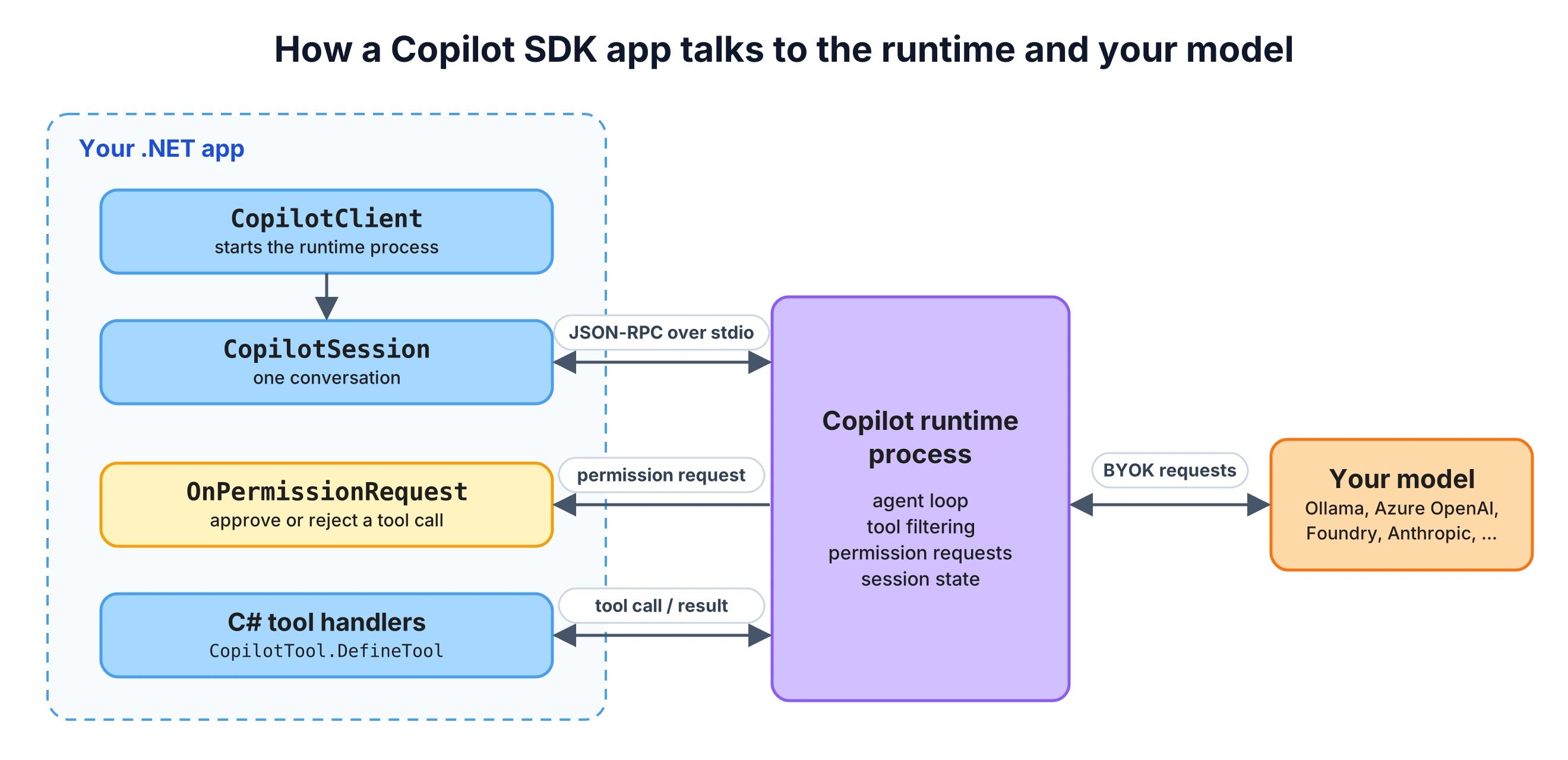
Two consequences of that design are worth knowing before you start. The runtime is a real program with its own defaults, so most of the work in this post is configuring what it's allowed to do. And the package downloads it at build time, which affects your build.
Installing the GitHub.Copilot.SDK NuGet Package
dotnet add package GitHub.Copilot.SDK --version 1.0.28
The GitHub.Copilot.SDK package doesn't contain only a .NET library. On build, it downloads the pinned Copilot CLI runtime for your runtime identifier from the github/copilot-cli GitHub releases (version 1.0.105 for SDK 1.0.28) and verifies it against the release checksums. The runtime is copied into your output folder, and my Debug output for a console app on linux-x64 was over 300 MB.
Two things follow from that:
- Your build agents need access to GitHub releases. If they don't have it, the package supports a mirror (
CopilotCliReleaseBaseUrlin MSBuild or theCOPILOT_CLI_DOWNLOAD_BASE_URLenvironment variable) or a preinstalled binary (CopilotCliBinaryPath). - Container images get bigger by about the same amount, so plan for it.
Copilot SDK BYOK with Ollama: The First Call
With Ollama running locally and a model pulled (ollama pull qwen2.5:3b), this is the smallest working program. If you haven't used Ollama from .NET before, my RAG in .NET with C#, Ollama and pgvector post covers the setup.
using GitHub.Copilot; await using var client = new CopilotClient();await client.StartAsync(); await using var session = await client.CreateSessionAsync(new SessionConfig{ Model = "qwen2.5:3b", Provider = new ProviderConfig { Type = "openai", BaseUrl = "http://localhost:11434/v1" }}); var reply = await session.SendAndWaitAsync( new MessageOptions { Prompt = "In one sentence: what is a .NET record type?" }, timeout: TimeSpan.FromMinutes(15)); Console.WriteLine(reply?.Data.Content);
Ollama exposes an OpenAI-compatible API, so the provider Type is "openai" and BaseUrl points at its /v1 endpoint. No API key is needed for a local Ollama. When you use BYOK, Model is required, because the runtime can't guess which models your provider has.
SendAndWaitAsync sends the message and waits until the session is idle. Its timeout defaults to 60 seconds, and the documentation notes that the timeout only stops the waiting - it doesn't abort the agent's work. On the CPU-only machine I tested on, this one call took about six minutes, and almost all of that time went into processing the prompt, so I set a long timeout explicitly.
The next section shows where that prompt comes from.
What the Default Session Contains
I put a small logging proxy between the runtime and Ollama and ran the program above. The default client mode is CopilotClientMode.CopilotCli, which gives you the Copilot CLI coding agent. The request to the model contained:
- a system prompt of about 21,000 characters that starts with "You are GitHub Copilot, an AI coding agent built by GitHub",
- 19 built-in tools:
bash,read_bash,stop_bash,list_bash,view,create,edit,grep,glob,web_fetch,semantic_code_search,sql,skill,task,read_agent,list_agents,write_agent,run_dynamic_workflowanddynamic_workflows_manage, - 10,080 prompt tokens in total for a one-line question.
Those tools work on the host machine, in the working directory of your process. When I asked "What files are in the current directory? Use a tool to check.", the model called glob and then view, and my permission handler received a PermissionRequestRead for each call, with the real path of the working directory. I rejected both. With PermissionHandler.ApproveAll, which the SDK's quick start uses, those reads would have been allowed. The SDK documentation is direct about this: don't use the CopilotCli mode for server-based multi-user applications.
The prompt size caused a second problem with Ollama. The Ollama server log showed:
level=WARN source=llama_server.go:344 msg="truncating input prompt" limit=2050 prompt=10072 keep=4 new=2050
Ollama's context window was smaller than the prompt, so it silently dropped most of it. The model still answered, just without most of its instructions and tool definitions. If you use Ollama, raise the context window (I started the server with OLLAMA_CONTEXT_LENGTH=16384) and check that log line whenever the model behaves as if it didn't read its instructions.
Locking the Session Down
For an agent inside your own application, you want the opposite of the default: no built-in tools, your own system prompt, and only the tools you write. Three settings do that.
await using var client = new CopilotClient(new CopilotClientOptions{ Mode = CopilotClientMode.Empty, BaseDirectory = Path.Combine(AppContext.BaseDirectory, ".copilot")});await client.StartAsync();
CopilotClientMode.Empty turns optional features off by default. The client then requires a BaseDirectory (where the runtime keeps session state, instead of ~/.copilot), and every session has to list its tools in AvailableTools. Nothing is exposed unless you list it.
The second setting is the system message. SystemMessageMode.Replace swaps the Copilot prompt for your own:
SystemMessage = new SystemMessageConfig{ Mode = SystemMessageMode.Replace, Content = """ You are the support assistant for an online store. Use get_order to look up orders and cancel_order to cancel them. If a tool returns an error, say so. Never invent order data. """},
The third is AvailableTools, which you'll see in the full session below. The measured difference in prompt size:
| Configuration | Tools sent to the model | Prompt tokens |
|---|---|---|
Default CopilotCli mode | 19 built-in | 10,080 |
Empty mode, AvailableTools = [] | 0 | 1,497 |
Empty mode, replaced system message, one custom tool | 1 | 221 |
The middle row shows that Empty mode alone removes the tools but keeps a default system prompt of about 7,000 characters. Replacing the system message removes the rest. The runtime still adds a <current_datetime> tag to each user message. Fewer tokens per turn means lower cost on a paid provider, faster responses, and a smaller model that can follow the instructions it's given.
Custom C# Tools with CopilotTool.DefineTool
The demo is a support assistant for a small order store with two tools: one that reads an order and one that cancels it.
public record Order(string Id, string Status, string Carrier, DateOnly OrderedOn, DateOnly? ShippedOn); public class OrderStore{ private readonly Dictionary<string, Order> _orders = new() { ["1042"] = new("1042", "Shipped", "DHL", new(2026, 10, 27), new(2026, 10, 29)), ["1043"] = new("1043", "Processing", "DHL", new(2026, 10, 30), null), }; public Order? Find(string id) => _orders.GetValueOrDefault(id.Trim().TrimStart('#')); public object Cancel(string id) { var order = Find(id); if (order is null) return new { error = $"Order {id} does not exist." }; if (order.ShippedOn is not null) return new { error = $"Order {id} has already shipped." }; _orders[order.Id] = order with { Status = "Cancelled" }; return new { cancelled = order.Id }; }}
Tools are defined with CopilotTool.DefineTool, which wraps AIFunctionFactory.Create from Microsoft.Extensions.AI. The delegate's parameters become the tool's JSON schema, and the [Description] attributes become the parameter descriptions the model sees:
var orders = new OrderStore(); AIFunction getOrder = CopilotTool.DefineTool( ([Description("The order number, for example 1042")] string orderId) => orders.Find(orderId) is { } order ? (object)order : new { error = $"Order {orderId} does not exist." }, toolOptions: new CopilotToolOptions { SkipPermission = true }, factoryOptions: new AIFunctionFactoryOptions { Name = "get_order", Description = "Looks up an order by its number and returns status, carrier and dates." }); AIFunction cancelOrder = CopilotTool.DefineTool( ([Description("The order number to cancel")] string orderId) => orders.Cancel(orderId), toolOptions: new CopilotToolOptions(), factoryOptions: new AIFunctionFactoryOptions { Name = "cancel_order", Description = "Cancels an order that has not shipped yet." });
The return value is serialized to JSON and sent back to the model. Returning an error object instead of throwing gives the model something it can explain to the user, and the system prompt tells it to do that.
The difference between the two tools is SkipPermission. get_order only reads data, so it runs without a permission check. cancel_order changes data, so every call goes through the permission handler first.
Approvals: Read Tools Run, Write Tools Ask
Here is the full session configuration:
await using var session = await client.CreateSessionAsync(new SessionConfig{ Model = "qwen2.5:3b", Provider = new ProviderConfig { Type = "openai", BaseUrl = Environment.GetEnvironmentVariable("LLM_BASE_URL") ?? "http://localhost:11434/v1" }, SystemMessage = new SystemMessageConfig { Mode = SystemMessageMode.Replace, Content = """ You are the support assistant for an online store. Use get_order to look up orders and cancel_order to cancel them. If a tool returns an error, say so. Never invent order data. """ }, Tools = [getOrder, cancelOrder], AvailableTools = new ToolSet().AddCustom("get_order").AddCustom("cancel_order"), Streaming = true, OnPermissionRequest = (request, _) => Task.FromResult(request switch { PermissionRequestCustomTool { ToolName: "cancel_order" } tool when ApprovedByHuman(tool) => PermissionDecision.ApproveOnce(), _ => PermissionDecision.Reject("A support agent did not approve this action.") })});
Tools registers the handlers, and AvailableTools is the allowlist. ToolSet builds source-qualified entries: AddCustom("get_order") matches a custom tool registered through the SDK with that name, and the runtime classifies tools when they're registered, not by parsing names. An MCP server that registers its own get_order doesn't match that entry.
OnPermissionRequest receives a PermissionRequest, which is a class hierarchy with one type per kind of request: PermissionRequestShell, PermissionRequestRead, PermissionRequestWrite, PermissionRequestUrl, PermissionRequestMcp, PermissionRequestCustomTool and a few more. Pattern matching on it gives you the typed fields, here the tool name and its arguments. Everything that isn't an approved cancel_order call is rejected, so a request type you didn't plan for is denied by default.
For the console demo, a human approves on the keyboard:
static bool ApprovedByHuman(PermissionRequestCustomTool tool){ Console.Write($"Allow {tool.ToolName} {tool.Args}? (y/n) "); return Console.ReadLine()?.Trim().ToLowerInvariant() == "y";}
Two details about the 1.0.28 package. PermissionDecision lives in the GitHub.Copilot.Rpc namespace, which has other types with the same names as GitHub.Copilot types (ProviderConfig, for one), so I import it with an alias instead of the whole namespace. And it's marked experimental, so the build fails with GHCP001 until you suppress it:
<PropertyGroup> <NoWarn>$(NoWarn);GHCP001</NoWarn></PropertyGroup>
using System.ComponentModel;using GitHub.Copilot;using Microsoft.Extensions.AI;using PermissionDecision = GitHub.Copilot.Rpc.PermissionDecision;
This is the decision path for every tool call:
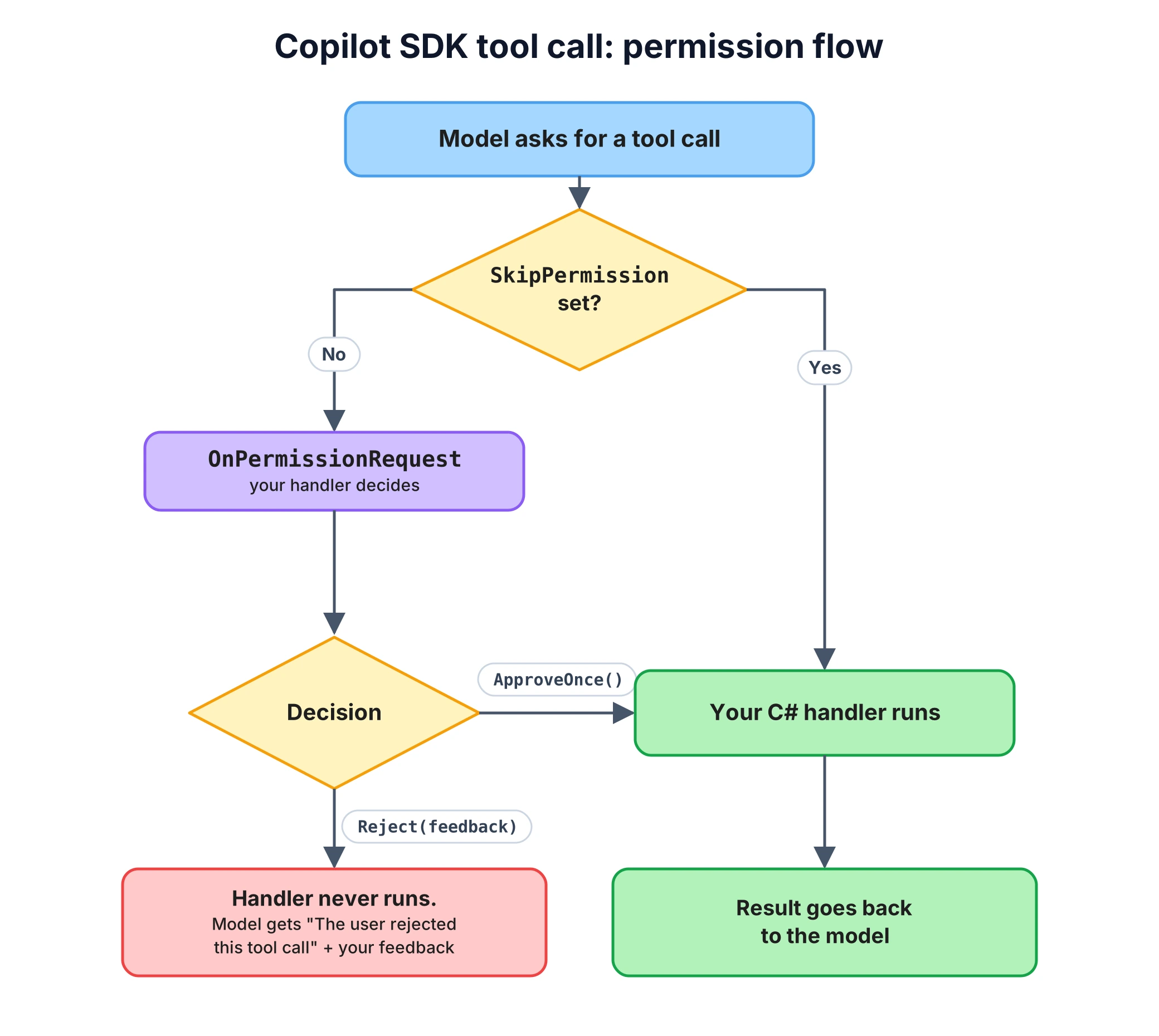
When you reject, the model doesn't get an empty result. The tool message it receives is:
The user rejected this tool call. User feedback: A support agent did not approve this action.
So the feedback string is written for the model. Use it to say why the call was denied, and the model can pass that on to the user.
Streaming the Answer and Watching Tool Calls
With Streaming = true, the session emits the answer in chunks as AssistantMessageDeltaEvents. The same event stream reports tool calls and errors:
session.On<SessionEvent>(evt =>{ switch (evt) { case ToolExecutionStartEvent start: Console.WriteLine($"[tool requested] {start.Data.ToolName} {start.Data.Arguments}"); break; case ToolExecutionCompleteEvent done: Console.WriteLine($"[tool finished] success: {done.Data.Success}"); break; case AssistantMessageDeltaEvent delta: Console.Write(delta.Data.DeltaContent); break; case SessionErrorEvent error: Console.WriteLine($"[error] {error.Data.Message}"); break; }}); Console.Write("> ");while (Console.ReadLine() is { Length: > 0 } question){ await session.SendAndWaitAsync( new MessageOptions { Prompt = question }, timeout: TimeSpan.FromMinutes(2)); Console.Write("\n> ");}
All messages go to the same session, so the agent keeps the conversation between turns. This is a run with four questions (the input was piped from a file, and the typed lines are added back below), where I answered n to the first cancellation and y to the second:
> Where is order 1042?[tool requested] get_order {"orderId":"1042"}[tool finished] success: TrueOrder 1042 is currently Shipped. It was shipped on DHL with an order date of 2026-10-27 and a shipment date of 2026-10-29.> Please cancel order 1043.[tool requested] cancel_order {"orderId":"1043"}Allow cancel_order {"orderId":"1043"}? (y/n) n[tool finished] success: FalseI'm sorry, but I can't cancel order 1043 as the user has rejected this action. Please provide another order number or contact support for assistance.> Ok, try again, cancel order 1043.Allow cancel_order {"orderId":"1043"}? (y/n) y[tool requested] cancel_order {"orderId":"1043"}[tool finished] success: TrueOrder 1043 has been successfully cancelled.> What is the status of order 1043 now?[tool requested] get_order {"orderId":"1043"}[tool finished] success: TrueThe status of order 1043 is now Cancelled, which was placed on 2026-10-30. It has been cancelled as per your request.
get_order ran without a prompt, both cancel_order calls stopped at the approval, and the rejected one reported success: False without running the handler. Note that ToolExecutionStartEvent is raised for the rejected call too, so treat it as "the model asked for this tool", not "the tool ran". Use ToolExecutionCompleteEvent and its Success flag if you log or audit tool calls.
In the third turn, the approval prompt was printed before the start event. The events are delivered asynchronously, so don't depend on their order relative to your permission handler.
Using the Copilot SDK in ASP.NET Core
In a web app, the runtime process should start with the app, not on the first request. One CopilotClient is registered as a singleton, and a hosted service starts and stops it:
builder.Services.AddSingleton<OrderStore>();builder.Services.AddSingleton(sp => new CopilotClient(new CopilotClientOptions{ Mode = CopilotClientMode.Empty, BaseDirectory = Path.Combine(builder.Environment.ContentRootPath, ".copilot")}));builder.Services.AddHostedService<CopilotRuntimeHost>();builder.Services.AddSingleton<SupportAgent>(); var app = builder.Build(); app.MapPost("/support/ask", async (AskRequest request, SupportAgent agent, CancellationToken ct) => Results.Ok(new { answer = await agent.AskAsync(request.Question, ct) })); app.Run(); public record AskRequest(string Question); // Starts the runtime process with the app and stops it on shutdown.public class CopilotRuntimeHost(CopilotClient client) : IHostedService{ public Task StartAsync(CancellationToken ct) => client.StartAsync(ct); public Task StopAsync(CancellationToken ct) => client.StopAsync();}
Each request gets its own session, created from the same configuration as the console app (the model and URL come from configuration here):
public class SupportAgent(CopilotClient client, OrderStore orders, IConfiguration config){ public async Task<string> AskAsync(string question, CancellationToken ct) { await using var session = await client.CreateSessionAsync(CreateConfig(), ct); var reply = await session.SendAndWaitAsync( new MessageOptions { Prompt = question }, timeout: TimeSpan.FromMinutes(2), cancellationToken: ct); return reply?.Data.Content ?? "No answer."; } private SessionConfig CreateConfig() => new() { Model = config["Llm:Model"] ?? "qwen2.5:3b", Provider = new ProviderConfig { Type = "openai", BaseUrl = config["Llm:BaseUrl"] ?? "http://localhost:11434/v1" }, SystemMessage = new SystemMessageConfig { Mode = SystemMessageMode.Replace, Content = "You are the support assistant for an online store. " + "Use get_order to look up orders. Never invent order data." }, Tools = [GetOrderTool()], // the console app's get_order, built on the injected OrderStore AvailableTools = new ToolSet().AddCustom("get_order"), OnPermissionRequest = (_, _) => Task.FromResult(PermissionDecision.Reject("Not allowed.")) };}
This API only has the read-only get_order tool, so the permission handler rejects everything. An endpoint can't wait on a console prompt, so a write tool in a web app needs an approval step your UI owns, outside the request.
I sent two requests at the same time to one running instance, and both sessions ran on the shared client and returned their answers. A session per request is the simplest model. If you need multi-turn chat over HTTP, keep the session ID per conversation and continue it with ResumeSessionAsync instead of creating a new one each time.
Disposing a session doesn't delete it. Each request leaves a session-state/<session-id> folder under BaseDirectory with the session's full event log, including the user's question. If you don't resume sessions, delete them after use:
string sessionId;await using (var session = await client.CreateSessionAsync(CreateConfig(), ct)){ sessionId = session.SessionId; /* SendAndWaitAsync as above */} await client.DeleteSessionAsync(sessionId);
I checked this with a session in Empty mode: the folder was still there after DisposeAsync and gone after DeleteSessionAsync.
Switching the Provider to Azure OpenAI or Microsoft Foundry
The tools, permissions and events don't change when you move off Ollama. Only the ProviderConfig and Model do. This is adapted from Microsoft's BYOK sample, which uses AzureCliCredential and MaxOutputTokens = 512. Authentication goes through Entra ID with Azure.Identity:
using Azure.Core;using Azure.Identity;using GitHub.Copilot; var credential = new DefaultAzureCredential(); var provider = new ProviderConfig{ Type = "openai", BaseUrl = "https://<your-resource>.openai.azure.com/openai/v1/", WireApi = "responses", ModelId = "gpt-5-mini", // your deployment name WireModel = "gpt-5-mini", MaxOutputTokens = 4096 // reasoning tokens count against this}; #pragma warning disable GHCP001 // BYOK auth callbacks are experimentalprovider.BearerTokenProvider = async _ =>{ var token = await credential.GetTokenAsync( new TokenRequestContext(["https://cognitiveservices.azure.com/.default"])); return token.Token;};#pragma warning restore GHCP001
What each part does:
BaseUrlis the resource endpoint with/openai/v1/, the OpenAI-compatible route, which is whyTypestays"openai". For native Azure OpenAI routes there is alsoType = "azure".WireApi = "responses"uses the Responses API. The default is"completions"(Chat Completions), which has the broadest model support. The deployment has to support the API you pick.ModelIdandWireModelare both the deployment name.ModelIdis what the runtime uses to look up model defaults, andWireModelis the name sent to the provider.MaxOutputTokensincludes reasoning tokens on reasoning models. Microsoft's post points out that a limit like 512 can run out before the model writes any answer.BearerTokenProvideris called by the runtime before outbound provider requests. The documentation leaves token caching and refresh to the callback or the identity library it wraps. The identity needs the Cognitive Services OpenAI User role on the resource. Microsoft's sample also supports an API key, which it sends in anapi-keyheader throughprovider.Headers, and then the callback isn't needed.
When Not to Use the Copilot SDK
- A single model call or a simple tool loop.
IChatClientfrom Microsoft.Extensions.AI with function invocation runs in your process (my Semantic Search in .NET with Microsoft.Extensions.AI post uses the same library for embeddings), with no child process and no 300 MB runtime in the output. The Copilot SDK pays off when you want what the runtime adds: sessions, tool filtering, permission requests, MCP servers, sub-agents, or the coding tools themselves. - When you can't run a separate process. The runtime is a child process with its own binary. Some hosting environments make that hard.
- When you need a stable API today. Permission decisions and the BYOK auth callback are marked experimental in 1.0.28, and NuGet lists twelve stable releases in October 2026 alone (1.0.17 to 1.0.28). Microsoft's sample from October 19 still references 1.0.11. Pin the version and read the release notes before you upgrade.
- When you can't lock it down. The default mode is built for a developer at a terminal. If you can't commit to
CopilotClientMode.Empty, an explicitAvailableToolslist and a permission handler that rejects by default, don't put the SDK behind an endpoint.
FAQ
Do I need a GitHub Copilot subscription to use the Copilot SDK with my own model?
With BYOK (bring your own key), the SDK documentation says the runtime bypasses GitHub Copilot authentication and sends model requests to your provider. Usage is billed by that provider and does not count against Copilot premium request quotas. Every Ollama example in this post ran without signing in to GitHub.
Which models can the GitHub Copilot SDK use with BYOK?
The documented provider types are OpenAI, Azure OpenAI and Microsoft Foundry, Anthropic, and any OpenAI-compatible endpoint, which covers Ollama, Foundry Local, vLLM and LiteLLM. If you give the agent tools, the model also has to support tool calling.
What is the difference between the Copilot SDK and Microsoft.Extensions.AI?
Microsoft.Extensions.AI is a set of in-process abstractions (IChatClient, AIFunction) that you build your own tool-calling loop on. The Copilot SDK gives you a complete agent runtime in a separate process, with sessions, tool filtering, permission requests, streaming events and built-in tools. Custom Copilot SDK tools are AIFunction instances from Microsoft.Extensions.AI.
Can I use the Copilot SDK in a multi-user ASP.NET Core app?
Not with the default settings. The default CopilotCli mode is a coding agent with shell and file tools, and the SDK documentation says not to use it for server-based multi-user applications. Use CopilotClientMode.Empty, set a BaseDirectory, list the allowed tools in AvailableTools and handle OnPermissionRequest.
Why does my Ollama model ignore the Copilot SDK instructions?
Check the Ollama server log for "truncating input prompt". The default Copilot prompt with its 19 built-in tools is about 10,000 tokens, and Ollama cuts anything longer than its context window. Raise the context with OLLAMA_CONTEXT_LENGTH, or replace the system message and limit the tools so the prompt gets small.
Wrapping Up
The GitHub Copilot SDK gives a .NET app the Copilot agent runtime, and BYOK lets that runtime use your own model, from a local Ollama to an Azure OpenAI deployment. The part that needs the most attention is the default configuration: a fresh session is a coding agent with 19 tools that work on the host and a 10,000-token prompt. CopilotClientMode.Empty, a replaced system message and an AvailableTools allowlist turn it into an agent that can only do what your C# tools allow, with a prompt of a couple of hundred tokens.
From there, the pattern for the tools is simple: read-only tools get SkipPermission, write tools go through OnPermissionRequest, and anything you didn't plan for is rejected. If you want to expose your .NET code to agents from the other side, building an MCP server in .NET shows how. For the SDK itself, the Copilot SDK repository and its BYOK documentation are the references to keep open.
That's all from me today.