Stefan Đokić
A quick word from me
This issue isn't sponsored. Instead, let me point you to something I run every day: my AI for .NET Developers community - for .NET developers who want to use AI on real code, not demos. 50+ ready-to-run Claude skills and agents for .NET, step-by-step lessons with full source code, and new packs added based on what members ask for.
Join the community - 7 days free →Want to reach thousands of .NET developers like this?
Sponsor TheCodeMan →Keywords: Durable Task SDK, durable execution .NET, Durable Task Scheduler, Durable Task Scheduler emulator, Microsoft.DurableTask, durable orchestrations C#, long-running workflows .NET, TaskOrchestrator, orchestration replay, durable timers, saga pattern vs durable execution, Durable Functions without Azure Functions
The Problem: A Process Spread Across Handlers
The Durable Task SDK gives you durable execution in .NET: you write a long-running workflow as one async C# method, and the runtime records every completed step in a history, so the method can wait minutes or days for events and timers, survive restarts, and continue where it stopped. It runs in any .NET app and uses the Durable Task Scheduler, or its local emulator, as the backend.
In my Wolverine saga post I built an order process. An order is placed, the payment and the shipment confirmation arrive in any order, and once both are in, the invoice goes out. If the payment doesn't arrive within 15 minutes, the order is cancelled. The saga version is a class with two flags, one Handle method per message, and a timeout message that Wolverine schedules.
That works, and for message-driven systems it's a good fit. The cost shows up when the process grows. The order of the steps isn't written down in one place - it's spread across Handle methods and the messages they return. Adding "reserve stock first, and release it if the order is cancelled" means more messages and handlers, and to see the full compensation path you have to read several of them.
Durable execution takes the opposite approach. You write the process as one method, top to bottom, and a runtime makes that method survive restarts and long waits. In this post I rebuild the same order process with Microsoft's Durable Task SDK in a plain ASP.NET Core app, run it against the local emulator, test it in-process, and compare it with the saga at the end.
What Is Durable Execution in .NET?
Durable execution is a way to run a long-running process as ordinary code while a runtime persists its progress, so the process continues after crashes, restarts and long waits. The Durable Task SDK splits your code into two kinds of tasks:
- Orchestrator
- describes the process. It calls activities, waits for external events and timers, and decides what happens next. It does no I/O itself.
- Activities
- the steps that do the actual work: call the inventory API, write to the database, send an email.
When the orchestrator awaits an activity, a timer or an event, the SDK doesn't keep the method alive in memory. It records what the orchestrator asked for in the instance's history, which the backend stores, and the method stops there. When the result comes in - the activity finished, the timer fired, the event arrived - the result is appended to the history and the orchestrator runs again from the first line. Every await that already has a result in the history completes immediately with that result, until the code reaches an await that doesn't have one yet.
That's replay. Microsoft's docs describe it as event sourcing: the orchestrator's local state is rebuilt from its history every time it runs.
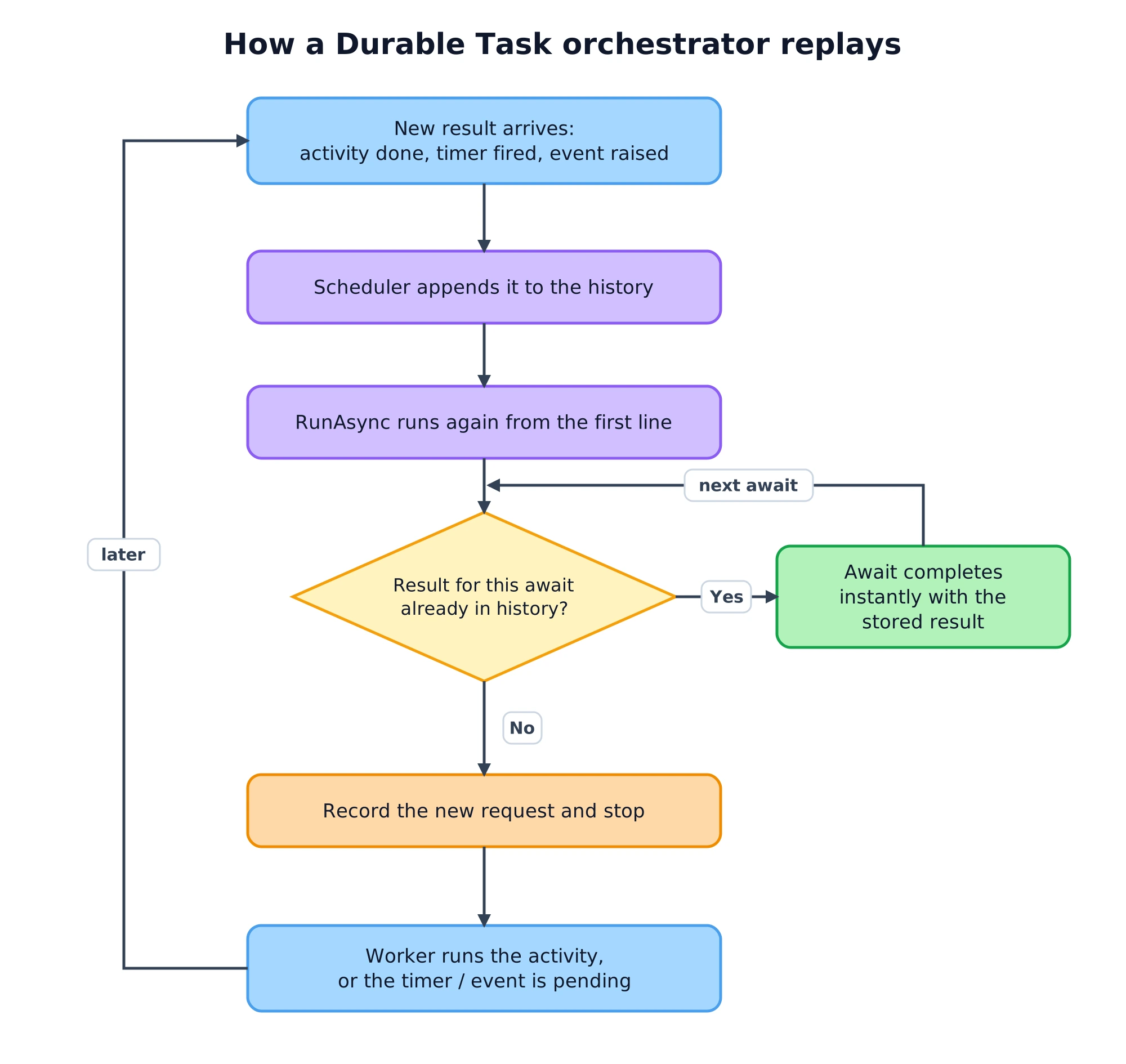
To see this in practice, I added a log line at the top of the orchestrator in the demo below. For one order, the method ran five times: once at the start, then once after each recorded result - the stock reservation, the payment event, the shipment event and the invoice activity. Only the first run had context.IsReplaying set to false.
This is also why orchestrator code has rules. If the method makes a different decision on replay than it made the first time, the history no longer matches the code. I'll cover the rules after the example.
Where the State Lives: Durable Task Scheduler
The standalone Durable Task SDK stores orchestration history in the Durable Task Scheduler, a managed Azure service. Your app can run anywhere - Container Apps, AKS, App Service, a VM, on-premises - and connects to the scheduler over gRPC. The scheduler pushes work items to your app, so there's no polling.
Microsoft's comparison page is explicit about one thing: the Durable Task SDKs use only the Durable Task Scheduler as their backend. Durable Functions also supports Azure Storage, MSSQL and Netherite, but the standalone SDKs don't.
For local development there's an emulator that runs in Docker. According to the Durable Task Scheduler docs, it keeps state in memory, so it's for development and tests only.
Running the Durable Task Scheduler Emulator Locally
docker run --name dtsemulator -d -p 8080:8080 -p 8082:8082 mcr.microsoft.com/dts/dts-emulator:latest
Port 8080 is the gRPC endpoint your app connects to. Port 8082 is a dashboard that lists every orchestration instance with its timeline and full history. It's the fastest way to see what replay actually stores.
The connection string for the emulator goes in appsettings.json:
{ "ConnectionStrings": { "DurableTask": "Endpoint=http://localhost:8080;TaskHub=default;Authentication=None" }}
A task hub is a logical container for orchestrations, and the emulator comes with one named default. In Azure, the endpoint points at your scheduler and authentication uses an Azure identity instead of None.
Setting Up the Durable Task Worker and Client in ASP.NET Core
Install two packages:
dotnet add package Microsoft.DurableTask.Worker.AzureManageddotnet add package Microsoft.DurableTask.Client.AzureManaged
I used version 1.27.0 of both, on .NET 10. The worker package runs your orchestrators and activities. The client package starts instances, raises events and reads their status. AzureManaged means both are wired for the Durable Task Scheduler.
Then register them in Program.cs:
using Microsoft.DurableTask.Client;using Microsoft.DurableTask.Client.AzureManaged;using Microsoft.DurableTask.Worker;using Microsoft.DurableTask.Worker.AzureManaged; var builder = WebApplication.CreateBuilder(args); string connectionString = builder.Configuration.GetConnectionString("DurableTask") ?? throw new InvalidOperationException("Missing DurableTask connection string"); // Demo implementation of IInventoryClient - see the activities sectionbuilder.Services.AddSingleton<IInventoryClient, InMemoryInventoryClient>(); builder.Services.AddDurableTaskWorker(worker =>{ worker.AddTasks(tasks => { tasks.AddOrchestrator<OrderFulfillmentOrchestration>(); tasks.AddActivity<ReserveStockActivity>(); tasks.AddActivity<ReleaseStockActivity>(); tasks.AddActivity<CancelOrderActivity>(); tasks.AddActivity<SendInvoiceActivity>(); }); worker.UseDurableTaskScheduler(connectionString);}); builder.Services.AddDurableTaskClient(client =>{ client.UseDurableTaskScheduler(connectionString);});
AddDurableTaskWorker registers a hosted service. On startup it opens a streaming connection to the scheduler and executes the orchestrators and activities you registered in AddTasks. AddDurableTaskClient registers a DurableTaskClient that you can inject into endpoints.
Here both run in the same app, which keeps the demo small. In production you can split them: an API that only uses the client, and worker processes that scale on their own.
Writing the Orchestrator: The Order Process in C#
This is the process from the saga post, plus a stock reservation at the start so there's something to compensate:
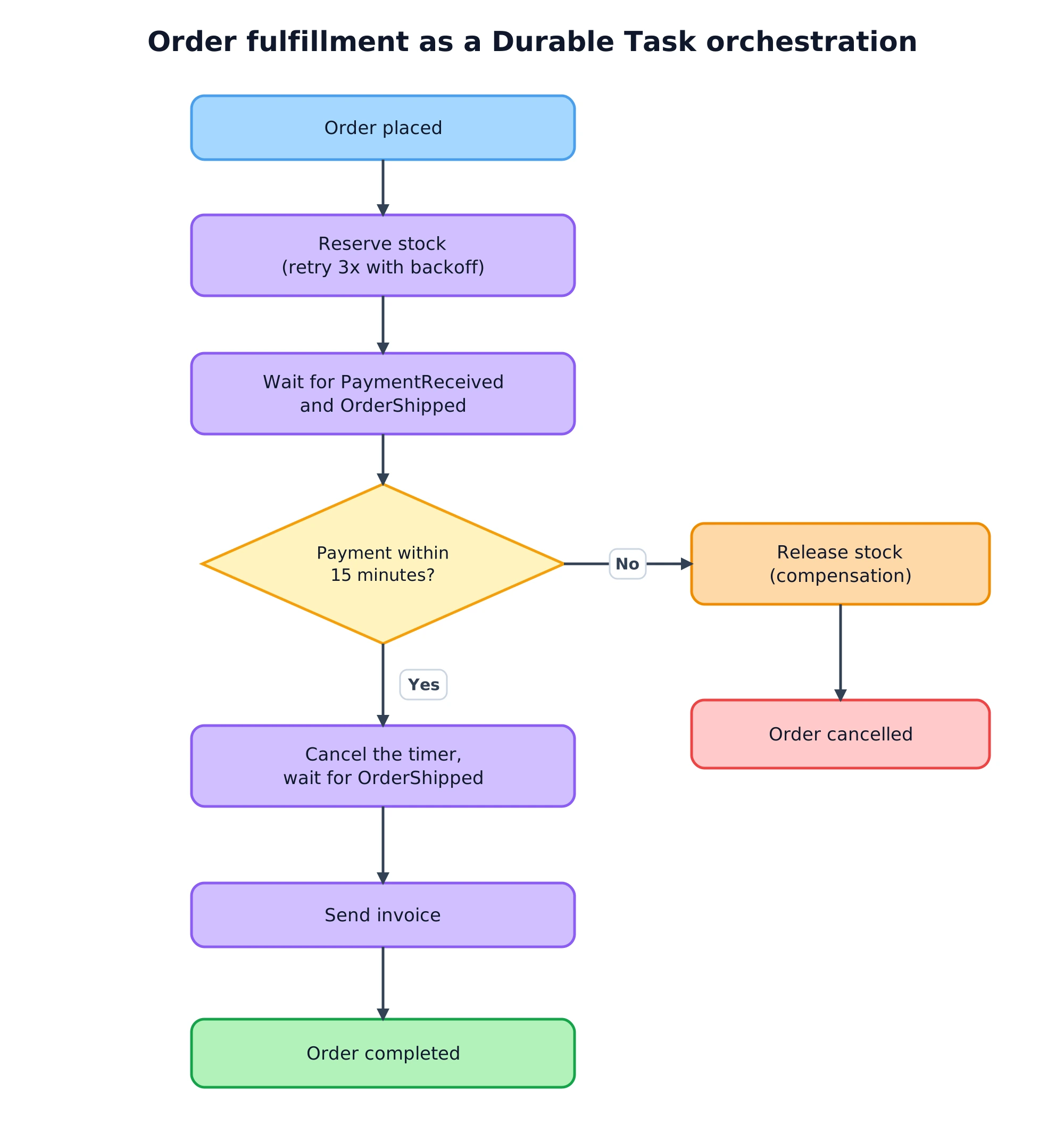
The inputs and events are plain records:
public record OrderInput(string OrderId, string Sku, int Quantity); public record PaymentReceived(string PaymentId, decimal Amount); public record OrderShipped(string TrackingNumber); public record InvoiceRequest(string OrderId, decimal Amount, string TrackingNumber); public record OrderResult(string OrderId, string Status); public static class OrderEvents{ public const string PaymentReceived = nameof(PaymentReceived); public const string OrderShipped = nameof(OrderShipped);}
In the saga, every message carried an OrderId so Wolverine could find the right saga instance. Here the correlation is the orchestration instance ID. I start each orchestration with the order ID as its instance ID, so an event for an order goes straight to that instance.
Now the orchestrator:
using Microsoft.DurableTask; public class OrderFulfillmentOrchestration : TaskOrchestrator<OrderInput, OrderResult>{ private static readonly TimeSpan PaymentWindow = TimeSpan.FromMinutes(15); private static readonly TaskOptions StockRetry = TaskOptions.FromRetryPolicy(new RetryPolicy( maxNumberOfAttempts: 3, firstRetryInterval: TimeSpan.FromSeconds(5), backoffCoefficient: 2.0)); public override async Task<OrderResult> RunAsync(TaskOrchestrationContext context, OrderInput order) { // Reserve stock. If the activity throws, the runtime retries it with backoff. await context.CallActivityAsync(nameof(ReserveStockActivity), order, StockRetry); context.SetCustomStatus("WaitingForPayment"); // Listen for both events up front - they can arrive in any order. Task<PaymentReceived> payment = context.WaitForExternalEvent<PaymentReceived>(OrderEvents.PaymentReceived); Task<OrderShipped> shipment = context.WaitForExternalEvent<OrderShipped>(OrderEvents.OrderShipped); // Durable timer for the payment deadline. using var timerCts = new CancellationTokenSource(); DateTime deadline = context.CurrentUtcDateTime.Add(PaymentWindow); Task paymentDeadline = context.CreateTimer(deadline, timerCts.Token); Task first = await Task.WhenAny(payment, paymentDeadline); if (first == paymentDeadline) { // Compensate: undo the reservation, then cancel. await context.CallActivityAsync(nameof(ReleaseStockActivity), order); await context.CallActivityAsync(nameof(CancelOrderActivity), order.OrderId); return new OrderResult(order.OrderId, "Cancelled"); } // Payment arrived first. Cancel the timer, or the instance stays Running until it fires. timerCts.Cancel(); context.SetCustomStatus("WaitingForShipment"); OrderShipped shipped = await shipment; PaymentReceived paid = await payment; await context.CallActivityAsync( nameof(SendInvoiceActivity), new InvoiceRequest(order.OrderId, paid.Amount, shipped.TrackingNumber)); return new OrderResult(order.OrderId, "Completed"); }}
The whole process is in one method, so I'll go through it top to bottom.
Retries. CallActivityAsync takes a TaskOptions with a retry policy. If ReserveStockActivity throws, the runtime waits 5 seconds and tries again, then 10 seconds, up to 3 attempts in total. The wait between attempts is a durable timer recorded in the history, not a Task.Delay in memory. If every attempt fails, CallActivityAsync throws a TaskFailedException inside the orchestrator, and you can catch it like any other exception. If you want to know why retry settings matter beyond this example, I wrote about that in When Retries Make the Outage Worse.
Custom status. SetCustomStatus stores a small value next to the instance that clients can read. I use it to show which step the order is waiting on.
Events in any order. Both WaitForExternalEvent calls happen before anything is awaited, so the orchestration listens for both from that point on. In my runs, sending the shipment before the payment worked without any extra code.
The deadline. CreateTimer creates a durable timer. The deadline is stored in the history, so the timer fires even if the app restarted in the meantime. The deadline is calculated from context.CurrentUtcDateTime, never from DateTime.UtcNow - more on that in the rules section.
Compensation. If the timer wins, the orchestrator releases the stock it reserved in the first step and cancels the order. In the saga version, this logic lived in the timeout handler and depended on the Paid flag. Here it's a branch in the same method, next to the step it undoes.
Cancelling the timer. I left timerCts.Cancel() out in one test run to see what happens. The invoice went out right away, but the instance stayed Running until the timer fired, because an orchestration doesn't complete while a timer it created is still pending. With a 15-minute window, that's 15 minutes of a finished order showing as running.
Writing Activities (and Why They Must Be Idempotent)
Activities are normal classes with constructor injection. This is where the I/O goes:
using Microsoft.DurableTask; public interface IInventoryClient{ Task ReserveAsync(string reservationId, string sku, int quantity); Task ReleaseAsync(string reservationId);} public class ReserveStockActivity(IInventoryClient inventory, ILogger<ReserveStockActivity> logger) : TaskActivity<OrderInput, bool>{ public override async Task<bool> RunAsync(TaskActivityContext context, OrderInput order) { logger.LogInformation("Reserving {Quantity} x {Sku} for order {OrderId} (instance {InstanceId})", order.Quantity, order.Sku, order.OrderId, context.InstanceId); // The order id is the reservation key, so a retried call doesn't reserve twice. await inventory.ReserveAsync(order.OrderId, order.Sku, order.Quantity); return true; }}
IInventoryClient stands in for whatever calls your inventory service. The demo uses an in-memory implementation.
The comment about the reservation key matters. Microsoft's programming model docs say the runtime guarantees that each activity runs at least once, and that it might run it again if a failure happens after the activity finished but before the result was recorded. So activities need to be idempotent. Using the order ID as the reservation key means a second call reserves the same stock instead of reserving it twice.
ReleaseStockActivity, CancelOrderActivity and SendInvoiceActivity follow the same shape, so I won't repeat them here.
Starting Orders and Raising Events From Endpoints
The API starts orchestrations and forwards events through DurableTaskClient:
app.MapPost("/orders", async (OrderInput order, DurableTaskClient client) =>{ try { string instanceId = await client.ScheduleNewOrchestrationInstanceAsync( nameof(OrderFulfillmentOrchestration), order, new StartOrchestrationOptions { InstanceId = order.OrderId }); return Results.Accepted($"/orders/{instanceId}", new { instanceId }); } catch (OrchestrationAlreadyExistsException) { return Results.Conflict(new { error = $"Order {order.OrderId} is already in progress" }); }}); app.MapPost("/orders/{orderId}/paid", (string orderId, PaymentReceived payment, DurableTaskClient client) => RaiseOrderEvent(client, orderId, OrderEvents.PaymentReceived, payment)); app.MapPost("/orders/{orderId}/shipped", (string orderId, OrderShipped shipment, DurableTaskClient client) => RaiseOrderEvent(client, orderId, OrderEvents.OrderShipped, shipment)); app.MapGet("/orders/{orderId}", async (string orderId, DurableTaskClient client) =>{ OrchestrationMetadata? instance = await client.GetInstanceAsync(orderId, getInputsAndOutputs: true); return instance is null ? Results.NotFound() : Results.Ok(new { instance.InstanceId, Status = instance.RuntimeStatus.ToString(), Step = instance.ReadCustomStatusAs<string>(), Result = instance.ReadOutputAs<OrderResult>() });}); static async Task<IResult> RaiseOrderEvent( DurableTaskClient client, string orderId, string eventName, object payload){ try { await client.RaiseEventAsync(orderId, eventName, payload); return Results.Accepted(); } catch (RpcException ex) when (ex.StatusCode == StatusCode.NotFound) { return Results.NotFound(); }}
OrchestrationAlreadyExistsException comes from the DurableTask.Core.Exceptions namespace, and RpcException and StatusCode come from Grpc.Core. Both are already referenced through the SDK packages.
Three details came out of testing this against the emulator:
- Duplicate starts. Starting a second orchestration with the same order ID while the first one is running throws
OrchestrationAlreadyExistsException, and the endpoint turns that into a409. Because the instance ID is the order ID, a retried "place order" request can't start a second run while the first is in progress. Once an instance has completed, though, the emulator accepted a new start with the same ID and ran the process again. If an order must never be processed twice, check that in your own database before you schedule the orchestration. - Unknown orders. Raising an event for an instance that doesn't exist throws an
RpcExceptionwithStatusCode.NotFound. Without thecatch, a typo in the order ID becomes a500. - Late events. Raising an event for an instance that has already completed succeeds, and nothing changes. A payment that arrives after the order was cancelled doesn't reopen it, so if late payments need a refund, that has to be handled outside this orchestration.
The GET endpoint reads the runtime status, the custom status and the output, so a client can poll the order without knowing anything about the orchestration.
What a Run Looks Like
With the emulator and the API running, one order goes through like this:
curl -X POST http://localhost:5080/orders -H "Content-Type: application/json" \ -d '{"orderId":"order-1001","sku":"KB-01","quantity":2}' curl -X POST http://localhost:5080/orders/order-1001/shipped -H "Content-Type: application/json" \ -d '{"trackingNumber":"TRK-778"}' curl -X POST http://localhost:5080/orders/order-1001/paid -H "Content-Type: application/json" \ -d '{"paymentId":"pay-55","amount":129.90}' curl http://localhost:5080/orders/order-1001
For this run I made the in-memory inventory client fail on its first call, to see the retry policy at work. This is the instance in the emulator dashboard:
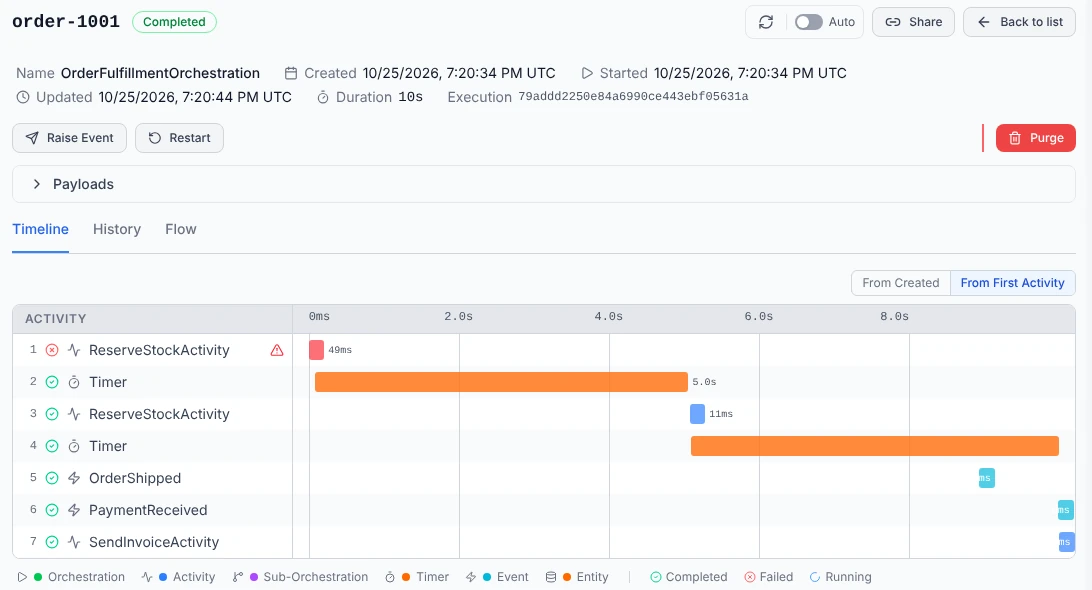
Row 1 is the failed reservation. Row 2 is the 5-second wait from the retry policy, and row 3 is the successful second attempt. Row 4 is the payment deadline timer, which ends when the payment arrives and the orchestration cancels it. The shipment event came in before the payment, and the invoice went out right after the payment.
I also checked the restart case. I killed the API process while an order was waiting for its payment, started it again, and sent the two events. The orchestration continued from where it stopped and completed, and the stock reservation didn't run a second time - its result was already in the history.
The History tab for the same instance shows the 20 raw entries behind this timeline - Activity Task Scheduled, Activity Task Failed, Timer Created, Timer Fired, Event Raised and so on. That list is what the orchestrator replays from.
Orchestrator Code Constraints: Determinism and Replay
Replay means the orchestrator has to make the same decisions every time it runs. Microsoft's code constraints page lists the rules. For .NET they come down to this:
- Time. Use
context.CurrentUtcDateTime, notDateTime.UtcNow,DateTime.NoworStopwatch. - GUIDs. Use
context.NewGuid(), notGuid.NewGuid(). - Delays. Use
context.CreateTimer(), notTask.Delay()orThread.Sleep(). - I/O. No
HttpClient,DbContextor file access in the orchestrator. Put it in an activity. - Async work. Don't start work outside the context, like
Task.Run, and don't useConfigureAwait(false). - Configuration. Don't read environment variables or mutable static state. Pass values in as input or return them from an activity.
- Random numbers. Get them from an activity.
The time rule is the one that's easiest to break without noticing:
// Different value on every replay - the deadline moves each time the method runsDateTime deadline = DateTime.UtcNow.AddMinutes(15); // Same value on every replay - it comes from the orchestration historyDateTime deadline = context.CurrentUtcDateTime.AddMinutes(15);
Logging has the same problem in a milder form. A normal ILogger call in an orchestrator logs on every replay. In my run that would have been five identical lines for one order. context.CreateReplaySafeLogger<T>() returns a logger that only writes when the orchestrator isn't replaying, and in the same run it logged once.
The last rule is about deployments. A running instance replays against whatever code is deployed. If you change the order or the number of await calls in an orchestrator while instances are still in flight, their history no longer matches the code. The SDK supports versioned orchestrators for standalone workers ([DurableTask("OrderWorkflow", Version = "v1")] with a version selected when you start the instance), and Microsoft's docs also describe side-by-side deployments and separate task hubs. Pick one of these before you change an orchestrator that has instances in flight.
Unit Testing Orchestrations With the In-Process Test Host
The Microsoft.DurableTask.InProcessTestHost package runs an in-memory backend inside the test process, so tests don't need Docker. It's still a preview package - I used 0.2.3-preview.1 - so expect the API to change.
using Microsoft.DurableTask.Client;using Microsoft.DurableTask.Testing;using Microsoft.Extensions.DependencyInjection; public class OrderFulfillmentTests{ [Fact] public async Task Order_completes_when_payment_and_shipment_arrive_in_any_order() { await using var host = await DurableTaskTestHost.StartAsync( tasks => { tasks.AddOrchestrator<OrderFulfillmentOrchestration>(); tasks.AddActivity<ReserveStockActivity>(); tasks.AddActivity<ReleaseStockActivity>(); tasks.AddActivity<CancelOrderActivity>(); tasks.AddActivity<SendInvoiceActivity>(); }, new DurableTaskTestHostOptions { ConfigureServices = services => { services.AddLogging(); services.AddSingleton<IInventoryClient, InMemoryInventoryClient>(); } }); var order = new OrderInput("order-42", "KB-01", 1); string instanceId = await host.Client.ScheduleNewOrchestrationInstanceAsync( nameof(OrderFulfillmentOrchestration), order); await host.Client.WaitForInstanceStartAsync(instanceId); // Shipment arrives before payment - the orchestration doesn't care. await host.Client.RaiseEventAsync(instanceId, OrderEvents.OrderShipped, new OrderShipped("TRK-1")); await host.Client.RaiseEventAsync(instanceId, OrderEvents.PaymentReceived, new PaymentReceived("pay-1", 49.90m)); using var timeout = new CancellationTokenSource(TimeSpan.FromSeconds(30)); OrchestrationMetadata result = await host.Client.WaitForInstanceCompletionAsync( instanceId, getInputsAndOutputs: true, timeout.Token); Assert.Equal(OrchestrationRuntimeStatus.Completed, result.RuntimeStatus); Assert.Equal("Completed", result.ReadOutputAs<OrderResult>()!.Status); }}
StartAsync registers the same orchestrator and activities as Program.cs, and ConfigureServices registers the dependencies the activities need. host.Client is a regular DurableTaskClient, so the test uses the same calls as the API. The test sends the shipment before the payment and checks that the order still completes. It passes in about two seconds.
Durable Task SDK vs the Saga Pattern
Both approaches coordinate a multi-step process without a shared transaction. They differ in where the flow is written and where the state lives. The table compares the durable version with the Wolverine saga from my earlier post; MassTransit's state machine sagas, which I covered in Saga Orchestration Pattern, sit on the same side as Wolverine.
| Wolverine saga | Durable Task SDK | |
|---|---|---|
| How the process is written | A state class plus one handler per message | One orchestrator method, top to bottom |
| Where state lives | Your database (Postgres via Marten, or EF Core) | Durable Task Scheduler in Azure, emulator locally |
| Timeouts | Scheduled timeout messages | Durable timers with CreateTimer |
| Compensation | Extra messages and handlers | Code in the same method |
| Retries | Wolverine's error handling policies | A retry policy per activity call |
| Correlation | A matching ID property on every message | The orchestration instance ID |
| Visibility | Your logs, traces and the saga table | Dashboard with a timeline and history per instance |
I'd pick a saga when the system is already event-driven, the process mostly reacts to messages from other services, and the state has to stay in your own database - for example on-premises, or anywhere an Azure dependency isn't an option.
I'd pick the Durable Task SDK when the process is a sequence of steps with waits, retries, deadlines or human approvals, and I want to read the whole flow in one place. The condition is that an Azure service holding the orchestration state is acceptable.
If you want the durable execution model without that dependency, Dapr Workflow and Temporal both offer it with .NET SDKs.
When Not to Use the Durable Task SDK
- One-step background work. If the job is "take a message, do one thing", a queue and a handler, or a Channels-based worker, is simpler.
- No Azure dependency allowed. Production needs the Durable Task Scheduler. The emulator keeps everything in memory.
- Large payloads. The scheduler limits orchestration and activity inputs and outputs, and event data, to 1 MB. Pass IDs and load the data inside an activity.
- Hot, latency-sensitive request paths. Every step goes through the scheduler and a replay of the orchestrator. That's fine for a process that waits minutes for a payment, not for work that has to finish inside a single HTTP request.
- A team that doesn't know the replay rules yet. One
DateTime.UtcNowin an orchestrator is easy to miss in a code review. Make sure everyone who touches orchestrators knows the rules above.
FAQ
What is durable execution in .NET?
Durable execution means writing a long-running process as normal code while a runtime records every completed step. If the process restarts or waits for hours, the runtime rebuilds its state from that record and continues from the last completed step. In .NET, the Durable Task SDK provides this with orchestrators (the process) and activities (the steps that do I/O).
Do I need Azure Functions to use the Durable Task SDK?
No. The standalone Durable Task SDK runs in any .NET app, for example an ASP.NET Core API or a worker service. You install Microsoft.DurableTask.Worker.AzureManaged and Microsoft.DurableTask.Client.AzureManaged, register the worker and client in Program.cs, and host the app wherever you want.
What backend does the Durable Task SDK use?
The standalone Durable Task SDKs use the Durable Task Scheduler, a managed Azure service, to store orchestration history. For local development there is an emulator that runs in Docker and keeps state in memory. Durable Functions supports more storage providers (Azure Storage, MSSQL, Netherite), but the standalone SDKs use only the Durable Task Scheduler.
How do I run the Durable Task SDK locally?
Run the Durable Task Scheduler emulator in Docker with docker run -d -p 8080:8080 -p 8082:8082 mcr.microsoft.com/dts/dts-emulator:latest. Point the worker and client at it with the connection string Endpoint=http://localhost:8080;TaskHub=default;Authentication=None. Port 8082 serves a dashboard with the timeline and history of every orchestration instance.
What is the difference between durable execution and the saga pattern?
A saga stores the state of a process and moves it forward with one handler per message, so the flow is spread across handlers. Durable execution writes the whole flow as one method and stores the history of completed steps, so retries, timeouts and compensation live in the same code. Both coordinate multi-step processes without a shared transaction.
Why can't a Durable Task orchestrator use DateTime.UtcNow?
Because orchestrators are replayed. The method runs again from the start every time a new result is recorded, and it must make the same decisions each time. DateTime.UtcNow returns a different value on every replay, so use context.CurrentUtcDateTime, which comes from the orchestration history and stays the same.
Wrapping Up
The Durable Task SDK gives you durable execution in a regular .NET app. The order process from the saga post became one orchestrator method with an activity retry policy, two external events, a durable timer for the payment deadline and a compensation branch, all readable top to bottom. The emulator and its dashboard make it easy to run locally and see the history that replay works from.
Three things to remember when you use it: keep orchestrators deterministic, make activities idempotent because they run at least once, and cancel timers you no longer need. Before you adopt it, decide whether storing orchestration state in the Durable Task Scheduler works for your system. If it doesn't, a saga with Wolverine and Postgres keeps everything in your own database. For more real-world scenarios, from invoice approvals to AI incident workflows, the .NET team's post Durable Task in the Real World is a good next read.
That's all from me today.