Stefan Đokić
A word from this week's sponsor
Reading about clean architecture is easy. Getting it right under real constraints is the hard part.
gives you puzzles that run your actual code and show you where your understanding breaks. Algorithms, databases, refactoring, and more.
Want to reach thousands of .NET developers like this?
Sponsor TheCodeMan →Keywords: System.Threading.Channels, producer consumer .NET, bounded channel, unbounded channel, backpressure .NET, Channel
The Endpoint That Accepted Work Faster Than It Could Do It
An API I looked at had one endpoint that took an upload, resized a batch of images, and returned. It worked fine in the demo. Then a customer scripted it and fired a few hundred uploads in a burst. Each request spun up its own resize work on the request thread, the CPU pinned at 100%, and everything else in the app - login, search, health checks - started timing out because the thread pool was drowning.
The uploads didn't need to be done before the response came back. They needed to be accepted and processed on their own terms. That's a producer-consumer problem: one side hands off work, the other side does it at a pace it can actually sustain. And you don't need RabbitMQ or a background job library to do it in one process. You need System.Threading.Channels.
System.Threading.Channels is a built-in .NET library for passing data between producers and consumers running concurrently in the same process. Producers write to a ChannelWriter<T>, consumers read from a ChannelReader<T>, and the channel handles the thread-safe, async handoff between them. The important part - the part most people skip - is that a bounded channel gives you backpressure for free. Here's how I actually use it.
Why the Naive Fix Makes It Worse
The first instinct is usually "just make it async" - kick the work off with Task.Run and return immediately:
[HttpPost("process")]public IActionResult Process(UploadRequest request){ // Fire-and-forget. Looks async. Is a trap. _ = Task.Run(() => _imageService.Resize(request)); return Accepted();}
This returns fast, so it looks like a win. It isn't. There's no limit on how many of these you start, so the same burst that pinned the CPU now pins it and the response returns 202 to everyone, telling them it worked. When the process recycles mid-flight, that work vanishes with no trace. And because the tasks are unobserved, an exception inside one just disappears. You've traded a visible slowdown for an invisible pile of dropped work.
The real fix is a queue between the two sides with a cap on it. When the queue fills up, the producer has to wait - that wait is the signal that you're taking work faster than you can finish it, and it's exactly the information you want to surface, not hide.
Channel Basics: Writer, Reader, and a Bound
A Channel<T> has two ends. You create it once and hand each end to the right side:
using System.Threading.Channels; // Capacity of 100. When full, writers wait instead of piling up memory.var channel = Channel.CreateBounded<WorkItem>(new BoundedChannelOptions(100){ FullMode = BoundedChannelFullMode.Wait, SingleReader = false, SingleWriter = false}); ChannelWriter<WorkItem> writer = channel.Writer;ChannelReader<WorkItem> reader = channel.Reader;
The FullMode is the whole point of the design, so it's worth knowing all four:
// Wait - WriteAsync waits until there's room. This is backpressure. Default choice.// DropWrite - silently discard the item being written when full.// DropOldest - evict the oldest queued item to make room for the new one.// DropNewest - evict the newest queued item and keep the incoming one.
Wait is what you want when every item matters and you'd rather slow the producer than lose data. The Drop* modes are for telemetry and live feeds where a fresh sample beats a complete history - if you're shipping metrics, dropping the oldest reading is fine.
SingleReader and SingleWriter are optimizations. Set them to true only when you truly have exactly one reader or one writer - the channel uses a faster internal path. When in doubt, leave them false; a wrong true is a subtle race, a wrong false is just slightly slower.
The Shape of the Pipeline
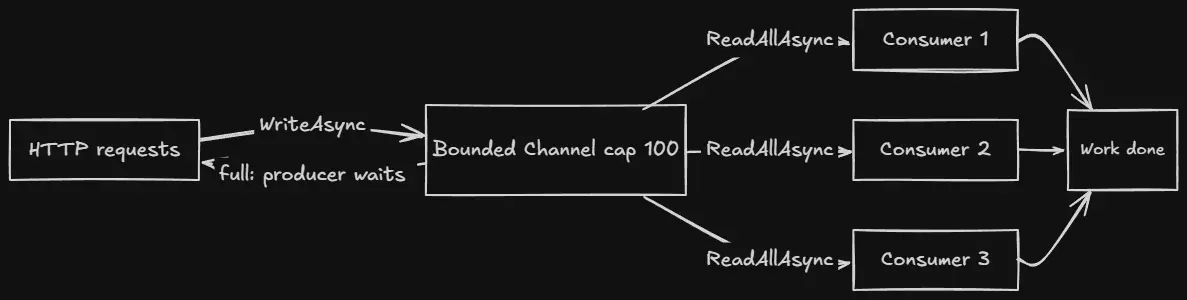
Requests come in on many threads and write to one channel. A small, fixed pool of consumers drains it. When the channel is full, the write awaits, and that backpressure travels straight back to the caller - which is what you want, because now the slowness is honest.
The Producer: An Endpoint That Pushes Work
The producer just writes. The only interesting decision is what to do when the channel is full, and WriteAsync handles it - it completes immediately if there's room, or awaits until a consumer frees a slot.
[ApiController][Route("api/[controller]")]public class ProcessingController : ControllerBase{ private readonly ChannelWriter<WorkItem> _writer; public ProcessingController(Channel<WorkItem> channel) => _writer = channel.Writer; [HttpPost] public async Task<IActionResult> Enqueue( WorkItem item, CancellationToken ct) { // Awaits if the channel is full - the caller feels the backpressure. await _writer.WriteAsync(item, ct); return Accepted(); }}
If you'd rather reject work than make the caller wait when you're saturated - a better behavior for a public API under attack - use TryWrite and return a 429:
if (!_writer.TryWrite(item)) return StatusCode(StatusCodes.Status429TooManyRequests, "Server busy, retry shortly."); return Accepted();
TryWrite never blocks. It returns false the instant the channel is full, and you turn that into a clean "too many requests" instead of a slow request. Which one you pick depends on who's calling - internal batch job, let it wait; public endpoint, reject fast.
The Consumer: A Hosted Service That Drains the Channel
The consumer lives in a BackgroundService so it starts with the app and stops with it. The whole loop is one line thanks to ReadAllAsync, which yields items until the channel is completed:
public class WorkConsumer : BackgroundService{ private readonly ChannelReader<WorkItem> _reader; private readonly ILogger<WorkConsumer> _logger; public WorkConsumer(Channel<WorkItem> channel, ILogger<WorkConsumer> logger) { _reader = channel.Reader; _logger = logger; } protected override async Task ExecuteAsync(CancellationToken stoppingToken) { // Yields each item as it arrives; ends when the channel completes. await foreach (var item in _reader.ReadAllAsync(stoppingToken)) { try { await ProcessAsync(item, stoppingToken); } catch (Exception ex) { // One bad item must not kill the loop. _logger.LogError(ex, "Failed to process {Id}", item.Id); } } } private async Task ProcessAsync(WorkItem item, CancellationToken ct) { /* ... the actual resize / send / write ... */ await Task.Delay(50, ct); }}
Two things that bite people here. First, the try/catch goes inside the loop, around a single item - if it wraps the whole await foreach, the first exception ends the loop and your consumer silently dies while the app keeps accepting work. Second, ReadAllAsync exits cleanly when the channel is completed, which is how graceful shutdown works (next section).
Wiring It Up and Running Multiple Consumers
Register the channel as a singleton so the producer and consumer share the same instance, then add as many consumer copies as you want throughput:
builder.Services.AddSingleton(_ => Channel.CreateBounded<WorkItem>(new BoundedChannelOptions(100) { FullMode = BoundedChannelFullMode.Wait })); // Three consumers reading from the same channel - parallelism you control.builder.Services.AddHostedService<WorkConsumer>();builder.Services.AddHostedService<WorkConsumer>();builder.Services.AddHostedService<WorkConsumer>();
The number of consumers is your concurrency dial. One consumer processes strictly in order; three process up to three at a time. Set it to match what the downstream work can handle - if ProcessAsync hits a database that only likes ten concurrent writers, don't register fifty consumers. This is the control the Task.Run version never gave you: a fixed, known ceiling on how much work runs at once.
Graceful Shutdown: Don't Drop the Buffer on Deploy
When the app stops, the channel might still hold items. If you just let the process die, that buffered work is lost. The fix is to complete the writer on shutdown and let the consumers drain what's left. A tiny hosted service handles the signal:
public class ChannelCompleter : IHostedService{ private readonly ChannelWriter<WorkItem> _writer; public ChannelCompleter(Channel<WorkItem> channel) => _writer = channel.Writer; public Task StartAsync(CancellationToken ct) => Task.CompletedTask; public Task StopAsync(CancellationToken ct) { // No more writes; ReadAllAsync will finish once the buffer is empty. _writer.Complete(); return Task.CompletedTask; }}
Once Complete() is called, WriteAsync throws for any new producer, and each consumer's ReadAllAsync keeps yielding until the buffer is empty and then exits its loop. Give the host enough shutdown time to finish draining with ShutdownTimeout:
builder.Services.Configure<HostOptions>(o => o.ShutdownTimeout = TimeSpan.FromSeconds(30));
Now a deploy drains cleanly instead of throwing away whatever was mid-flight. This is the piece that separates a toy example from something you can actually ship.
When Channels Is the Wrong Tool
Channels lives and dies with the process. If the app restarts, the buffered items are gone - there's no disk, no replay, no acknowledgment. That's completely fine for work you can afford to lose or regenerate: image thumbnails, cache warming, non-critical notifications. It is not fine for a payment you must not drop or an email that legally has to go out.
The moment you need durability across restarts, retries with a dead-letter path, or work shared between separate services, you've outgrown Channels and you want a real broker or a database-backed outbox pattern. Channels is the in-process tool - reach for it when the producer and consumer live in the same app and the buffer is allowed to be volatile. Know which situation you're in before you ship, not after the first restart eats a queue.
FAQ
What is System.Threading.Channels used for in .NET?
Channels is a built-in library for passing data between producers and consumers running concurrently in the same process. One or more producers write messages to a channel and one or more consumers read them, with the channel handling the thread-safe handoff. It's the in-process equivalent of a queue - use it for background work, buffering bursts, and decoupling the code that accepts work from the code that does it, without pulling in an external message broker.
What's the difference between a bounded and an unbounded channel?
An unbounded channel accepts writes forever, so a fast producer and a slow consumer will grow the backlog until you run out of memory. A bounded channel has a fixed capacity; once it's full, writes wait (or drop, depending on the full mode) until the consumer catches up. Bounded channels are what give you backpressure, which is why they're the safe default for anything driven by external load.
How is a Channel different from BlockingCollection?
BlockingCollection blocks the calling thread when the collection is full or empty, which ties up a thread pool thread while it waits. Channels are async-first - WriteAsync and ReadAsync yield the thread instead of blocking it, so a waiting producer or consumer costs nothing. On modern async .NET, Channels is the better fit almost everywhere BlockingCollection used to be used.
Do I still need a message queue like RabbitMQ if I use Channels?
Channels lives inside one process, so if that process restarts, whatever was buffered is gone, and it can't distribute work across multiple services. Use Channels for in-process background work where losing the buffer on restart is acceptable. Reach for a real broker like RabbitMQ or a database-backed outbox when you need durability, retries across restarts, or work shared between separate services.
Wrapping Up
Producer-consumer stopped needing a library the moment System.Threading.Channels shipped. A bounded channel gives you a thread-safe, async handoff with real backpressure - the producer feels it when you're behind, instead of quietly building a memory leak or dropping work on the floor. A BackgroundService with ReadAllAsync drains it, the number of consumers is your concurrency dial, and completing the writer on shutdown lets you deploy without throwing away the buffer.
The two decisions that matter most: bound the channel so a burst can't take the process down, and complete the writer on shutdown so a deploy drains instead of dropping. Get those right and the endpoint that fell over under a burst of uploads just... doesn't - it accepts what it can, makes the caller wait when it must, and works through the backlog at a pace it can actually sustain.
And if you'd rather have this kind of review done for you - catching the fire-and-forget Task.Run, the unbounded channel, the try/catch in the wrong place - that's exactly what I built AI for .NET Developers for: 50+ Claude-based skills and agents that review your C#, audit security, and optimize EF Core right down to the file and line, running on your real code. If you live in .NET, it's worth a look.
That's all from me today.