Stefan Đokić
A quick word from me
This issue isn't sponsored - I write these deep dives in my free time and keep them free for everyone. If your company sells AI tools, dev tools, courses, or services that .NET developers would actually use, sponsoring an issue is the most direct way to reach them.
Want to reach thousands of .NET developers? Sponsor TheCodeMan →Background
Imagine this:
You’re reviewing a pull request and realize 40 files were changed… just because someone’s Visual Studio auto-formatter is configured differently. Or maybe you merge a branch and suddenly dozens of warnings pop up in the build. Or someone pushed code with tabs instead of spaces, different brace styles, or ignored analyzer hints.
Sound familiar?
We can fix all of that by making our CI pipeline the single source of truth for style and quality.
Our CI should not only build and test code, but also ensure:
- ✅ Every line follows the same style rules
- ✅ Code passes all Roslyn analyzer checks
- ✅ No formatting differences sneak in
✅ Developers see consistent results locally and in CI
That’s exactly what we’ll build here - a simple GitHub repo that fails a pull request if any of those rules are broken.
Step 1 - Setting up the playground
Let’s start from scratch:
mkdir dotnet-ci-hardening-democd dotnet-ci-hardening-demogit initdotnet new sln -n Acmedotnet new classlib -n Acme.Calculatordotnet sln Acme.sln add Acme.Calculator/Acme.Calculator.csproj
This gives us a clean repo with one small class library. Now we’ll add build rules that enforce analyzer and formatting policies everywhere - locally and in CI.
Step 2 - Locking down build rules with Directory.Build.props
This file lives at the root of your repo. It automatically applies to every project underneath it. Think of it as your global .editorconfig for MSBuild. Directory.Build.props:
<!-- Directory.Build.props --><Project> <PropertyGroup> <!-- Enable analyzers and modern analysis level --> <EnableNETAnalyzers>true</EnableNETAnalyzers> <AnalysisLevel>latest</AnalysisLevel> <!-- Make style warnings fail the build --> <EnforceCodeStyleInBuild>true</EnforceCodeStyleInBuild> <TreatWarningsAsErrors>true</TreatWarningsAsErrors> <!-- For deterministic builds --> <ContinuousIntegrationBuild>true</ContinuousIntegrationBuild> <Deterministic>true</Deterministic> <DebugType>portable</DebugType> </PropertyGroup> <!-- Ignore a few less important warnings --> <PropertyGroup> <WarningsNotAsErrors>$(WarningsNotAsErrors);CS1591</WarningsNotAsErrors> </PropertyGroup> <!-- Add more analyzers --> <ItemGroup> <PackageReference Include="StyleCop.Analyzers" Version="1.2.0-beta.556" PrivateAssets="All" /> <PackageReference Include="Roslynator.Analyzers" Version="4.12.4" PrivateAssets="All" /> </ItemGroup></Project>
What’s happening here?
- EnableNETAnalyzers
- turns on Microsoft’s built-in analyzer set (performance, naming, etc.)
- AnalysisLevel=latest
- uses the latest rules for your .NET SDK version
- EnforceCodeStyleInBuild
- actually respects your .editorconfig during the build
- TreatWarningsAsErrors
- no more “I’ll fix that later” excuses
- Extra analyzer packages
- StyleCop and Roslynator add hundreds of best-practice rules From this point, every build will fail if a warning is raised. Let’s make sure those warnings are defined clearly next.
Step 3 - Defining your style rules (.editorconfig)
Before: branch explosion
Your .editorconfig is the contract for code style.
Every developer (and the CI) will follow it exactly.
.editorconfig:
root = true [*.cs]charset = utf-8indent_style = spaceindent_size = 4end_of_line = lfinsert_final_newline = truetrim_trailing_whitespace = true # Usings and orderingdotnet_sort_system_directives_first = true:warningdotnet_separate_import_directive_groups = true:warning # Qualification rulesdotnet_style_qualification_for_field = false:warningdotnet_style_qualification_for_property = false:warningdotnet_style_qualification_for_method = false:warning # Analyzer examplesdotnet_diagnostic.IDE0005.severity = warning # Remove unused usingsdotnet_diagnostic.SA1200.severity = warning # Using placementdotnet_diagnostic.RCS1213.severity = warning # Remove unused members # Optional: relax doc comment warningsdotnet_diagnostic.CS1591.severity = none # Disable StyleCop file header & XML comment rulesdotnet_diagnostic.SA1633.severity = none # File must have a headerdotnet_diagnostic.SA1636.severity = none # Header text must matchdotnet_diagnostic.SA1638.severity = none # File header must include filenamedotnet_diagnostic.SA0001.severity = none # Disable XML comment analysis warningdotnet_diagnostic.CS1591.severity = none # Ignore "missing XML comment" warningsdotnet_diagnostic.IDE0005.severity = none
Why this matters
When EnforceCodeStyleInBuild=true, these rules become part of your build.
You can fine-tune severity levels (suggestion, warning, error), and CI will honor them.
Step 4 - Push this to the main branch
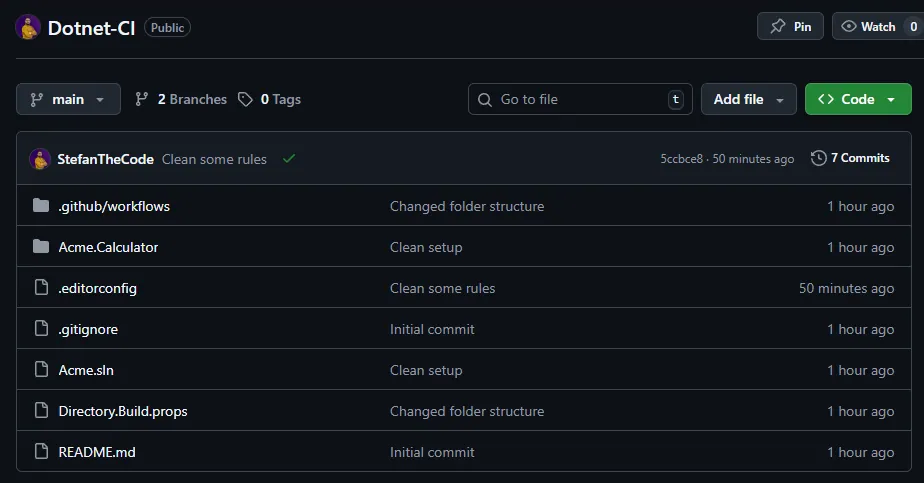
When you push to the main branch on GitHub, next to the name of the commit, the pipeline icon will be displayed, from which we will find out whether the pipeline passed or failed.
Check the main branch here.
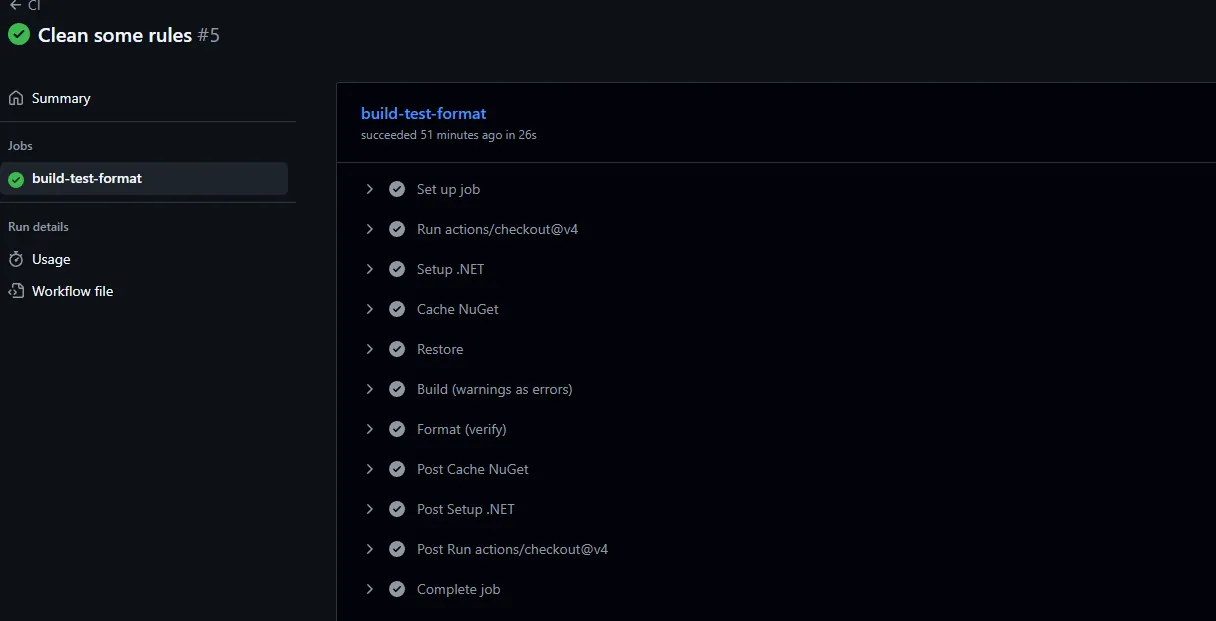
If we go into details, we will see all the processes that happened in that pipeline, where we can see more details for each one.
Step 5 - Add intentionally bad code(to prove it works)
Let’s create a class that violates multiple rules. Acme.Calculator/Calculator.cs
// Client picks columns: "CustomerID,Name,Country"using System; // unusedusing System.Threading.Tasks; // unused namespace Acme.Calculator{ public class Calculator { public int Add(int a,int b){ return a + b; } // bad spacing + analyzer warnings }}
If you run:
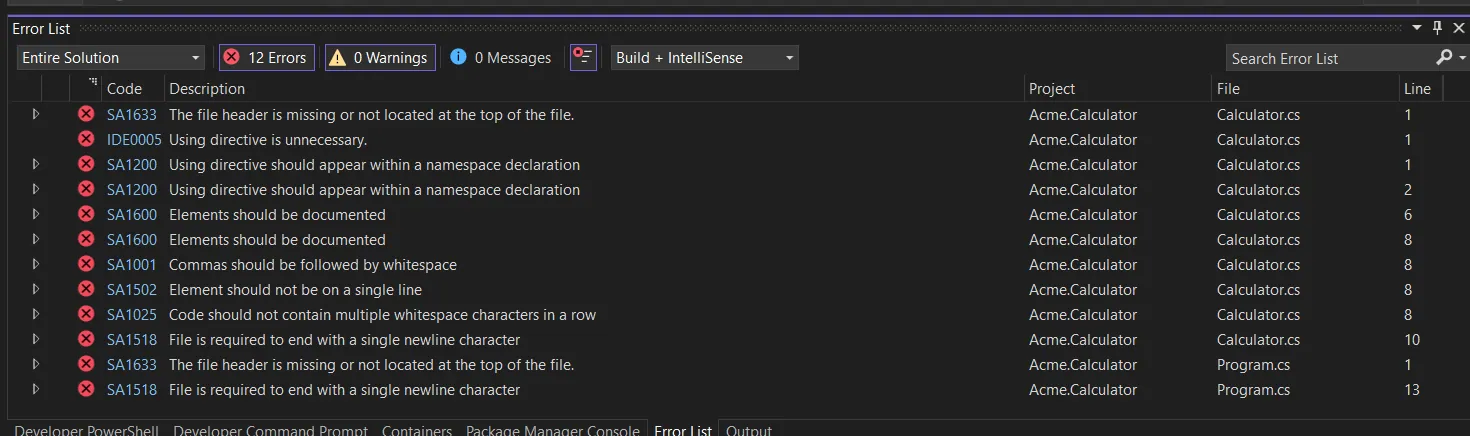
dotnet build -c Release /warnaserror
You’ll probably get warnings turned into errors.
And if you run:
dotnet format --verify-no-changes
You’ll get: Formatting differences were found. Run 'dotnet format' to fix them.
Perfect - that’s exactly what we want!
Now let’s make CI do the same check automatically.
Step 5 - GitHub Actions: Automate your standards
Here’s the real magic.
This workflow will fail your PR if analyzers or formatting are off.
.github/workflows/ci.yml:
name: CIon: push: branches: [ main ] pull_request: jobs: build-test-format: runs-on: ubuntu-latest steps: - uses: actions/checkout@v4 - name: Setup .NET uses: actions/setup-dotnet@v4 with: dotnet-version: 9.0.x - name: Cache NuGet uses: actions/cache@v4 with: path: ~/.nuget/packages key: nuget-${ { runner.os } }-${ { hashFiles('**/*.csproj') } } restore-keys: nuget-${ { runner.os } }- - name: Restore run: dotnet restore - name: Build (warnings as errors) run: dotnet build --no-restore -c Release /warnaserror - name: Format (verify) run: dotnet format --no-restore --verify-no-changes
Explanation
- dotnet build /warnaserror
- fails if any analyzer or code-style warning occurs
- dotnet format --verify-no-changes
- fails if code isn’t properly formatted
- actions/cache
- speeds up builds by caching your NuGet packages
- actions/setup-dotnet
- installs the SDK version you specify Now every pull request runs these checks automatically.
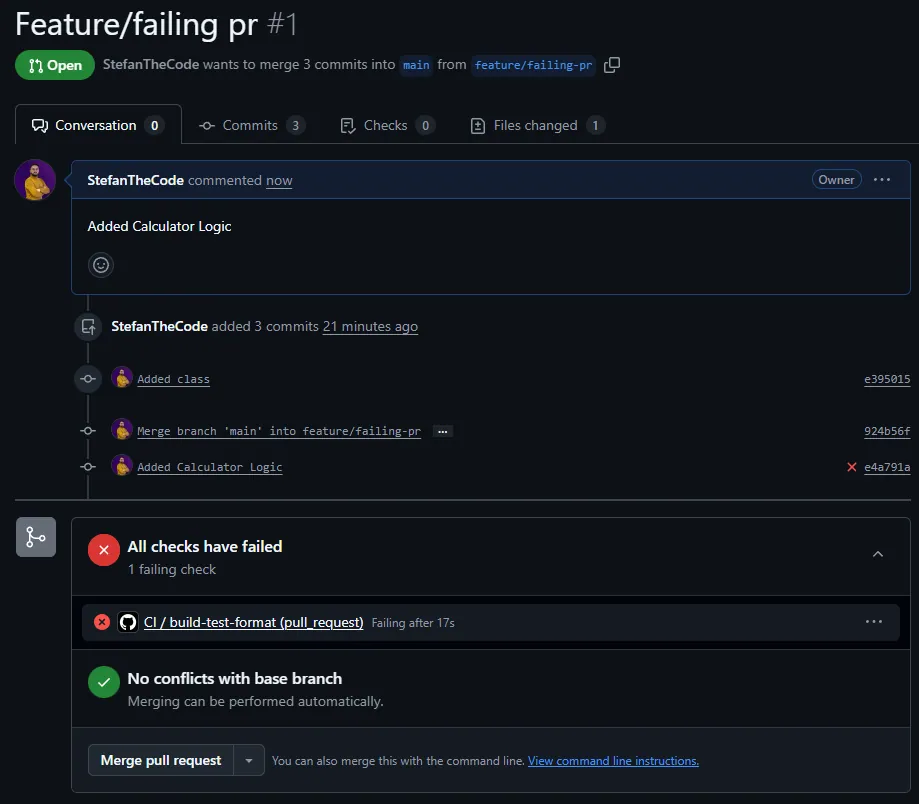
Step 6 - Open a PR and watch it fail
Push your branch with the bad code:
git checkout -b feature/failing-prgit add .git commit -m "add intentionally bad formatting"git push -u origin feature/failing-pr
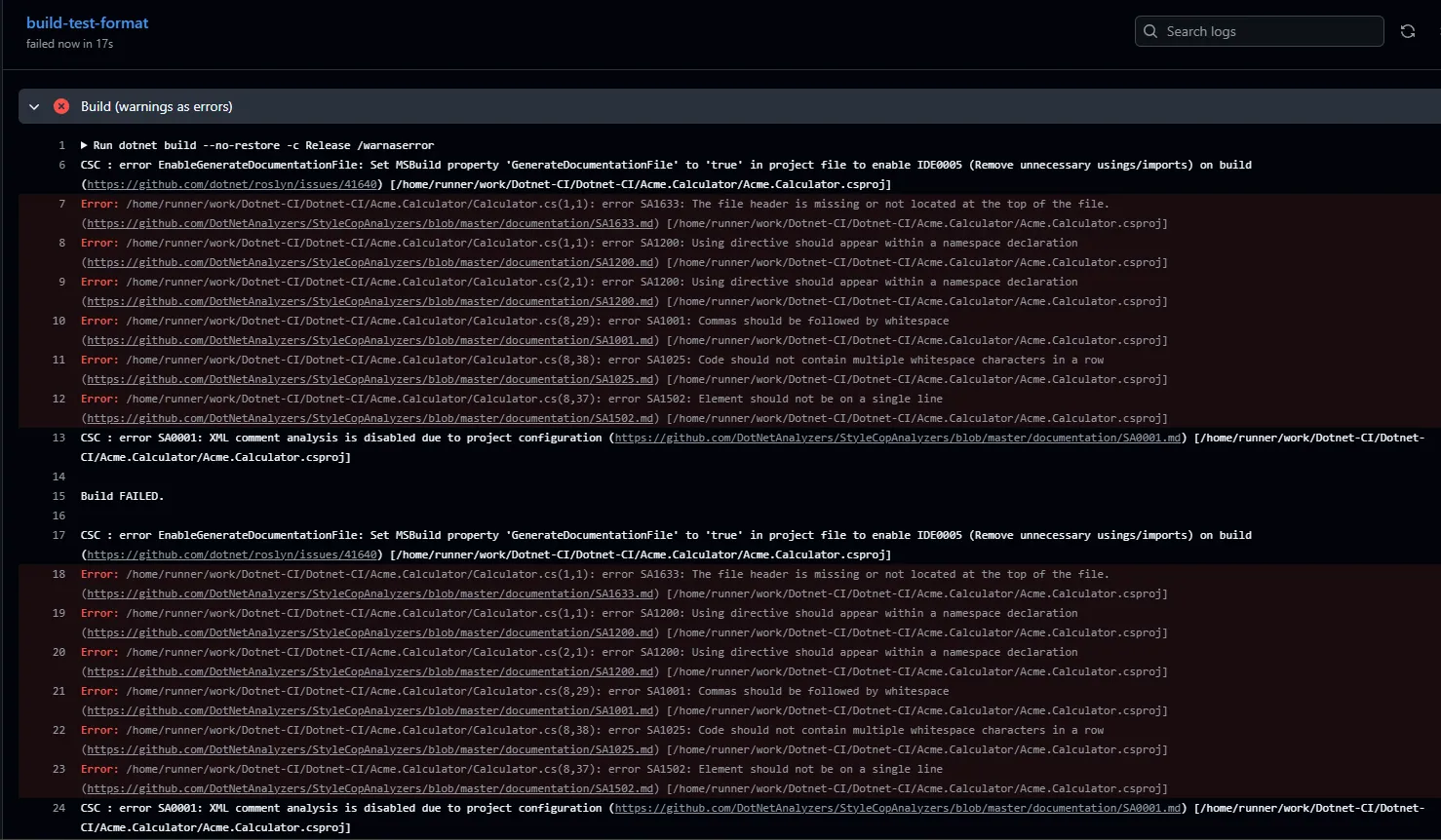
Open a pull request on GitHub. You’ll see red ❌ status checks. GitHub will annotate your PR inline with messages like:
IDE0005: Using directive is unnecessary.SA1200: Using directives must be placed outside the namespace.
This is CI doing code review for you. No more “Please fix spacing” comments from teammates.
And if you check the details:
Step 7 - Fix and make it green
Now fix the class: Calculator.cs:
namespace Acme.Calculator{ public static class Calculator { public static int Add(int a, int b) { return a + b; } }}
Commit and push again:
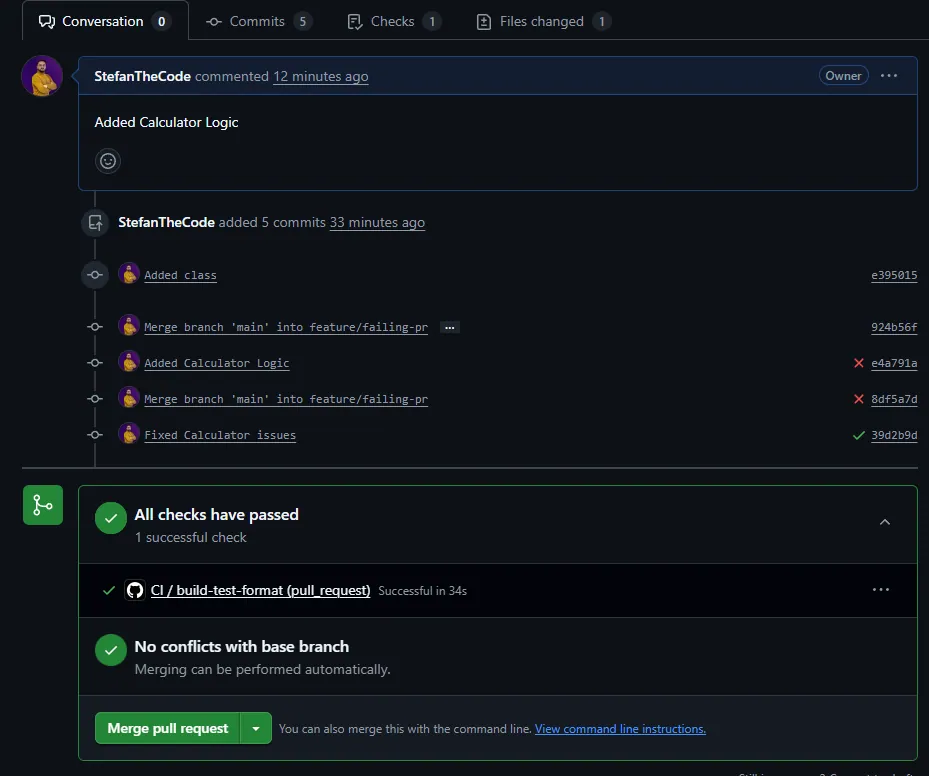
git add .git commit -m "fix: clean code formatting and remove unused usings"git push
Re-run CI → everything turns green ✅ That’s your happy path: style, analyzers, and format all clean.
Bonus: Add a simple test (optional but realistic)
A quick test project helps validate the whole pipeline:
dotnet new xunit -n Acme.Calculator.Testsdotnet sln add Acme.Calculator.Tests/Acme.Calculator.Tests.csprojdotnet add Acme.Calculator.Tests reference Acme.Calculator
Acme.Calculator.Tests/CalculatorTests.cs:
namespace Acme.Calculator.Tests{ /// <summary> /// Calculator Tests. /// </summary> public class CalculatorTests { /// <summary> /// Add tests. /// </summary> [Fact] public void Add_ReturnsSum() { int result = Calculator.Add(2, 3); Assert.Equal(5, result); } }}
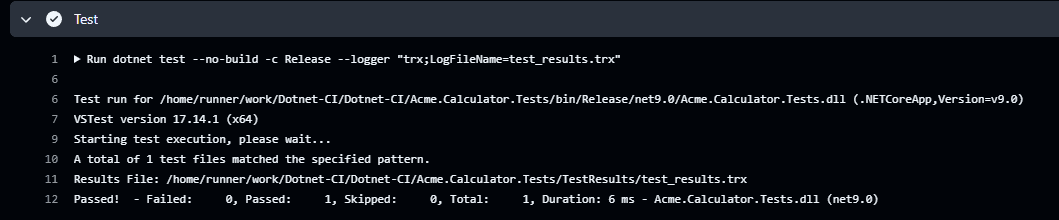
Add a new step to CI before formatting:
- name: Test run: dotnet test --no-build -c Release
After pushing to the branch, you will see new pipeline job "Test":
Bonus 2: Protect your main branch
Go to your GitHub repo settings → Branches → Branch protection rules.
Add a rule for main:
- ✅ Require status checks to pass before merging
- ✅ Select the workflow named CI This ensures that no code can be merged unless it’s clean, tested, and formatted.
Wrapping Up
You’ve just built a bullet-proof CI pipeline for your .NET projects - one that doesn’t just build and test code, but actively enforces quality.
By the end of this walkthrough, you’ll have seen how to:
- ✅ Use Directory.Build.props to centralize analyzer and build rules
- ✅ Define a consistent style with .editorconfig
- ✅ Automate checks with dotnet format --verify-no-changes
- ✅ Catch real issues early using Roslyn and StyleCop analyzers
- ✅ Keep GitHub Actions as your single source of truth for code quality
Most importantly, you’ve learned how to tune these rules to your team’s needs - turning off noisy documentation analyzers and keeping only what truly matters: readable, maintainable, and consistent code.
Every pull request now gets a free, automated code review.
No more style debates, no more “forgot to run formatter,” inconsistent builds between developers.
Your CI does the hard work - and your team ships cleaner code with confidence.
So the next time you push a branch, remember:
- ✅ If it builds clean and formats perfectly on CI, it’s ready for main.
Check the source code here.
That's all from me for today.
Want to enforce clean code automatically? My Pragmatic .NET Code Rules course shows you how to set up analyzers, CI quality gates, and architecture tests - a production-ready system that keeps your codebase clean without manual reviews. Or grab the free Starter Kit to try it out.