Stefan Đokić
A word from this week's sponsors
is my community for .NET devs who want to actually use AI in real projects - building agents, wiring up MCP, and shipping AI features in C# without the hype. You get 50+ Claude skills and agents, weekly lessons, and direct access to me. There's a 7-day free trial, so you can look around before you commit.
Datadog put together an AI Security Best Practices Guide - practical guidance for anyone building, deploying, or operating AI-powered applications. It covers how to secure the infrastructure behind AI apps, protect the software and data they rely on, and reduce risk across the entry points users interact with. If you're moving AI into production, security belongs in the architecture from day one.
Read the guide →Want to reach thousands of .NET developers like this?
Sponsor TheCodeMan →Keywords: vector search EF Core 10, SQL Server 2025 vector type, VECTOR_DISTANCE, EF.Functions.VectorDistance, semantic search .NET, embeddings SQL Server, DiskANN vector index, SqlVector, RAG .NET, nearest neighbor search SQL Server
The Problem: Two Databases for One Feature
You want semantic search in your .NET app. Not keyword matching - real "find me things that mean roughly this" search over your own data: support articles, product descriptions, documents. The standard advice for the last few years has been the same: generate embeddings, then stand up a dedicated vector database to store and search them. Pinecone, Qdrant, Milvus, pgvector on a separate Postgres - pick one. But if that data already lives in SQL Server, you increasingly don't have to: SQL Server 2025 and EF Core 10 let you run vector search in the database you already have, with each embedding stored right next to the row it describes.
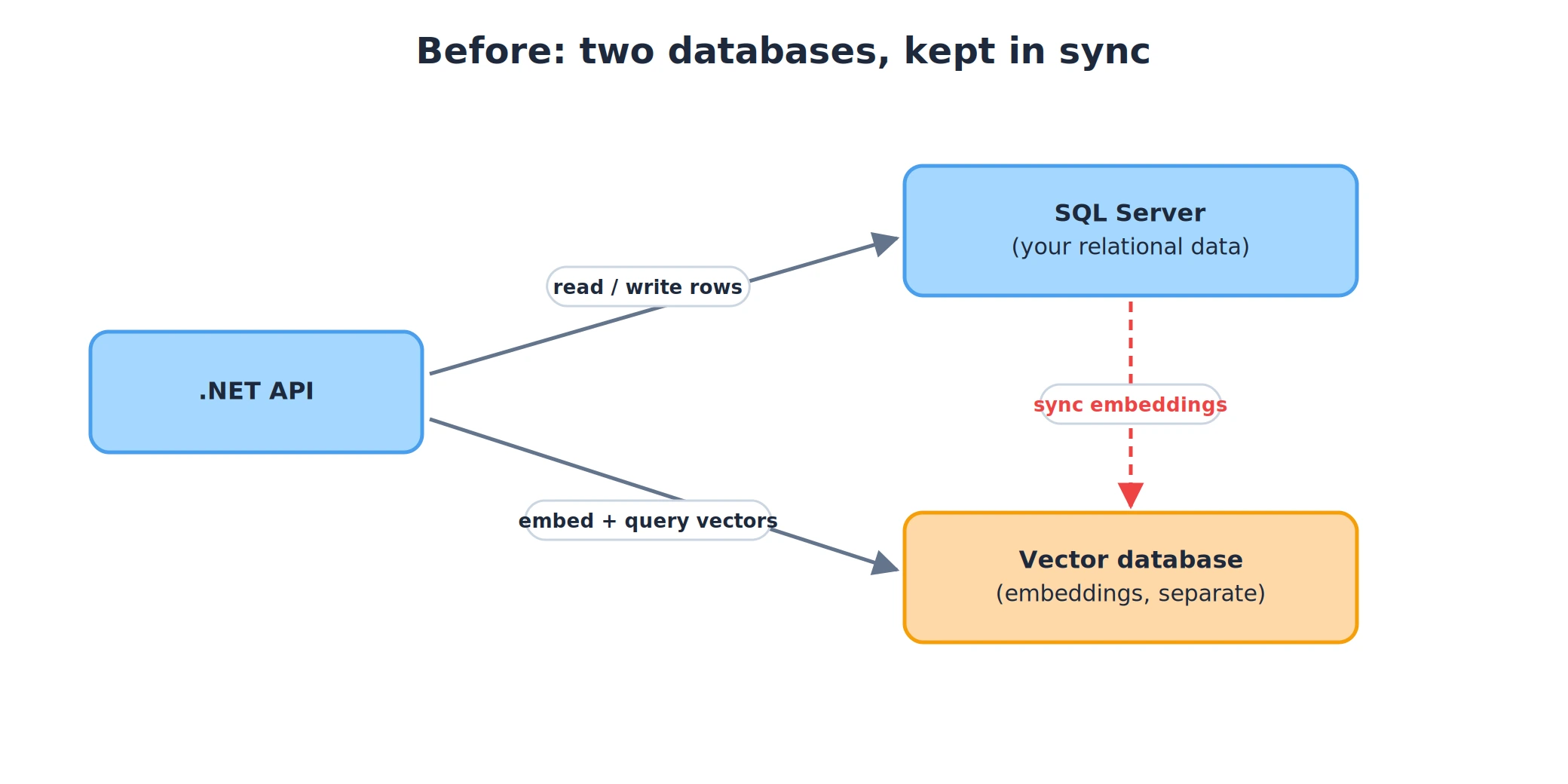
So now you have two databases. Your actual data lives in SQL Server, where it always has. The embeddings live somewhere else. And the moment you split them, you own a synchronization problem: every time a row changes, you have to re-embed it and push the new vector to the other store. Every delete has to happen in two places. A write that succeeds in SQL Server but fails against the vector store leaves the two silently out of sync, and now your search returns results for a product you deleted last week.
There's a second cost that's easy to miss. Because the vectors are in a different system, you can't filter them with a normal SQL WHERE. If you want "the nearest documents that belong to this tenant and aren't archived," you either over-fetch from the vector store and filter in memory, or you push tenant IDs into the vector store's metadata and hope its filtering is good enough. What used to be a trivial WHERE TenantId = @id AND IsArchived = 0 becomes a distributed problem.
For a lot of applications, the separate vector database was solving a problem SQL Server couldn't. As of SQL Server 2025, it can. This post is about doing vector search directly in SQL Server 2025 from EF Core 10 - storing the embedding in the same row as the data, and querying it in LINQ - so semantic search stops being a second database and goes back to being a column.
What SQL Server 2025 Actually Added
SQL Server 2025 introduces a native VECTOR type. It's a real column type, not a VARBINARY you serialize into by hand:
CREATE TABLE Documents( Id INT IDENTITY PRIMARY KEY, Content NVARCHAR(MAX) NOT NULL, Embedding VECTOR(1536) NOT NULL);
A VECTOR(n) holds n single-precision floats. The maximum is 1998 dimensions, which covers the embedding models most people use - OpenAI's text-embedding-3-small is 1536, for example. Each dimension is 4 bytes, so a 1536-dimension vector is about 6 KB per row.
You insert a vector as a JSON array (shortened here for readability), and SQL Server stores it in an optimized binary form:
INSERT INTO Documents (Content, Embedding)VALUES (N'Refund policy for digital goods', '[0.021, -0.155, 0.093, ...]');
To search, you use VECTOR_DISTANCE. It takes a metric, two vectors, and returns the distance between them:
DECLARE @query VECTOR(1536) = '[0.017, -0.140, 0.088, ...]'; SELECT TOP (5) Id, Content, VECTOR_DISTANCE('cosine', Embedding, @query) AS DistanceFROM DocumentsORDER BY Distance;
The metric is 'cosine', 'euclidean', or 'dot'. 'cosine' is the usual choice for text embeddings. Smaller distance means more similar, so ordering by distance ascending and taking the top N gives you the nearest neighbors. That's the whole search: no extra service, no sync job, and the query can carry any WHERE clause you want over the other columns in the same table.
That last point is the one that matters. Filtering by tenant, by category, by a date range, and doing a nearest-neighbor search - it's one query, over one table, in one transaction.
Wiring It Up in EF Core 10
Here's the part that used to require a community plugin. EFCore.SqlServer.VectorSearch existed for EF Core 8 and 9. In EF Core 10 the support is built into the SQL Server provider, so there's no extra package to add for the query side - you map a vector property and use EF.Functions.VectorDistance directly.
The vector property is typed SqlVector<float>, which ships in the Microsoft.Data.SqlClient driver (version 6.1 and later). Map it to a vector(n) column with the standard [Column] attribute:
public class Document{ public int Id { get; set; } public string Content { get; set; } = default!; [Column(TypeName = "vector(1536)")] public SqlVector<float> Embedding { get; set; }}
Or configure it with the fluent API instead of the attribute:
protected override void OnModelCreating(ModelBuilder modelBuilder){ modelBuilder.Entity<Document>() .Property(d => d.Embedding) .HasColumnType("vector(1536)");}
To actually put data in, you need embeddings. Generate them with Microsoft.Extensions.AI - the IEmbeddingGenerator abstraction works over OpenAI, Azure OpenAI, or a local model, so your code doesn't care which:
// generator is an IEmbeddingGenerator<string, Embedding<float>>// registered in DI - backed by OpenAI, Azure OpenAI, Ollama, etc.ReadOnlyMemory<float> vector = await generator.GenerateVectorAsync(document.Content); db.Documents.Add(new Document{ Content = document.Content, Embedding = new SqlVector<float>(vector)}); await db.SaveChangesAsync();
The embedding and the content are saved in the same SaveChangesAsync call. If the write fails, both roll back together. There's no second store to keep in step, so the whole class of sync bugs simply doesn't exist here. It's the same EF-Core-and-AI toolbox behind AI agents for .NET with EF Core - only now the embeddings live in your own tables.
Querying: Nearest-Neighbor Search in LINQ
The search itself is a LINQ query. Embed the user's text, then order by the distance to the stored embeddings:
ReadOnlyMemory<float> queryVector = await generator.GenerateVectorAsync(userQuery); var results = await db.Documents .OrderBy(d => EF.Functions.VectorDistance( "cosine", d.Embedding, new SqlVector<float>(queryVector))) .Take(5) .ToListAsync();
EF Core translates that into the VECTOR_DISTANCE query from earlier. And because it's just a query, every other LINQ operator still works. Want the nearest documents for one tenant, excluding archived ones? Add a Where:
var results = await db.Documents .Where(d => d.TenantId == tenantId && !d.IsArchived) .OrderBy(d => EF.Functions.VectorDistance( "cosine", d.Embedding, new SqlVector<float>(queryVector))) .Take(5) .ToListAsync();
This is the payoff for keeping the vectors in SQL Server. The filter and the similarity search run together, server-side, and you get back only the rows that pass both. With a separate vector database this is the awkward part; here it's a Where clause. These are still ordinary EF Core queries, so the usual EF query performance techniques - projections, AsNoTracking, and the rest - apply unchanged.
Exact vs Approximate: When You Need a Vector Index
Everything above is exact search. VECTOR_DISTANCE in an ORDER BY compares the query vector against every row in the result set and returns the true nearest neighbors. That's a full scan, and it's completely fine up to a point - Microsoft's rough guidance is that exact search works well into the tens of thousands of vectors. For a lot of apps, that's the whole dataset, and you never need anything more.
Past that, scanning every row per query gets expensive. That's where the vector index comes in. SQL Server 2025 can build a DiskANN index over a vector column, and you query it with the VECTOR_SEARCH function for approximate nearest-neighbor search. The index is in preview, so you have to switch on preview features for the database before you can create one:
ALTER DATABASE CURRENT SET PREVIEW_FEATURES = ON;
CREATE VECTOR INDEX IX_Documents_Embedding ON Documents(Embedding) WITH (METRIC = 'cosine', TYPE = 'DiskANN');
SELECT s.Id, s.distance, d.ContentFROM VECTOR_SEARCH( TABLE = Documents AS d, COLUMN = Embedding, SIMILAR_TO = @query, METRIC = 'cosine', TOP_N = 5 ) AS sORDER BY s.distance;
Approximate means it skips most of the comparisons using the index's graph structure, so it's much faster at scale - and occasionally it misses a true nearest match. For semantic search that trade is usually fine, because the embeddings are already an approximation of meaning. Because the index is in preview, treat it as something to adopt deliberately, not a default to reach for on day one.
The decision of which to use isn't complicated:
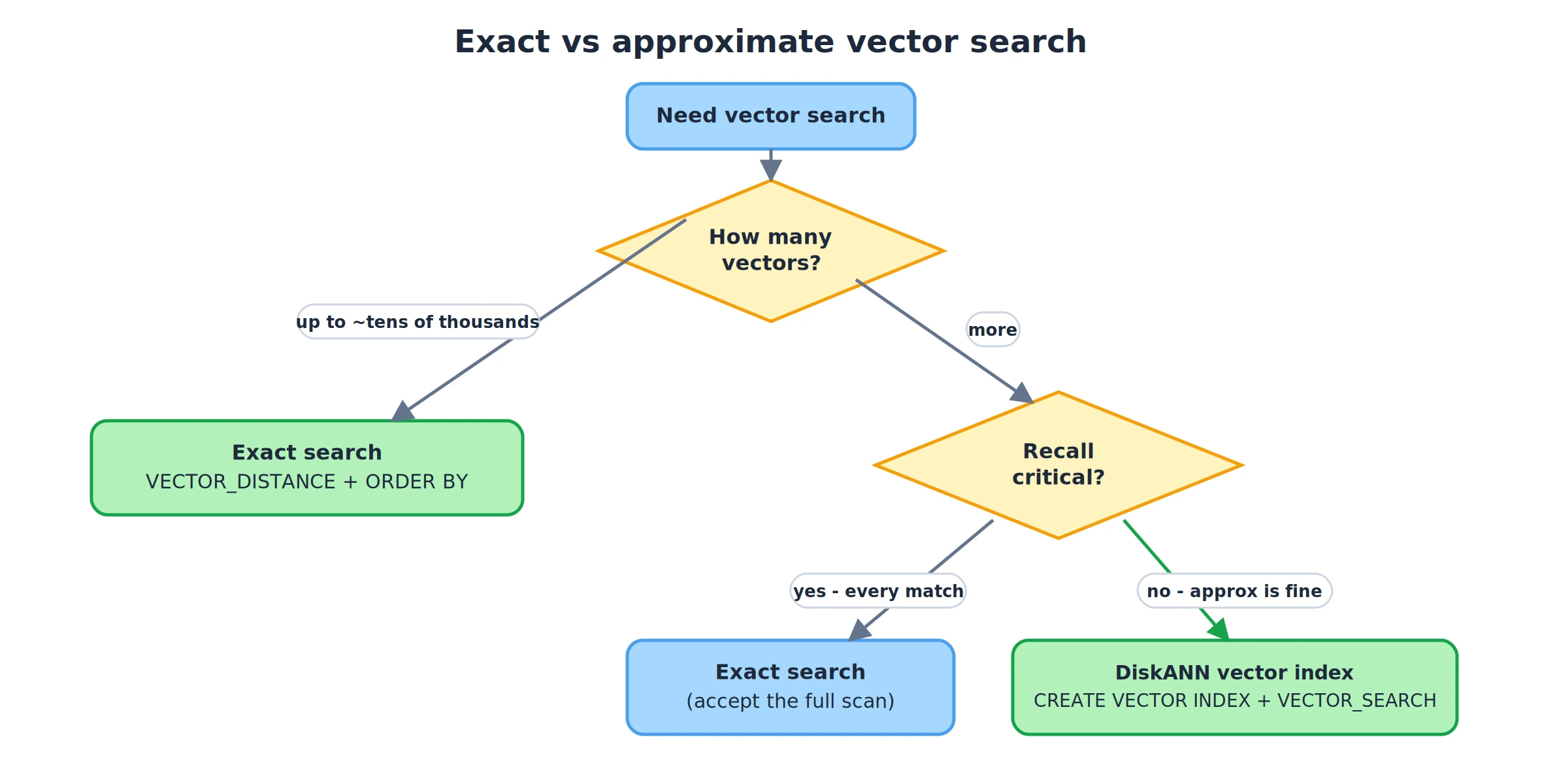
Start exact. It's simpler, it's not in preview, and it gives correct results. Add the vector index when the row count and the query latency actually justify it.
What Changes in Your Architecture
The concrete change is that a moving part goes away. Before, a search feature meant your app, SQL Server, and a separate vector store you had to write to, read from, and keep synchronized:
After, the embedding is a column on the row it describes, and there's one store to talk to:
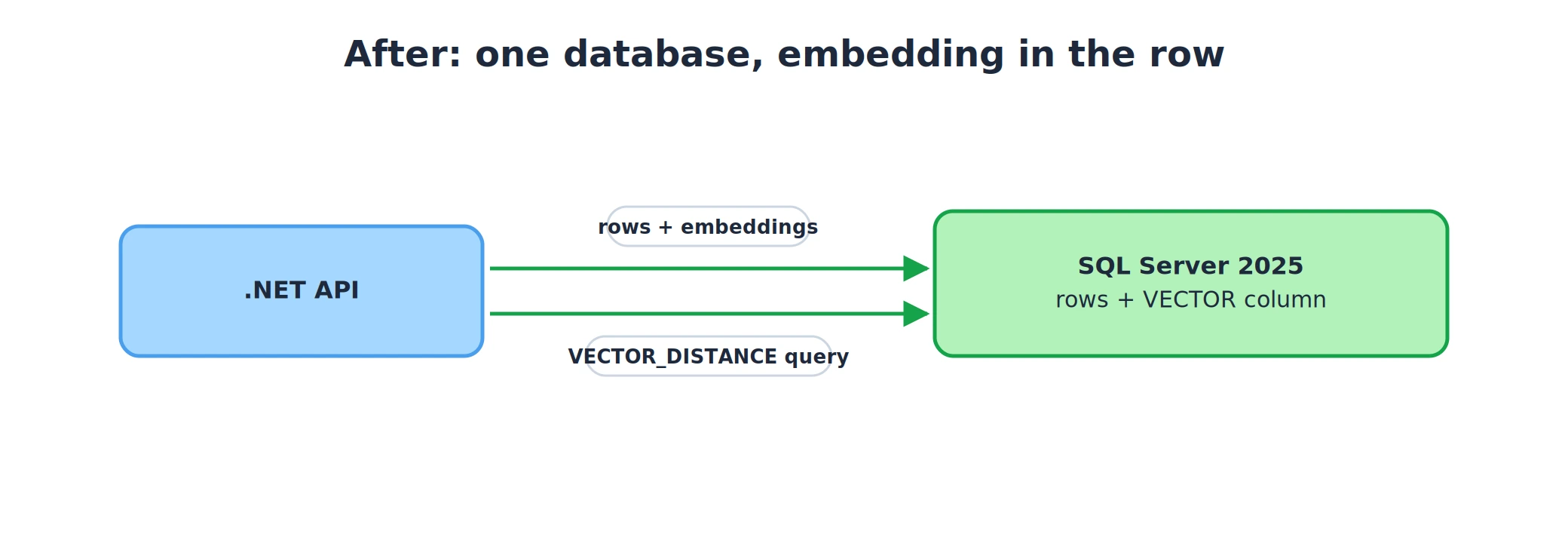
You delete a row and its embedding goes with it. You update a row's text, re-embed it, and save both in one transaction. You back up one database and the search index is in the backup. None of that is exciting - it's just less to operate.
When a Dedicated Vector Database Still Makes Sense
The title is a claim about most .NET APIs, not all of them. There are real cases where a purpose-built vector database is still the better tool, and it's worth being honest about them:
- Very large scale. At tens of millions of vectors and up, a system built only for ANN search will usually outperform SQL Server and give you more knobs to tune recall and latency.
- Vector-first workloads. If the vectors are the product - a standalone semantic search service with little relational data around them - putting them in SQL Server buys you less.
- Index features SQL Server doesn't expose yet. The DiskANN index is new and in preview, with fewer tuning options than a mature dedicated engine. If you need fine control over the index, that's a reason to look elsewhere.
- You're not on SQL Server. Obviously. If your data lives in Postgres,
pgvectoris the equivalent move - keep the vectors next to the data.
The point isn't that vector databases are pointless. It's that "add a vector database" stopped being the automatic first step for a .NET app that already runs on SQL Server. For the common case - some relational data, a search feature over it, application scale - the embedding is now just another column, and that's a real simplification.
FAQ
Do I still need a dedicated vector database with SQL Server 2025?
For most application-scale workloads, no. If your embeddings already belong next to relational data you filter and join on, storing them in a VECTOR column and querying with VECTOR_DISTANCE keeps everything in one database and one transaction. A dedicated vector database still earns its place at very large scale, for vector-first services, or when you need index tuning SQL Server doesn't expose yet.
What is the maximum vector size in SQL Server 2025?
The VECTOR type supports up to 1998 dimensions, stored as 4-byte floats by default. That covers the common embedding models - text-embedding-3-small is 1536 dimensions. Larger models like text-embedding-3-large (3072) have to be dimension-reduced to fit.
How do I do vector search in EF Core 10?
Map a SqlVector<float> property to a vector(n) column, then OrderBy(d => EF.Functions.VectorDistance("cosine", d.Embedding, queryVector)) and Take(n). EF Core 10 translates that to a VECTOR_DISTANCE query. The EFCore.SqlServer.VectorSearch plugin was for EF 8 and 9 - EF Core 10 has this built in.
What's the difference between exact and approximate vector search?
Exact search compares the query against every candidate row and always returns the true nearest neighbors, which is fine up to roughly tens of thousands of vectors. Approximate search uses a DiskANN vector index and VECTOR_SEARCH to skip most comparisons - faster at scale, at the cost of occasionally missing a true match. The vector index is in preview in SQL Server 2025.
Wrapping Up
Semantic search in a .NET app used to come with a tax: a second database, a sync pipeline, and a filtering story that fought your relational data instead of using it. SQL Server 2025 and EF Core 10 remove that tax for the common case. The embedding is a VECTOR column on the same row as your data, the search is a LINQ OrderBy over EF.Functions.VectorDistance, and any WHERE you already use still applies.
If you're building search or RAG over data that already lives in SQL Server, try the single-database version first - and if you're feeding that data to an AI assistant, it pairs naturally with an MCP server in .NET. Start with exact search, add the DiskANN index only when scale demands it, and reach for a dedicated vector database when you actually hit the cases where it wins - not by default.