Stefan Đokić
A quick word from me
This issue isn't sponsored - I write these deep dives in my free time and keep them free for everyone. If your company sells AI tools, dev tools, courses, or services that .NET developers would actually use, sponsoring an issue is the most direct way to reach them.
Want to reach thousands of .NET developers? Sponsor TheCodeMan →Replace Swagger UI with Apidog's modern API documentation. Apidog generates beautiful, interactive API docs from your OpenAPI specs with advanced features like custom branding, seamless sharing, and auto-generated documentation from code comments. Give your .NET APIs the professional documentation they deserve with Apidog's all-in-one platform that goes beyond basic Swagger UI. Check it now
Background
If you've ever built a distributed system or microservices in .NET, you've probably run into the challenge of keeping services in sync.
Whether it's notifying other services of an event, invalidating a cache, or sending real-time updates to a dashboard - you need a messaging mechanism.
While technologies like RabbitMQ or Kafka are excellent for complex workflows, sometimes all you need is something simple, fast, and already in your stack.
Enter: Redis Pub/Sub.
In this guide, you'll learn how to:
- Understand what Redis Pub/Sub is
- Implement it with clean .NET code
- Use background services for subscribers
- Apply it to a real-world use case
- Extend with advanced tips
Let's dive in!
What Is Redis Pub/Sub?
Redis Pub/Sub (Publish/Subscribe) is a built-in feature of Redis that lets services send and receive messages through named channels.
- Publishers send messages to a channels
- Subscribers listen to that channel and handle messages as they arrive
It's fast, lightweight, and doesn't require message persistence. It's great for real-time use cases where losing a message here or there isn't the end of the world.
When to use it:
- Real-time UI updates (e.g., dashboards)
- Cache invalidation across services
- Lightweight event signaling between apps
Real-World Example: Order Notifications System
Imagine you have an e-commerce platform. When an order is placed:
- The order API should notify other systems (e.g., email service, warehouse dashboard)
- These services listen for new orders and take action Let’s build:
- A Publisher app (sends "new order" messages)
- A Subscriber app (receives and logs them)
Setup: Create Two Console Apps - Testing
You can extend ProblemDetails with your own data:
dotnet new console -n OrderPublishercd OrderPublisherdotnet add package StackExchange.Redis cd ..dotnet new console -n OrderSubscribercd OrderSubscriberdotnet add package StackExchange.Redis
Also, make sure Redis is running locally with Docker:
docker run -p 6379:6379 redis
OrderPublisher: Send New Order Messages
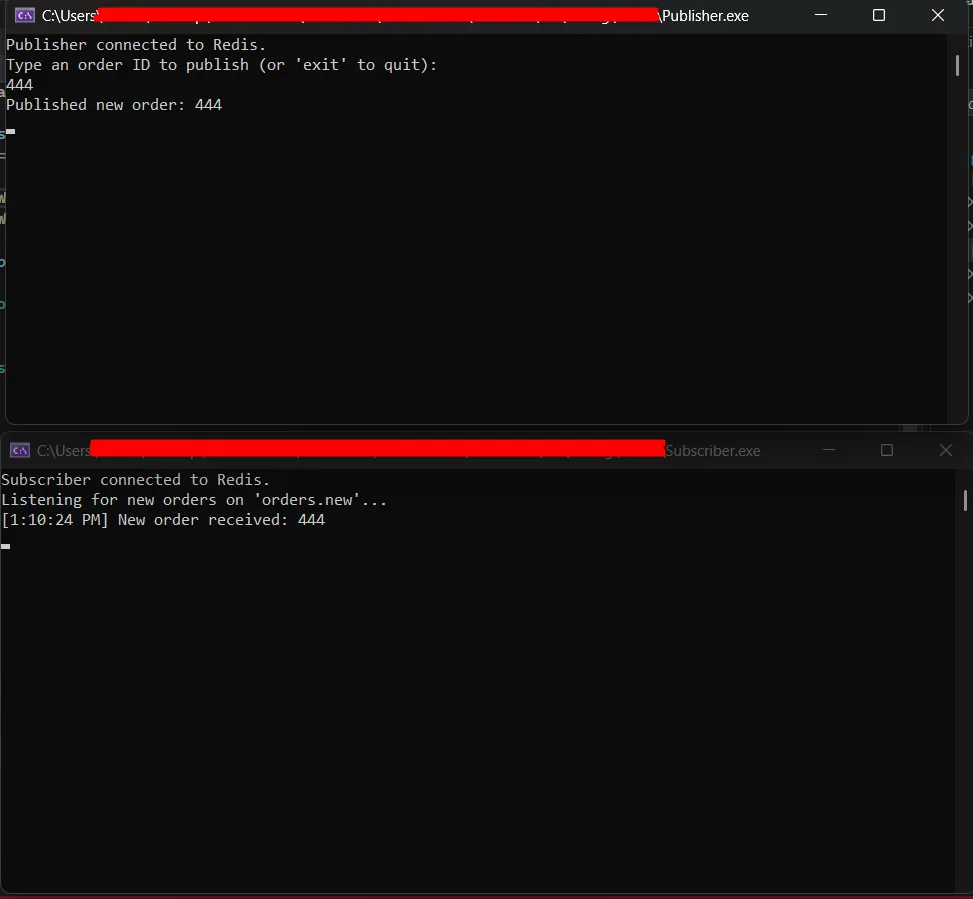
This app simulates a simple order entry system where a user can type an order ID, and the app will publish that order to a Redis channel named orders.new. It's useful for simulating events coming from an order placement service in a microservice environment.
using StackExchange.Redis; var redis = await ConnectionMultiplexer.ConnectAsync("localhost:6379");var pub = redis.GetSubscriber(); Console.WriteLine("Publisher connected to Redis.");Console.WriteLine("Type an order ID to publish (or 'exit' to quit):"); while (true){ var input = Console.ReadLine(); if (input?.ToLower() == "exit") break; await pub.PublishAsync(RedisChannel.Literal("orders.new"), input); Console.WriteLine($"[{DateTime.Now.T}]: Published: {input}");}
Details:
- The app connects to a Redis instance running on localhost:6379
- It opens an input loop so you can type order IDs in real time
- Each input is sent as a message to the orders.new channel
- You can use this app as a simulation of your order API broadcasting new order events
OrderSubscriber: Listen for New Orders
This app simulates a downstream service - like an email notifier or a dashboard backend - that listens for new order messages. It subscribes to the same orders.new channel and reacts as messages arrive.
using StackExchange.Redis; var redis = await ConnectionMultiplexer.ConnectAsync("localhost:6379");var sub = redis.GetSubscriber(); Console.WriteLine("Subscriber connected to Redis.");Console.WriteLine("Listening for new orders on 'orders.new'..."); await sub.SubscribeAsync(RedisChannel.Literal("orders.new"), (channel, message) =>{ Console.WriteLine($"[{DateTime.Now:T}] New order received: {message}");}); await Task.Delay(Timeout.Infinite);
Details:
- The subscriber also connects to Redis at localhost:6379
- It explicitly subscribes to the orders.new channel using RedisChannel.Literal() to avoid deprecated implicit casting
- When a message is published, it logs the message and timestamp
- The Task.Delay(Timeout.Infinite) call keeps the app running so it can continue receiving messages
This kind of app is perfect for services that need to respond immediately when an event occurs, without polling or tight coupling to the publisher.
Result
So, why this Pattern works:
This pattern is great when you want:
- Loose coupling: Publishers don’t need to know who’s listening
- Real-time response: Events are delivered instantly
- No setup headaches: No queues, brokers, or durable message stores
Some ideas
1. Pattern Subscriptions
Pattern subscriptions are like subscribing to multiple related topics without having to explicitly list them. It’s extremely useful in evolving systems where new event types are added over time.
For example:
You're running a logistics backend. You might have these channels:
- orders.new
- orders.updated
- orders.shipped
- orders.cancelled
Instead of subscribing to each one manually, pattern matching with "orders.*" lets you dynamically catch all of them. You can even log them generically, route them to specific handlers, or store them in an audit trail.
Wildcard matching has a small performance cost in Redis if overused. Use it wisely in high-volume systems, and prefer literal channels where possible.
await sub.SubscribeAsync("orders.*", (channel, message) =>{ Console.WriteLine($"Wildcard message on {channel}: {message}");});
2. Multi-Environment Support
When running apps in different environments (Dev, QA, Prod), you don’t want a test in Dev to accidentally trigger a workflow in Prod. Using the environment as a channel prefix prevents cross-talk.
Real-world example:
- Your staging system sends test orders to staging.orders.new
- Production services only subscribe to production.orders.new
- Your logging dashboard can subscribe to both, but label them differently
This pattern brings safe separation while using the same Redis instance.
var env = Environment.GetEnvironmentVariable("ASPNETCORE_ENVIRONMENT") ?? "dev";await pub.PublishAsync($"{env}.orders.new", orderId);
3. JSON Payloads
Plain strings like "123" are limiting. If you want to include more details (amount, timestamp, customer), JSON gives you the flexibility to evolve your messages without changing the channel name or breaking consumers.
var orderJson = JsonSerializer.Serialize(new { OrderId = "123", Total = 99.9 });await pub.PublishAsync("orders.new", orderJson);
For more advanced messaging, see RabbitMQ in .NET and NATS Real-Time Messaging.
Wrapping Up
Redis Pub/Sub gives you real-time messaging in .NET without all the overhead of heavier brokers. It’s:
- Fast
- Easy to implement
- Great for real-time eventing
We used a clean and realistic example (order notifications) with a publisher and subscriber app to show how it works in the real world. And we included extra tips to make it production-ready.
Redis Pub/Sub won’t solve every messaging problem, but for low-latency, fire-and-forget scenarios, it’s a solid tool to keep in your toolbox.
That's all from me today.
P.S. Follow me on YouTube.