Stefan Đokić
A word from this week's sponsor

Moving to EF Core 10 on Oracle, MySQL, PostgreSQL, or SQLite? The latest release of Devart dotConnect - ADO.NET data providers for major databases and cloud services - maps EF Core 10 complex types to JSON columns and includes a demo MCP server sample that connects Claude, Cursor, or VS Code to your database.
Try dotConnect free for 30 days →Want to reach thousands of .NET developers like this?
Sponsor TheCodeMan →Keywords: EF Core 10 JSON complex types, EF Core jsonb PostgreSQL, ComplexProperty ToJson, Npgsql EF Core 10, ExecuteUpdate JSON, complex types vs owned entities, jsonb GIN index, EF Core JSON column, xmin concurrency token, Postgres jsonb .NET
The Problem: Nested Data Without Five Extra Tables
EF Core 10 JSON complex types let you map a nested .NET object to a single PostgreSQL jsonb column with ComplexProperty(p => p.Details, d => d.ToJson()). Npgsql translates LINQ on nested properties to jsonb operators and ExecuteUpdate to jsonb_set, and complex types replace owned entities as the recommended way to map JSON.
A product has a name and a price. It also has a manufacturer, stock, dimensions, a list of tags and a few reviews. None of that has a life of its own - nobody queries a Dimensions row without its product.
The classic relational answer is a table per nested thing: ProductDimensions, ProductTags, ProductReviews, each with a foreign key, each with a join. It works, but you pay for it in migrations, joins and Include calls for data that is only ever read together.
Postgres has had a better option for years: jsonb. The problem was always the EF Core side. You either mapped a POCO with [Column(TypeName = "jsonb")] and got limited querying, or you used owned entities with ToJson() and ran into their quirks.
EF Core 10 fixes this with JSON complex types. You map the nested object with ComplexProperty(...).ToJson(), Npgsql stores it in a jsonb column, and you query and bulk-update properties inside it with normal LINQ.
In this post I'll map a real model, show the exact SQL Npgsql generates for every query and update, add indexes that EF Core's queries actually use, and show the one behavior that will lose data if you don't know about it. Everything here was run against Npgsql.EntityFrameworkCore.PostgreSQL 10.0.3.
EF Core Complex Types vs Owned Entities
Before EF Core 10, JSON columns were mapped with owned entities. An owned entity is still an entity type. It has a hidden key, and EF Core tracks it by identity. That causes three practical problems:
- Assignment fails.
customer.BillingAddress = customer.ShippingAddress;throws onSaveChanges, because the same owned instance can't belong to two properties. - Comparison is by reference. Comparing two addresses in LINQ doesn't compare their contents.
- No bulk updates.
ExecuteUpdatecan't set properties inside an owned JSON entity.
Complex types have value semantics. They have no identity, so assigning copies the values, comparison is by contents, and ExecuteUpdate works on nested properties. The EF Core 10 release notes say it plainly: complex types are the better choice for JSON, and owned-entity users should switch. The Npgsql JSON mapping docs recommend the same and mark the old POCO mapping as deprecated.
Here's how I decide where nested data goes:
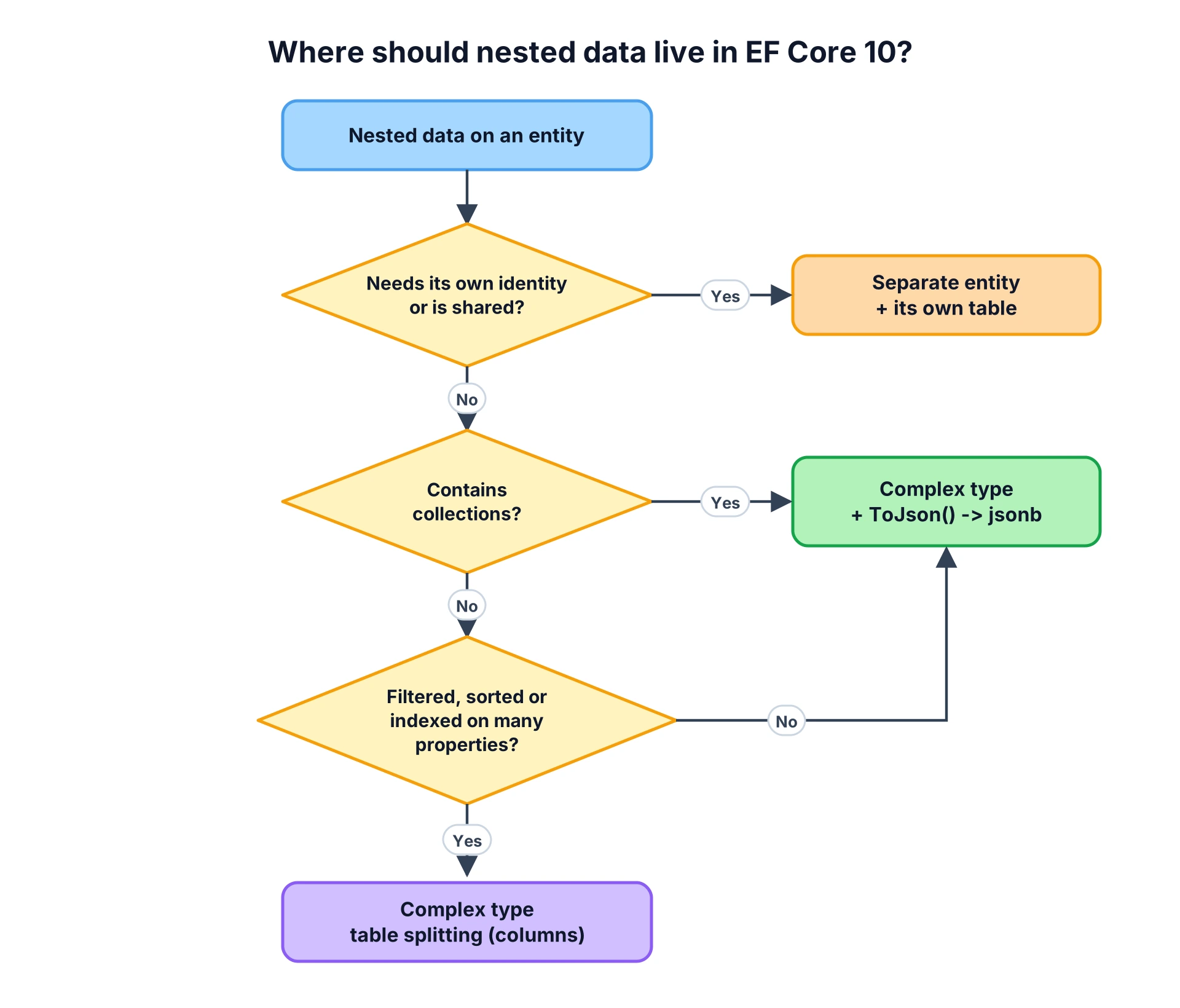
If the nested data has its own identity or other entities point to it, it's an entity. If it's a value that belongs to one owner, it's a complex type. Collections push it into JSON, because table splitting can't hold a list.
Table splitting is the same ComplexProperty mapping without ToJson(). If Dimensions lived directly on Product, ComplexProperty(p => p.Dimensions) would map it to regular columns like Dimensions_WidthMm and Dimensions_WeightGrams in the Products table. That's the better fit for a small, flat value you filter, sort or index on a lot, because each property is a normal typed column.
Mapping a Complex Type to jsonb
The model is plain C#. No attributes, no keys on the nested types:
public class Product{ public int Id { get; set; } public required string Name { get; set; } public decimal Price { get; set; } public required ProductDetails Details { get; set; }} public class ProductDetails{ public required string Manufacturer { get; set; } public int Stock { get; set; } public required Dimensions Dimensions { get; set; } public List<string> Tags { get; set; } = []; public List<Review> Reviews { get; set; } = [];} public class Dimensions{ public int WidthMm { get; set; } public int HeightMm { get; set; } public int WeightGrams { get; set; }} public class Review{ public required string Author { get; set; } public int Rating { get; set; }}
The configuration is one line:
protected override void OnModelCreating(ModelBuilder modelBuilder){ modelBuilder.Entity<Product>() .ComplexProperty(p => p.Details, d => d.ToJson());}
Nested types (Dimensions), scalar lists (Tags) and lists of objects (Reviews) are all picked up from the Details mapping. You don't configure them separately.
This is the table Npgsql creates:
CREATE TABLE "Products" ( "Id" integer GENERATED BY DEFAULT AS IDENTITY, "Name" text NOT NULL, "Price" numeric NOT NULL, "Details" jsonb NOT NULL, CONSTRAINT "PK_Products" PRIMARY KEY ("Id"));
One jsonb column, no extra tables. A stored row looks like this:
{ "Manufacturer": "Keychron", "Stock": 40, "Dimensions": { "WidthMm": 360, "HeightMm": 40, "WeightGrams": 1100 }, "Tags": ["keyboard", "wireless"], "Reviews": [{ "Author": "Ana", "Rating": 5 }, { "Author": "Marko", "Rating": 2 }]}
Npgsql uses jsonb by default, which is what you want. It's stored in a parsed binary format, it supports indexing, and the docs note it's "almost always preferred for efficiency reasons" over json.
Querying jsonb with LINQ in EF Core
You query nested properties like any other property. The interesting part is the SQL.
Filter on a nested property:
var keychron = await db.Products .Where(p => p.Details.Manufacturer == "Keychron") .ToListAsync();
SELECT p."Id", p."Name", p."Price", p."Details"FROM "Products" AS pWHERE (p."Details" ->> 'Manufacturer') = 'Keychron'
Go two levels deep and project:
var light = await db.Products .Where(p => p.Details.Dimensions.WeightGrams < 500) .Select(p => new { p.Name, p.Details.Stock }) .ToListAsync();
SELECT p."Name", CAST(p."Details" ->> 'Stock' AS integer) AS "Stock"FROM "Products" AS pWHERE (CAST(p."Details" #>> '{Dimensions,WeightGrams}' AS integer)) < 500
The projection only pulls Stock out of the document, not the whole Details column. Use projections here the same way you would with regular columns - the same rules from my EF Core query optimization checklist apply.
Search a scalar array:
var wireless = await db.Products .Where(p => p.Details.Tags.Contains("wireless")) .ToListAsync();
SELECT p."Id", p."Name", p."Price", p."Details"FROM "Products" AS pWHERE (p."Details" -> 'Tags') @> to_jsonb('wireless'::text)
This is one of the improvements in Npgsql 10. Contains on a JSON array becomes the @> containment operator, which a GIN index can serve.
Filter on a collection of objects:
var badlyReviewed = await db.Products .Where(p => p.Details.Reviews.Any(r => r.Rating <= 2)) .Select(p => p.Name) .ToListAsync();
SELECT p."Name"FROM "Products" AS pWHERE EXISTS ( SELECT 1 FROM ROWS FROM (jsonb_to_recordset(p."Details" -> 'Reviews') AS ("Rating" integer)) WITH ORDINALITY AS r WHERE r."Rating" <= 2)
Npgsql expands the JSON array into rows with jsonb_to_recordset and runs a normal EXISTS. It works, but it has to unpack the array for every row it checks. That's fine for a filtered set, and slow as the only filter on a large table.
OrderBy on a nested property works too and translates to ORDER BY CAST(p."Details" ->> 'Stock' AS integer).
Bulk Updates with ExecuteUpdate
This is the part owned entities never had. You can update a single property inside the JSON without loading anything:
await db.Products .Where(p => p.Name == "Mechanical Keyboard") .ExecuteUpdateAsync(s => s.SetProperty( p => p.Details.Stock, p => p.Details.Stock - 1));
UPDATE "Products" AS pSET "Details" = jsonb_set(p."Details", '{Stock}', to_jsonb((CAST(p."Details" ->> 'Stock' AS integer)) - 1))WHERE p."Name" = 'Mechanical Keyboard'
Npgsql uses jsonb_set to change only the Stock key, and it computes the new value inside the database. There's no read-modify-write in your application, so two of these running at the same time can't overwrite each other.
Setting a constant works the same way:
await db.Products .Where(p => p.Details.Manufacturer == "Anker") .ExecuteUpdateAsync(s => s.SetProperty(p => p.Details.Manufacturer, "Anker Innovations"));
UPDATE "Products" AS pSET "Details" = jsonb_set(p."Details", '{Manufacturer}', to_jsonb(@p))WHERE (p."Details" ->> 'Manufacturer') = 'Anker'
The Trap: SaveChanges Rewrites the Whole Document
Now the regular way of updating. Load the product, change one nested property, save:
var keyboard = await db.Products.SingleAsync(p => p.Name == "Mechanical Keyboard");keyboard.Details.Stock = 100;await db.SaveChangesAsync();
UPDATE "Products" SET "Details" = @p0WHERE "Id" = @p1;
@p0 is the entire Details document. EF Core tracks changes per property, but for a JSON column it sends the whole serialized value back. The same happens when you add an item to Reviews or reassign Dimensions.
On its own that's just a bigger write. The problem is concurrency. Two requests load the same product, each changes a different part of the document, and both save:
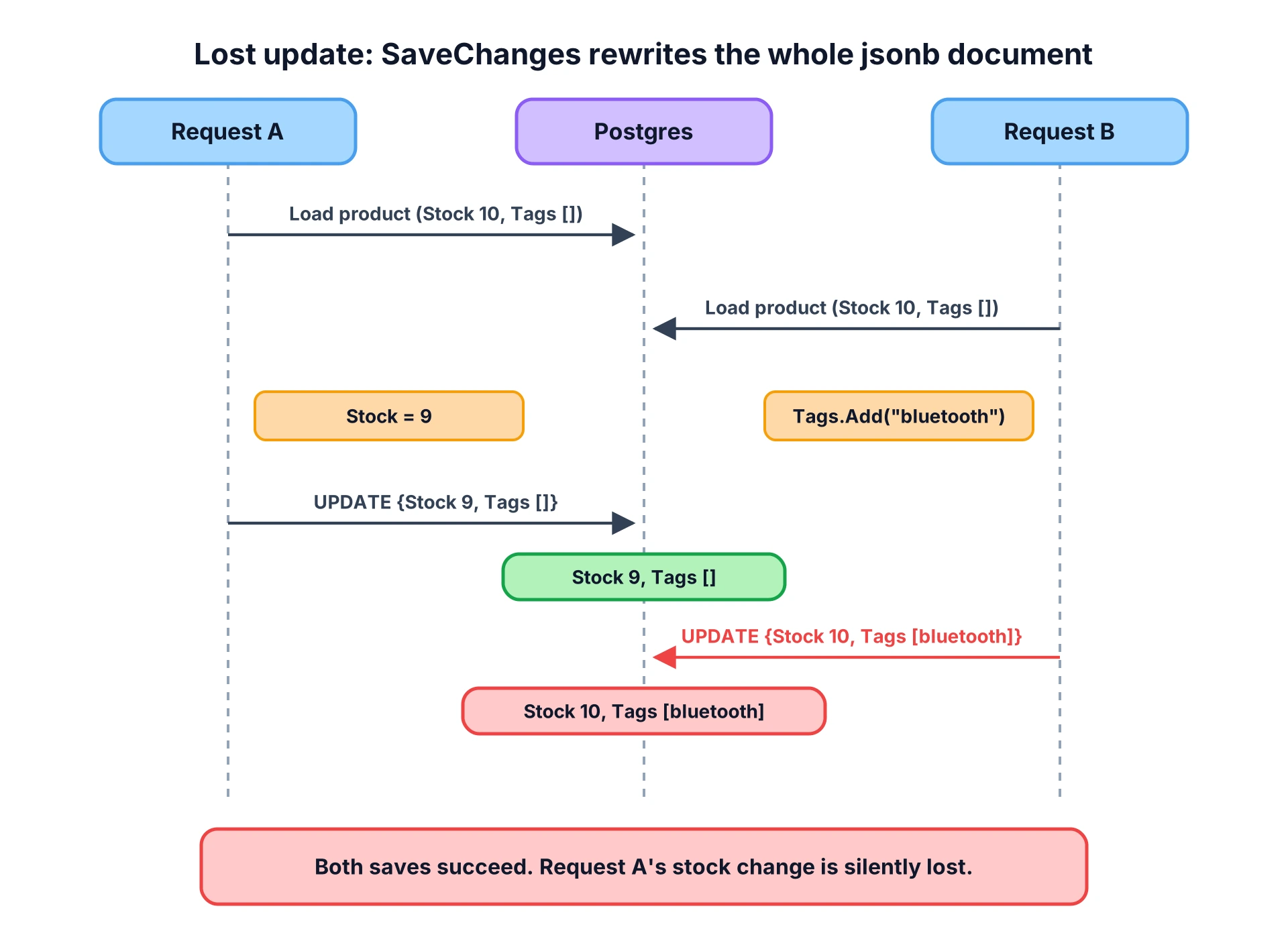
I ran exactly this with two DbContext instances, which is what two concurrent requests get with a scoped DbContext:
await using var a = new AppDbContext();await using var b = new AppDbContext(); var pa = await a.Products.SingleAsync();var pb = await b.Products.SingleAsync(); pa.Details.Stock = 9; // request A: someone bought onepb.Details.Tags.Add("bluetooth"); // request B: an editor adds a tag await a.SaveChangesAsync();await b.SaveChangesAsync(); // Result: stock=10, tags=[bluetooth]
Both saves succeed. No exception, no warning. Request A's stock change is gone, because request B wrote its full copy of the document on top of it. With separate columns this wouldn't happen, since each UPDATE would only touch the column that changed. With one JSON column, any two writers to the same row conflict.
There are two fixes, and I use both.
1. Use ExecuteUpdate for targeted changes. Stock decrements, counters, status flags - anything that changes one value should go through ExecuteUpdateAsync. It updates one key with jsonb_set in a single statement.
2. Add an optimistic concurrency token for read-modify-write. Postgres has a system column, xmin, that changes every time a row is updated. Npgsql maps a uint property marked as a row version to it:
public class Product{ // ... public uint Version { get; set; }} modelBuilder.Entity<Product>() .Property(p => p.Version) .IsRowVersion();
No new column is created. SaveChanges now adds the version to the WHERE clause:
UPDATE "Products" SET "Details" = @p0WHERE "Id" = @p1 AND xmin = @p2RETURNING xmin;
Running the same two requests again, request B's save throws DbUpdateConcurrencyException, and the stock stays at 9. Your code catches it, reloads, and retries or returns a 409. That's the behavior you want: the conflict is visible instead of silently losing data. The EF Core concurrency docs cover the retry patterns.
The two fixes work together. ExecuteUpdate also changes the row's xmin, so if another request already loaded that product and then calls SaveChanges, it gets the same DbUpdateConcurrencyException instead of overwriting the bulk update.
Indexing jsonb for EF Core Queries
A jsonb column with no index means every JSON filter is a sequential scan. EF Core 10 doesn't let you declare an index on a property inside a complex type - HasIndex(p => p.Details.Manufacturer) throws an ArgumentException - so I add the indexes in a migration with raw SQL, the same way I create policies in the Postgres row-level security post. EF Core 11 previews start adding indexes on complex type properties, but on EF Core 10 raw SQL is the way.
The rule: the index has to match the expression EF Core generates. Look at the SQL above and copy the expression.
public partial class AddProductDetailsIndexes : Migration{ protected override void Up(MigrationBuilder migrationBuilder) { // Equality on Details.Manufacturer -> B-tree expression index migrationBuilder.Sql(""" CREATE INDEX "IX_Products_Details_Manufacturer" ON "Products" (("Details" ->> 'Manufacturer')); """); // Tags.Contains(...) -> GIN index on the array migrationBuilder.Sql(""" CREATE INDEX "IX_Products_Details_Tags" ON "Products" USING gin (("Details" -> 'Tags')); """); } protected override void Down(MigrationBuilder migrationBuilder) { migrationBuilder.Sql("""DROP INDEX "IX_Products_Details_Manufacturer";"""); migrationBuilder.Sql("""DROP INDEX "IX_Products_Details_Tags";"""); }}
On a table with 200,000 products (Postgres 16, local machine, 500 distinct manufacturers and 300 distinct tags, so each query matches roughly 400 and 667 rows), these are the EXPLAIN ANALYZE numbers for the two queries from earlier:
| Query | No index | With index |
|---|---|---|
Details.Manufacturer == "M42" | 23.9 ms (parallel seq scan) | 0.65 ms (bitmap index scan) |
Details.Tags.Contains("t42") | 48.3 ms (parallel seq scan) | 1.29 ms (bitmap index scan) |
Watch out for one thing: a GIN index on the whole column, USING gin ("Details" jsonb_path_ops), doesn't help the Tags.Contains query. That index serves "Details" @> '{"Tags": ["t42"]}', but EF Core generates ("Details" -> 'Tags') @> ..., which is a different expression. Postgres only uses an expression index when the query uses the same expression (see jsonb indexing in the PostgreSQL docs). Always confirm with EXPLAIN.
If you filter on a nested property constantly and need it in many indexes, that's a sign it belongs in a real column, not in the JSON.
Moving from OwnsOne(...).ToJson()
If you already have JSON columns mapped as owned entities, the switch is a configuration change:
// Before (EF Core 8/9 style)modelBuilder.Entity<Customer>().OwnsOne(c => c.Address, a =>{ a.ToJson(); a.OwnsMany(x => x.Lines);}); // After (EF Core 10)modelBuilder.Entity<Customer>() .ComplexProperty(c => c.Address, a => a.ToJson());
In my test, both mappings produced the same jsonb column and the same document shape ({"City": "Nis", "Lines": [{"Text": "x"}], "Street": "Main"}), and data written through OwnsOne was read back correctly through ComplexProperty. Still, run dotnet ef migrations add after the switch, read what it generates, and test against a copy of production data before you deploy.
When Not to Use JSON Complex Types
- The data has its own identity. If other tables reference it, or you load it on its own, it's an entity.
- You need the history of changes. A JSON document only holds the current state. For "what did this look like last month", use something like temporal tables with EF Core.
- You filter, join and sort on it everywhere. A few indexed JSON paths are fine. If half your queries dig into the document, use columns.
- Many writers touch the same row. Every
SaveChangesrewrites the whole document. UseExecuteUpdateandxmin, or split the hot data out. - The array grows without limit. A product with 50,000 reviews in one
jsonbvalue means every save rewrites all of them. Put unbounded collections in a table. - You need collections of structs. Complex types can be structs, but collections of structs aren't supported yet in EF Core 10.
- You want an optional complex type with only optional properties. A nullable complex property (
ProductDetails? Details) needs at least one required property on the type in EF Core 10.
FAQ
What are complex types in EF Core 10?
Complex types are .NET types that live inside an entity and have no identity of their own, like an address or a set of product details. EF Core 10 can map them either to extra columns in the owner's table or, with ToJson(), to a single JSON column. They have value semantics, so you can copy, assign and compare them by contents.
Should I use complex types or owned entities for JSON columns?
Use complex types. Owned entities are still entity types with a hidden identity, which breaks assignment between properties, compares by reference in LINQ and doesn't support ExecuteUpdate on JSON. Microsoft and the Npgsql docs both recommend complex types with ToJson() for JSON mapping in EF Core 10 and later.
Does EF Core 10 support jsonb in PostgreSQL?
Yes. With Npgsql.EntityFrameworkCore.PostgreSQL 10, ComplexProperty(...).ToJson() maps to a jsonb column by default. LINQ queries on nested properties translate to the ->, ->> and #>> operators, Contains on a JSON array translates to @>, and ExecuteUpdate on a nested property translates to jsonb_set.
How do I index a jsonb column used by EF Core?
Create the index in a migration with migrationBuilder.Sql, and make it match the exact expression EF Core generates. Use a B-tree expression index for equality on a single property, for example ("Details" ->> 'Manufacturer'), and a GIN index for containment on an array, for example ("Details" -> 'Tags'). Check the generated SQL in the logs and confirm with EXPLAIN.
Does SaveChanges update only the changed JSON property?
No. When you change any property inside a JSON complex type and call SaveChanges, EF Core writes the whole JSON document back to the column. Two requests that change different parts of the same document can overwrite each other. Use ExecuteUpdate for targeted changes, or add an xmin concurrency token so the second write fails instead of silently losing data.
How do I prevent lost updates on a jsonb column in EF Core?
Change single values with ExecuteUpdateAsync, which updates one key inside the document with jsonb_set in a single statement. For load-modify-save code, map a uint property with IsRowVersion() so Npgsql uses the Postgres xmin system column as a concurrency token. A conflicting SaveChanges then throws DbUpdateConcurrencyException instead of overwriting the other write.
Wrapping Up
EF Core 10 JSON complex types make Postgres jsonb a normal part of your model. One line of configuration maps a nested object graph to a single column, LINQ queries translate to proper jsonb operators, and ExecuteUpdate changes one key with jsonb_set.
Two things to take with you. First, SaveChanges rewrites the whole document, so use ExecuteUpdate for targeted changes and add an xmin row version anywhere two requests can touch the same row. Second, index the exact expressions EF Core generates and verify with EXPLAIN.
If you're still on OwnsOne(...).ToJson() or [Column(TypeName = "jsonb")], this is a good release to move.