Stefan Đokić
A word from this week's sponsors
Datadog put together an AI Security Best Practices Guide - practical guidance for anyone building, deploying, or operating AI-powered applications. It covers how to secure the infrastructure behind AI apps, protect the software and data they rely on, and reduce risk across the entry points users interact with. If you're moving AI into production, security belongs in the architecture from day one.
Read the guide →The ElevenLabs is free to start - you can create an account and turn text into natural, human-sounding speech in minutes, no card required. The free tier gives you realistic AI voices in dozens of languages through a simple API you can call straight from your .NET code, so you can add narration, voiceover, or a voice feature to a project without paying for anything upfront. If you've been meaning to try AI voice, this is the no-risk way to do it.
Start free with ElevenLabs →Want to reach thousands of .NET developers like this?
Sponsor TheCodeMan →Keywords: JSON Lines in .NET, streaming JSON .NET 11, SerializeAsyncEnumerable, System.Text.Json streaming, IAsyncEnumerable JSON, ndjson .NET, stream large API response C#
The Problem: One Big Array Sits in Memory Before Anything Leaves
You have an endpoint that returns a list. Maybe it's an export of every order from last quarter, or a feed of sensor readings. The code looks fine:
app.MapGet("/orders/export", async (OrderService service) =>{ List<Order> orders = await service.GetAllAsync(); return Results.Ok(orders);});
Here's what actually happens when that list is large. GetAllAsync pulls every row into a List<Order>. Then Results.Ok hands the whole list to the serializer, which builds the entire JSON array in memory before the first byte goes to the client. So you're holding two copies of the data at once - the objects and their serialized form - and the client waits until the last row is serialized to receive anything.
At a few hundred rows nobody notices. At a few hundred thousand, memory spikes, the garbage collector starts working, and time-to-first-byte is the time it took to serialize everything. Scale that to a handful of concurrent requests and the process feels it.
The fix is to stop buffering. Serialize one item, write it out, move to the next - and never hold the whole thing at once.
What .NET Already Had: Streaming an Array
System.Text.Json has been able to stream an IAsyncEnumerable<T> since .NET 6. Return one from a minimal API and the framework writes the JSON array incrementally instead of buffering it:
app.MapGet("/orders/export", (OrderService service) => service.GetAllAsyncStream()); // returns IAsyncEnumerable<Order>
public async IAsyncEnumerable<Order> GetAllAsyncStream( [EnumeratorCancellation] CancellationToken ct = default){ await foreach (Order order in _repository.ReadAllAsync(ct)) { yield return order; }}
That already solves the memory side. The server holds one order at a time, not the whole list. The output is still a single JSON array:
[{"Id":1,"Total":42.0},{"Id":2,"Total":19.5}, ... ]
Which is fine for a browser calling fetch and doing await res.json(). But it has a catch for large data: the array is one JSON document. A consumer that wants to process items as they arrive has to parse the array incrementally, and if the connection drops halfway you're left with a truncated, invalid JSON document - the trailing ] never arrives. You can't append to it either. There's no clean way to open a file, write more records, and close it again later.
For streams, logs, and exports, an array is the wrong shape.
JSON Lines: One Object Per Line
JSON Lines (also written NDJSON) is the format most streaming tools already use - one JSON value per line, separated by \n, no wrapping array:
{"Id":1,"Total":42.0}{"Id":2,"Total":19.5}{"Id":3,"Total":88.25}
Each line is a complete, independent JSON document. That's the whole point. A consumer reads a line, parses it, processes it, and forgets it. If the connection drops after line two, the first two lines are still valid and usable. You can append a fourth line to the file tomorrow without touching the first three. Every log pipeline, every data-warehouse bulk loader, every event stream speaks this format.
In .NET 11, System.Text.Json can produce it directly. The new overloads of JsonSerializer.SerializeAsyncEnumerable take a topLevelValues flag:
using System.Text;using System.Text.Json; static async IAsyncEnumerable<Reading> GetReadings(){ yield return new("sensor-1", 21.5); yield return new("sensor-2", 22.0);} await using var stream = new MemoryStream();await JsonSerializer.SerializeAsyncEnumerable( stream, GetReadings(), topLevelValues: true); Console.WriteLine(Encoding.UTF8.GetString(stream.ToArray()));// {"Id":"sensor-1","Value":21.5}// {"Id":"sensor-2","Value":22} public sealed record Reading(string Id, double Value);
With topLevelValues: true there's no opening [, no commas between items, no closing ]. Each element is serialized and followed by a newline. The format also ignores WriteIndented, so every object stays on a single line - which is the only thing that makes "read one line, parse one record" work.
Streaming JSON Lines From an ASP.NET Core Endpoint
The framework's default result serializes to a JSON array, so to send JSON Lines you write to the response stream yourself. It's a few lines, and it stays fully streamed:
app.MapGet("/orders/export", (OrderService service, HttpResponse response, CancellationToken ct) =>{ response.ContentType = "application/x-ndjson"; return JsonSerializer.SerializeAsyncEnumerable( response.Body, service.GetAllAsyncStream(ct), topLevelValues: true);});
SerializeAsyncEnumerable returns a Task, so the endpoint just returns it. Orders flow from the database, through the serializer, onto the wire, one at a time. Memory stays flat whether the export is a thousand rows or ten million. Use the content type application/x-ndjson (or application/jsonl) so clients know what they're getting instead of assuming a single array.
Here's the difference in shape:
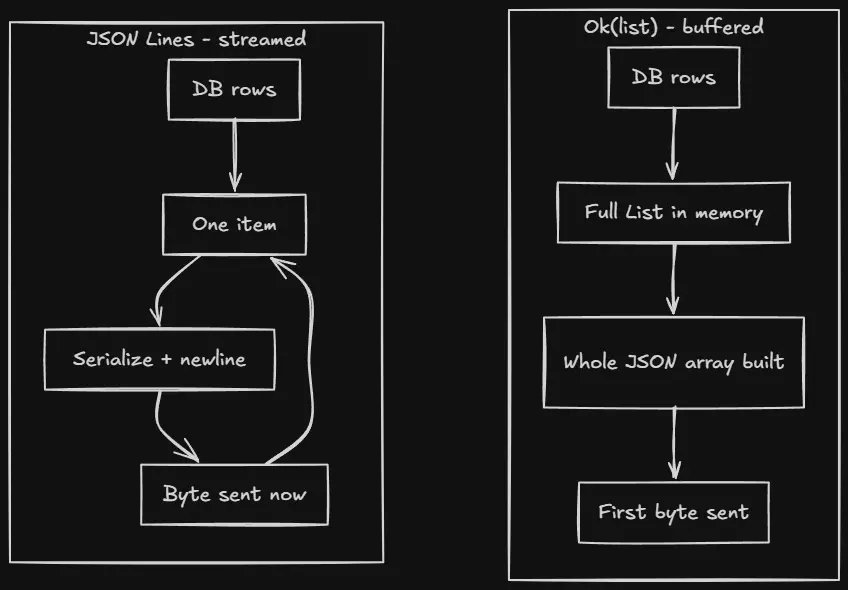
The buffered path can't send a byte until the last row is serialized. The streamed path sends the first record almost immediately and never holds more than one at a time.
Reading JSON Lines Back
Because each line is its own document, reading is just as simple - and it works on any .NET version, since a line is plain JSON:
using var reader = new StreamReader(stream); string? line;while ((line = await reader.ReadLineAsync()) is not null){ if (line.Length == 0) continue; Reading reading = JsonSerializer.Deserialize<Reading>(line)!; await ProcessAsync(reading);}
You process each record as it arrives and never build a big collection. If you're consuming a regular JSON array from a stream instead, JsonSerializer.DeserializeAsyncEnumerable<T>(stream) has done that incrementally since .NET 6 - reach for it when the source is an array, and read line by line when the source is JSON Lines.
When To Use It
Reach for JSON Lines when the data is large or open-ended: exporting a big table, returning a long report, feeding a data pipeline, or writing an append-only log or event file. It shines when the consumer processes records one at a time and when a dropped connection should leave valid partial data behind.
Don't bother for small responses. A list of 20 items fits in memory fine, and a normal JSON array is what browsers and most HTTP clients expect by default. Switching those to JSON Lines only makes them harder to consume for no gain. This is a tool for the big, streaming cases - not a replacement for every array you return.
FAQ
What is the difference between JSON Lines and NDJSON?
They're the same format in practice: one JSON value per line, newline-separated, no wrapping array. "NDJSON" (newline-delimited JSON) and "JSON Lines" (JSONL) are two names for it, and application/x-ndjson is the content type you'll most often see.
Does SerializeAsyncEnumerable load the whole collection into memory?
No. It enumerates the IAsyncEnumerable<T> one item at a time, serializes each, and writes it to the stream before moving on. That's what keeps memory flat regardless of how many items you stream.
Do I need JSON Lines to stream, or is IAsyncEnumerable enough?
Returning an IAsyncEnumerable<T> already streams a JSON array without buffering, so memory is handled either way. JSON Lines adds the format benefits on top: each record is independently valid, partial output survives a dropped connection, and you can append to a file. Pick it when those matter.
Can browsers read a JSON Lines response?
Not with await res.json() - that expects a single JSON document. A browser consumer has to read the response stream and split on newlines, parsing each line itself. For a plain browser fetch that just wants the data, a normal array is simpler; keep JSON Lines for pipelines and large exports.
Wrapping Up
The default Ok(list) is fine until the list gets big, and then it quietly costs you memory and time-to-first-byte because the whole array is built before anything ships. Returning an IAsyncEnumerable<T> fixes the memory. JSON Lines - now built into System.Text.Json in .NET 11 with SerializeAsyncEnumerable(..., topLevelValues: true) - fixes the shape too: independently valid records, safe partial output, and a format every streaming tool already understands.
Next time you write an export or a feed endpoint, ask whether the caller really wants one giant array or a stream of records. For anything large, it's the second one.