Migrate .NET Framework to .NET 10, piece by piece
Skills and agents that move WebForms, MVC 5, Web API 2, WCF and EF6 to .NET 10 one slice at a time - with tests that prove nothing changed.
Big-bang rewrites of old .NET apps stall for the same reasons: months without shipping, no proof the new app behaves like the old one, and an estimate nobody can explain. This pack starts with a report that shows the real size of the job, then moves the app over while it keeps running.
No rewrite. Four steps.
One prompt, one HTML report
The scanner reads your solution and the report shows what has to change, how big the job is, days with and without AI, blockers, risks and the questions your team has to answer. Diagrams included, works offline.
Tests before code
Parity tests record what the old app answers today: normalized HTML and JSON, status codes, headers. Flow tests cover postback screens, characterization tests lock the business rules - quirks included.
.NET 10 in front, both apps run
A new ASP.NET Core app with YARP sits in front of the old one. Migrated routes stay in .NET 10, everything else falls through. Session and sign-in are shared through the System.Web adapters.
One slice, one commit, green tests
One page, controller, service or DbContext at a time. A route moves only when its parity tests are green. The orchestrator agent keeps the state in MIGRATION.md and stops for you at every decision.
What the report looks like
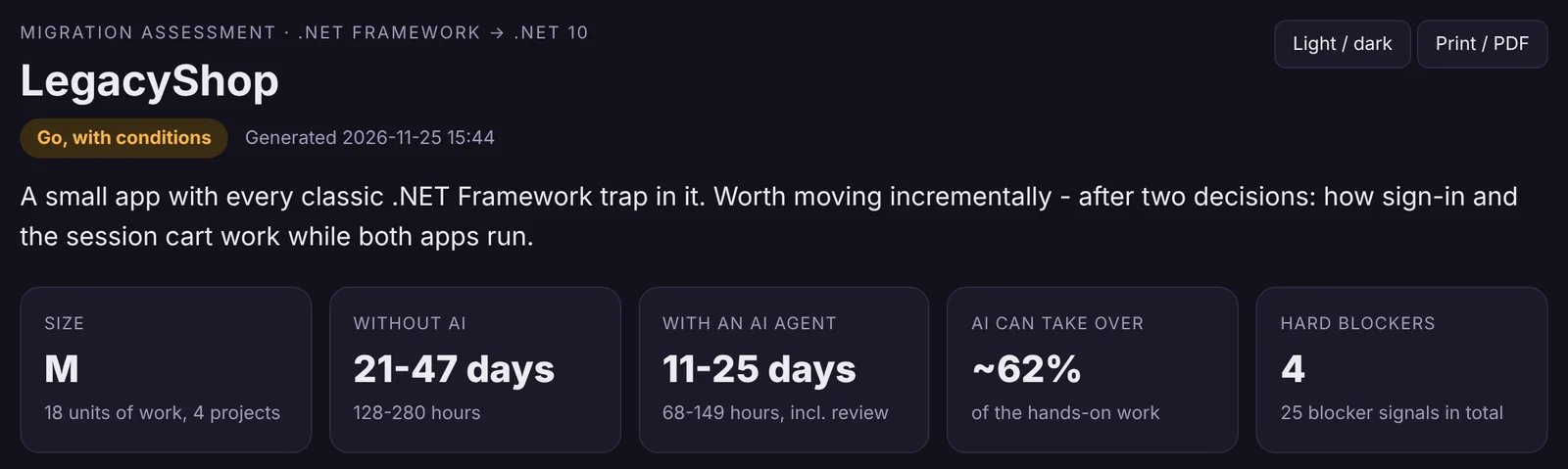
This is the real report for LegacyShop, the sample app in the repo: a .NET Framework 4.8 web shop with WebForms, Web API 2, MVC 5, WCF and EF6. Every page, controller, service and DbContext becomes a unit of work with hours, and every hour is split between the AI agent and you.
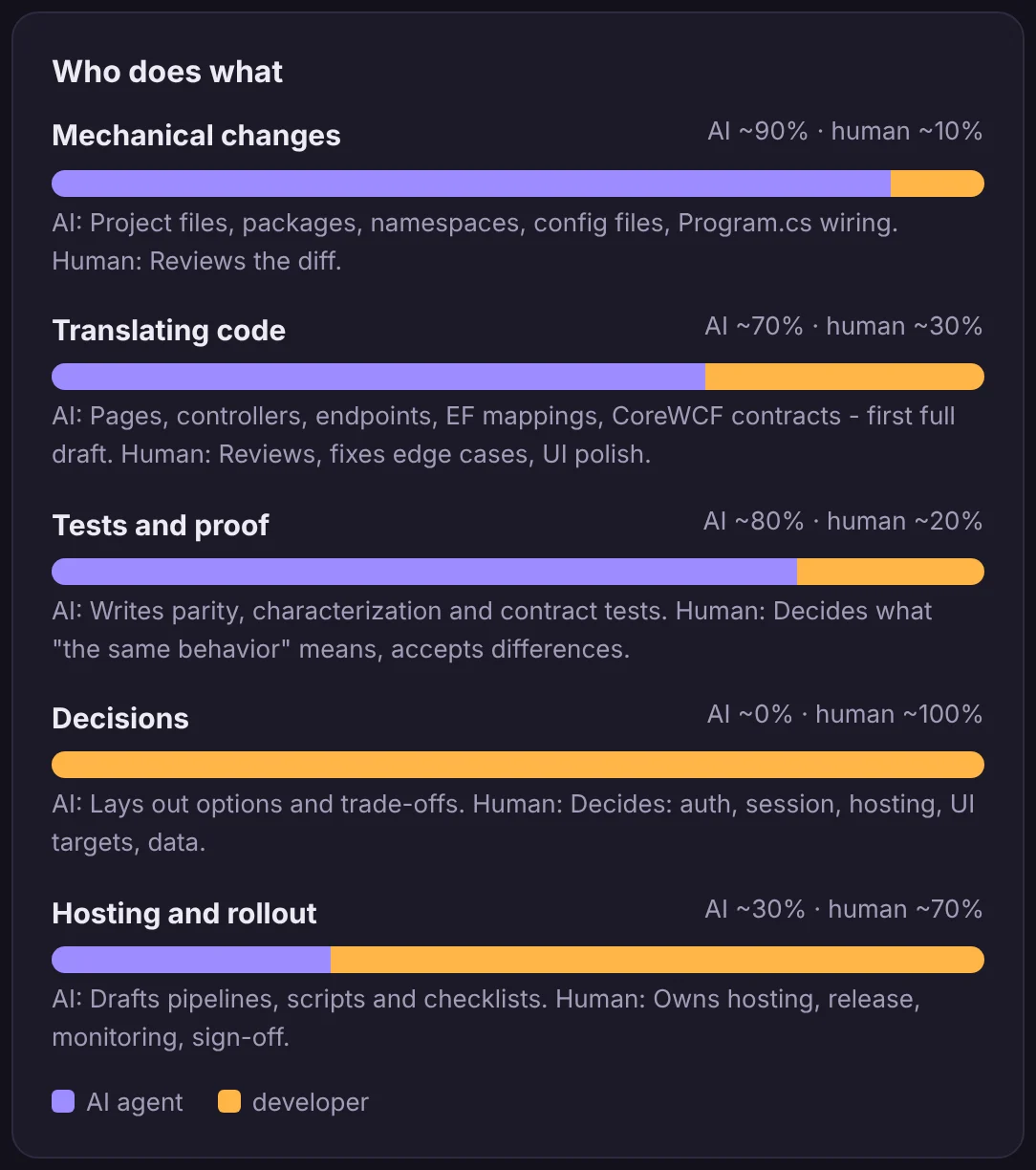
What AI does. What you do.
Project files, packages, config and the first draft of the translated code are work an agent does well. Tests too - it writes the parity and contract tests, you decide what "the same behavior" means.
Decisions are yours: how sign-in and session work while both apps run, where the new app is hosted, which WebForms pages become Razor Pages and which become Blazor.
What moves where
Two packs and a sample app
8 skills + the dotnet-migration-orchestrator agent that runs the whole migration.
migration-assessment-report - The scan and the HTML reportmigration-safety-net - Parity, flow and characterization testsyarp-strangler-setup - The .NET 10 host with YARP, remote session and authwebforms-page-migrator - One WebForms page to its targetaspnet-mvc-webapi-migrator - MVC 5 and Web API 2 controllerswcf-service-migrator - WCF to CoreWCF with contract testsef6-to-efcore-migrator - EF 6.5 bridge, then EF Corelegacy-config-auth-migrator - Config, auth, session, Data ProtectionFor the apps that stay on .NET Framework for now. 4 skills + 2 agents.
legacy-package-migrator - packages.config to Central Package Managementadonet-data-access-auditor - SQL injection and leaks in classic ADO.NETwinforms-maintainer - Cross-thread, frozen UI and leak fixesspan-memory-refactor - Span<T> / Memory<T> for hot codeA .NET Framework 4.8 web shop that builds and runs, with 29 migration traps and 9 behavior quirks planted in it and an answer key. verify.ps1 builds it, starts it and runs 17 smoke checks. Practice here before you touch your own code.
Join the community, then one prompt
The Legacy Pack and the Migration Pack are part of the AI for Developers community. Inside you get the install steps for Claude Code and GitHub Copilot (VS Code and Copilot CLI), a lesson for every skill and agent, and the LegacyShop sample app to practice on.
Then, in your solution folder:
Assess MySolution.sln for migration to .NET 10.
Before you start
Is this a rewrite tool?
No. It does the opposite: the old app keeps running and the system moves over one slice at a time. Each slice is a small diff you can review, proven by tests.
Does it work with GitHub Copilot?
Yes. The skills are plain SKILL.md files that Copilot reads as they are, and every agent has a Copilot edition. It works in VS Code, Visual Studio and Copilot CLI.
How much can AI really do?
Most of the mechanical work, the first draft of the translated code and most of the tests. On the sample app the report puts it at about 62% of the hands-on work. Decisions about auth, session, hosting and data stay with you.
What isn't covered yet?
It scans C# projects only (no VB.NET yet). WinForms and WPF UI migration, and reporting tools like Crystal Reports or ActiveReports, are out of scope. It's a beta - tell me what it missed on your app.
How do I get it?
The pack is part of the AI for Developers community, together with the AI for Developers course, 50+ skills and agents with a lesson for each, weekly AI news and live calls. Members get the install steps for Claude Code and GitHub Copilot inside. The sample report on this page is free to open.
Start with the report.
Join the community, run it on your solution, read the numbers, then decide. Questions, or a case the pack missed? Bring it to the group.