Stefan Đokić
A quick word from me
This issue isn't sponsored - I write these deep dives in my free time and keep them free for everyone. If your company sells AI tools, dev tools, courses, or services that .NET developers would actually use, sponsoring an issue is the most direct way to reach them.
Want to reach thousands of .NET developers? Sponsor TheCodeMan →The background
Middleware in the context of web development is a piece of software that sits between two or more software applications or layers, enabling them to communicate, manage data, or execute other functions.
Middleware enables us to add extra functionality either before or after the processing of an HTTP request. You're likely already utilizing several of the framework's pre-existing middleware components (Authentication, Authorization, Routing, etc.). But it is also possible to create custom middleware for your needs. Here I will show how I do it and why I think it is the best way.
How do I create Middleware?
There are a couple of ways that middleware can be implemented, which I'll talk about a little later. My way is to create Factory-Based Middleware through the implementation of the existing IMiddleware interface. This class actually represents the middleware itself and has only one InvokeAsync method that is executed during each request. This is where you implement the logic of your middleware. Here's how you can do it:
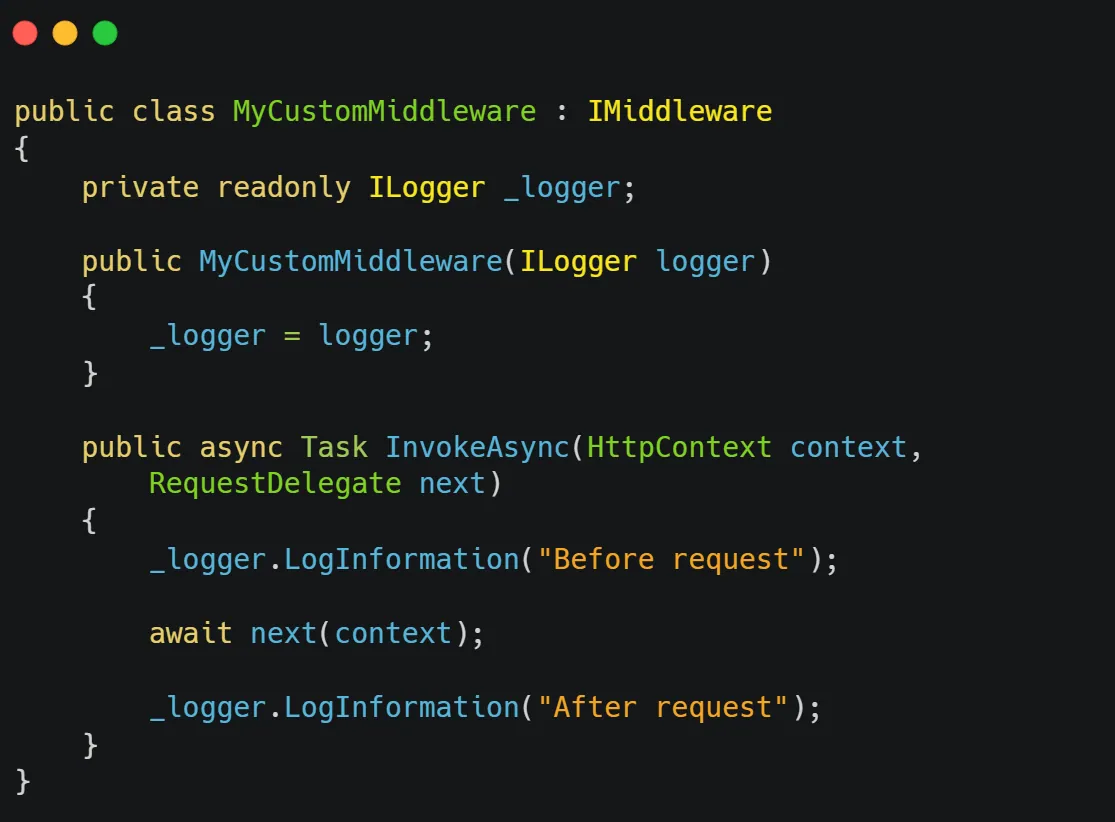 And that's it, you have implemented your Middleware.
Of course, in order for this to work, as for everything else, it is necessary to add the service and configure the middleware in the Program.cs class:
And that's it, you have implemented your Middleware.
Of course, in order for this to work, as for everything else, it is necessary to add the service and configure the middleware in the Program.cs class:
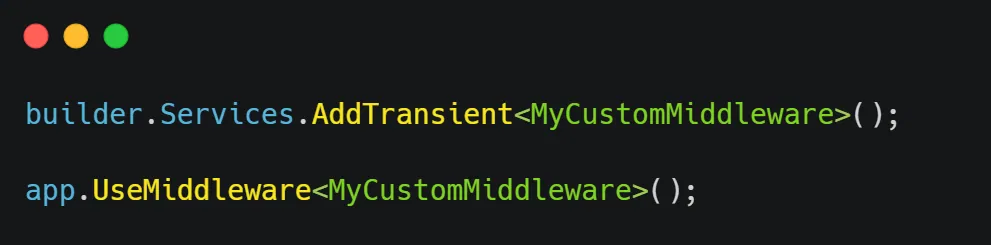
Why is this the way I prefer?
Explicit Interface
The IMiddleware interface makes it clear what a middleware component should do, and it ensures that you don't accidentally miss the InvokeAsync method.
Reusability and Testability
Because it's strongly-typed and follows a clear interface, this kind of middleware is often easier to unit test. You can mock dependencies more easily and validate whether your middleware behaves as expected under different conditions.
Readability
The strongly-typed nature of the middleware can make the code more readable and easier to understand, particularly for developers who are new to the project or are not as familiar with middleware in general.
What are the alternatives?
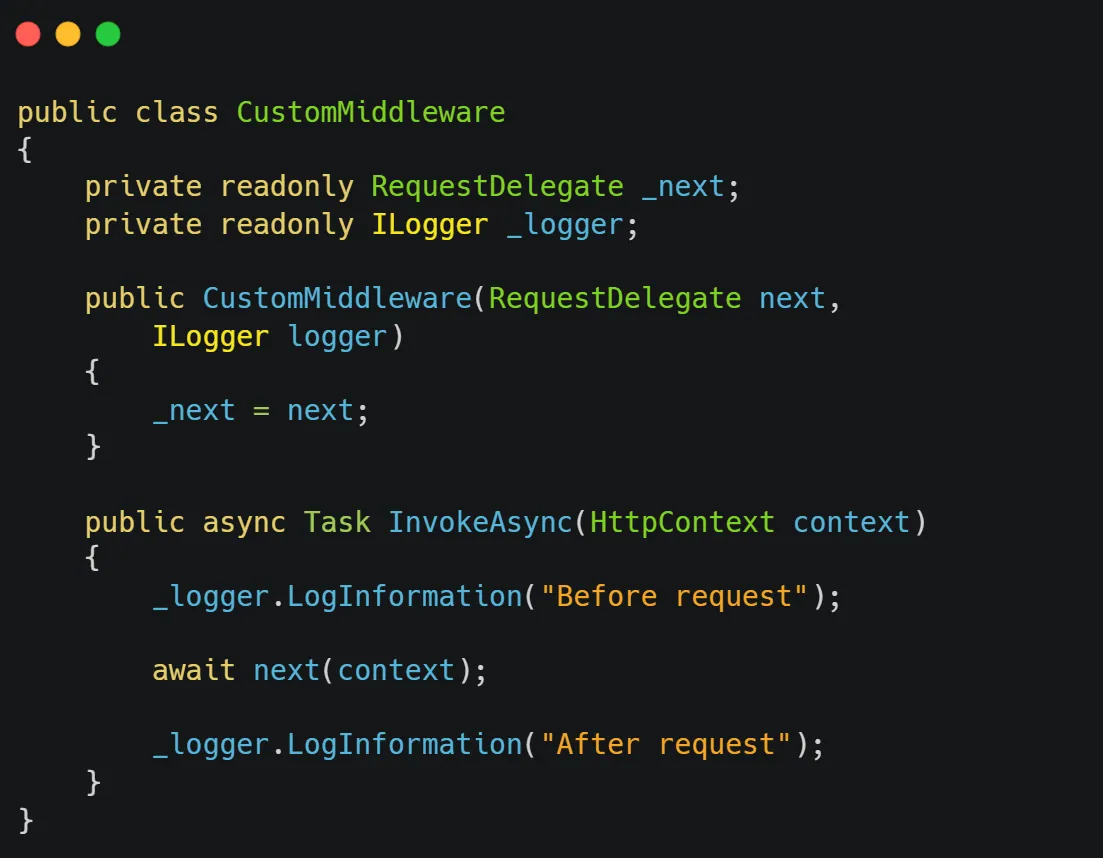
Alternative #1: Convention Middleware
In this case, instead of implementing the interface, I use RequestDelegate.
Here is the implementation:
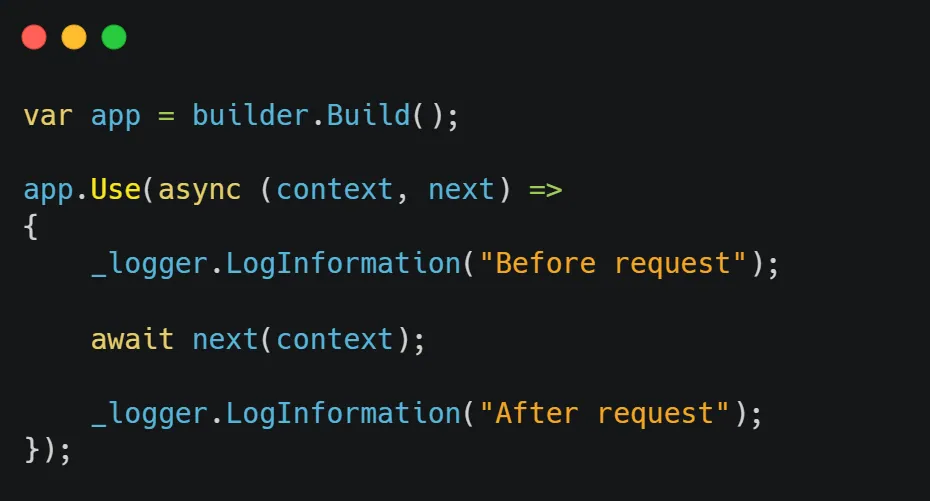
Alternative #2: Middleware with Request Delegate
You can do that by calling the Use method on the WebApplication instance and providing a lambda method with two arguments. The first argument is the HttpContext and the second argument is the actual next request delegate in the pipeline RequestDelegate.
Here is the implementation:
 And that's it.
Wrapping up
In today's Newsletter issue, I showed you how to implement Middleware in ASP.NET Core. I showed 3 possible ways, how I do it and which way I choose, as well as why I think the implementation of the IMiddleware interface is the best. That's all from me for today.
dream BIG!
Want to enforce clean code automatically? My Pragmatic .NET Code Rules course shows you how to set up analyzers, CI quality gates, and architecture tests - a production-ready system that keeps your codebase clean without manual reviews. Or grab the free Starter Kit to try it out.