Stefan Đokić
A quick word from me
This issue isn't sponsored - I write these deep dives in my free time and keep them free for everyone. If your company sells AI tools, dev tools, courses, or services that .NET developers would actually use, sponsoring an issue is the most direct way to reach them.
Want to reach thousands of .NET developers? Sponsor TheCodeMan →This issue is self-sponsored. By supporting my work and purchasing my products, you directly help me keep this newsletter free and continue creating high-quality, practical .NET content for the community.
Thank you for the support 🙌
P.S. I’m currently building a new course, Pragmatic .NET Code Rules, focused on creating a predictable, consistent, and self-maintaining .NET codebase using .editorconfig, analyzers, Visual Studio code cleanup, and CI enforcement.
The course is available for pre-sale until the official release, with early-bird pricing for early adopters. You can find all the details on the Pragmatic .NET Code Rules course page.

Watch Server-Sent Events on YouTube
Introduction: Real-Time in Modern ASP.NET Core Applications
Real-time features are no longer a luxury in modern web applications. Users expect live updates when they place an order, monitor a background job, or track delivery progress. As .NET developers, we often reach for WebSockets or SignalR the moment someone says “real-time.”
But here’s the architectural truth: if your system only needs server-to-client streaming, WebSockets might be unnecessary complexity.
With .NET 10, ASP.NET Core now provides first-class support for Server-Sent Events (SSE) via Results.ServerSentEvents. This makes real-time streaming in ASP.NET Core simpler, cleaner, and more aligned with HTTP semantics.
In this article, you’ll learn what Server-Sent Events are, how they work in .NET 10, and how to implement a real-world, real-time order tracking system using modern ASP.NET Core patterns.
What Are Server-Sent Events (SSE) in .NET 10?
Server-Sent Events (SSE) are a web standard that allows a server to push updates to a browser over a single long-lived HTTP connection. The response uses the text/event-stream content type and continuously sends messages as events occur.
Unlike WebSockets, SSE is unidirectional. Data flows from the server to the client. There is no full-duplex communication channel. This constraint is actually a benefit in many systems because it reduces architectural complexity.
In practical terms, SSE in ASP.NET Core allows you to stream an IAsyncEnumerable<T> directly to a browser using native HTTP infrastructure. With .NET 10, this is now handled by Results.ServerSentEvents, which abstracts away manual header configuration, formatting, and flushing logic.
If your scenario involves streaming order updates, job progress, metrics, logs, or notifications, Server-Sent Events in .NET 10 may be the most pragmatic solution.
Why Use Server-Sent Events Instead of WebSockets?
In real-world enterprise systems, complexity has a cost. WebSockets introduce connection upgrades, bidirectional state management, additional infrastructure considerations, and often external libraries like SignalR.
If your system does not require bidirectional communication, adding WebSockets may be architectural overengineering.
Server-Sent Events operate entirely over standard HTTP. There is no upgrade handshake. Browsers support SSE natively via the EventSource API and automatically reconnect when connections drop.
This makes SSE in ASP.NET Core particularly attractive for cloud environments and reverse proxy setups.
For use cases like order tracking, background processing updates, or deployment status streaming, SSE provides a cleaner and more maintainable solution.
Real-World Example: Real-Time Order Tracking in ASP.NET Core
Let’s implement a real-time order tracking system using Server-Sent Events in .NET 10.
Imagine a customer places an order.
Behind the scenes, multiple asynchronous operations occur: payment validation, packaging, shipping, and delivery confirmation.
Instead of polling the backend every few seconds, the frontend subscribes to a streaming endpoint and receives updates instantly.
We begin with a simple domain model representing order status changes.
public enum OrderStatus{ Created, PaymentConfirmed, Packed, Shipped, OutForDelivery, Delivered} public sealed record OrderStatusUpdate( Guid OrderId, OrderStatus Status, DateTime Timestamp);
Using a record ensures immutability and clean serialization. In a real production system, these updates might originate from a background service, a message broker, or domain events inside your modular monolith.
Building a Streaming Infrastructure with Channels
To support real-time streaming in .NET 10, we need a mechanism that decouples event producers from subscribers.
System.Threading.Channels is ideal for this scenario.
Channels provide high-performance asynchronous pipelines that integrate seamlessly with IAsyncEnumerable<T>, which is exactly what Results.ServerSentEvents expects.
Here’s a simple streaming service:
public sealed class OrderStreamService{ private readonly ConcurrentDictionary<Guid, Channel<OrderStatusUpdate>> _streams = new(); public ChannelReader<OrderStatusUpdate> Subscribe(Guid orderId) { var channel = Channel.CreateUnbounded<OrderStatusUpdate>(); _streams[orderId] = channel; return channel.Reader; } public async Task PublishAsync(OrderStatusUpdate update) { if (_streams.TryGetValue(update.OrderId, out var channel)) { await channel.Writer.WriteAsync(update); } } public void Unsubscribe(Guid orderId) { if (_streams.TryRemove(orderId, out var channel)) { channel.Writer.TryComplete(); } }}
This service allows any part of the system to publish order updates without knowing who is listening. The SSE endpoint simply subscribes and streams events as they arrive. This pattern fits naturally into Clean Architecture, Vertical Slice Architecture, or a Modular Monolith.
Implementing Server-Sent Events in .NET 10 Using Results.ServerSentEvents
Now we implement the streaming endpoint using the modern .NET 10 approach.
app.MapGet("/orders/{orderId:guid}/stream", ( Guid orderId, OrderStreamService streamService, CancellationToken cancellationToken) =>{ var reader = streamService.Subscribe(orderId); return Results.ServerSentEvents( reader.ReadAllAsync(cancellationToken), eventType: "order-update");});
This is the key difference in .NET 10.
Results.ServerSentEvents automatically:
- Sets the
Content-Typeto text/event-stream - Serializes each item to JSON
- Formats SSE messages correctly
- Flushes responses properly
- Handles cancellation tokens
- Manages the HTTP streaming lifecycle
In earlier versions of ASP.NET Core, developers had to manually write headers, format strings with data: prefixes, and call
FlushAsync.
In .NET 10, this is now built into the framework.
This makes real-time streaming in ASP.NET Core significantly cleaner and less error-prone.
Simulating Backend Order Processing
To demonstrate real-time updates, we can simulate asynchronous order processing.
app.MapPost("/orders/{orderId:guid}/simulate", async ( Guid orderId, OrderStreamService streamService) =>{ var statuses = Enum.GetValues<OrderStatus>(); foreach (var status in statuses) { await Task.Delay(2000); await streamService.PublishAsync(new OrderStatusUpdate( orderId, status, DateTime.UtcNow)); } return Results.Ok("Order simulation completed.");});
Each status update is published to the channel. The SSE endpoint streams updates immediately to connected clients. There is no polling and no additional messaging infrastructure required.
Testing Server-Sent Events in .NET 10 Using Postman
When building real-time streaming features with Server-Sent Events (SSE) in .NET 10, testing becomes slightly different compared to traditional REST endpoints.
Unlike a typical GET request that returns a JSON response and closes the connection, an SSE endpoint:
- Keeps the HTTP connection open
- Streams data continuously
- Sends events over time
Does not complete immediately This means we must test it differently, and Postman supports this perfectly, as long as you configure it correctly.
In this chapter, we’ll test both:
- The POST endpoint that simulates order processing
- The GET SSE endpoint that streams real-time updates
Testing the POST Simulation Endpoint in Postman
First, we need to trigger the backend processing.
This endpoint simulates order status transitions and publishes events into our streaming pipeline.
Step 1 - Create a New Request in Postman
- Method: POST
- URL:
https://localhost:7060/orders/{orderId}/simulate - Replace {orderId} with a real GUID.
You don’t need a request body for this example. Step 2 - Send the Request Click Send.
You should receive: "Order simulation completed."
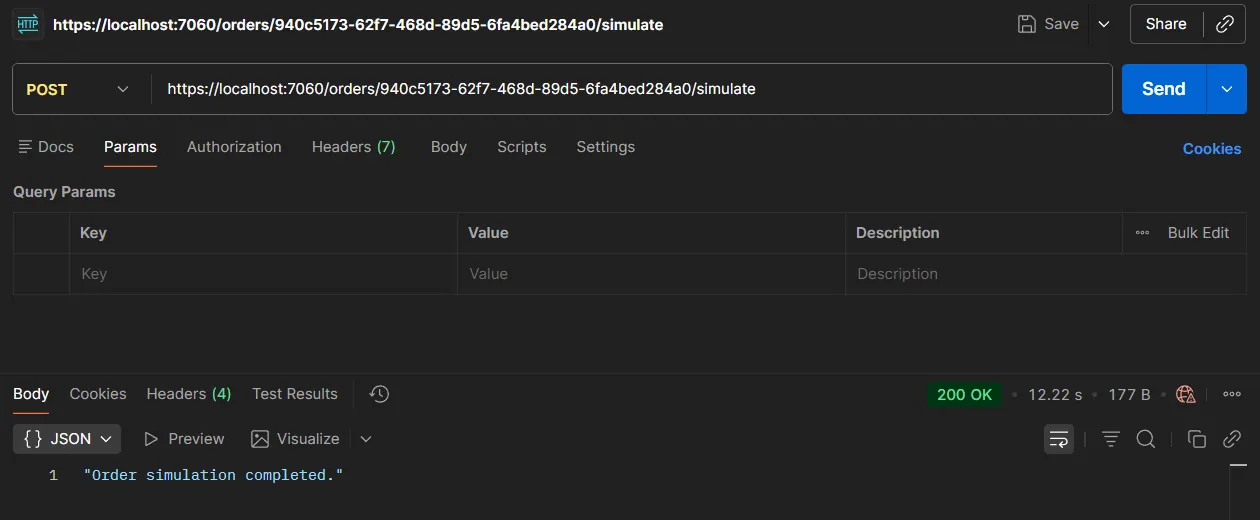
But here’s what actually happens in the background:
- The endpoint starts publishing events
- Every 2 seconds a new OrderStatusUpdate is emitted
These events will be streamed through the SSE endpoint At this moment, no client is connected yet, so nothing is visible.
Now we test the real-time part.
Testing the GET SSE Endpoint in Postman
Testing Server-Sent Events in Postman is slightly different from normal APIs.
Because the connection remains open, you must:
- Use GET
- Do not expect the request to complete
- Observe streaming output in real time
Step 1 - Create a New GET Request
- Method: GET
- URL:
https://localhost:7060/orders/{orderId}/stream
Step 2 - Send the Request
Click Send.
Postman will not complete the request immediately.
Instead, you will start seeing streaming data like:
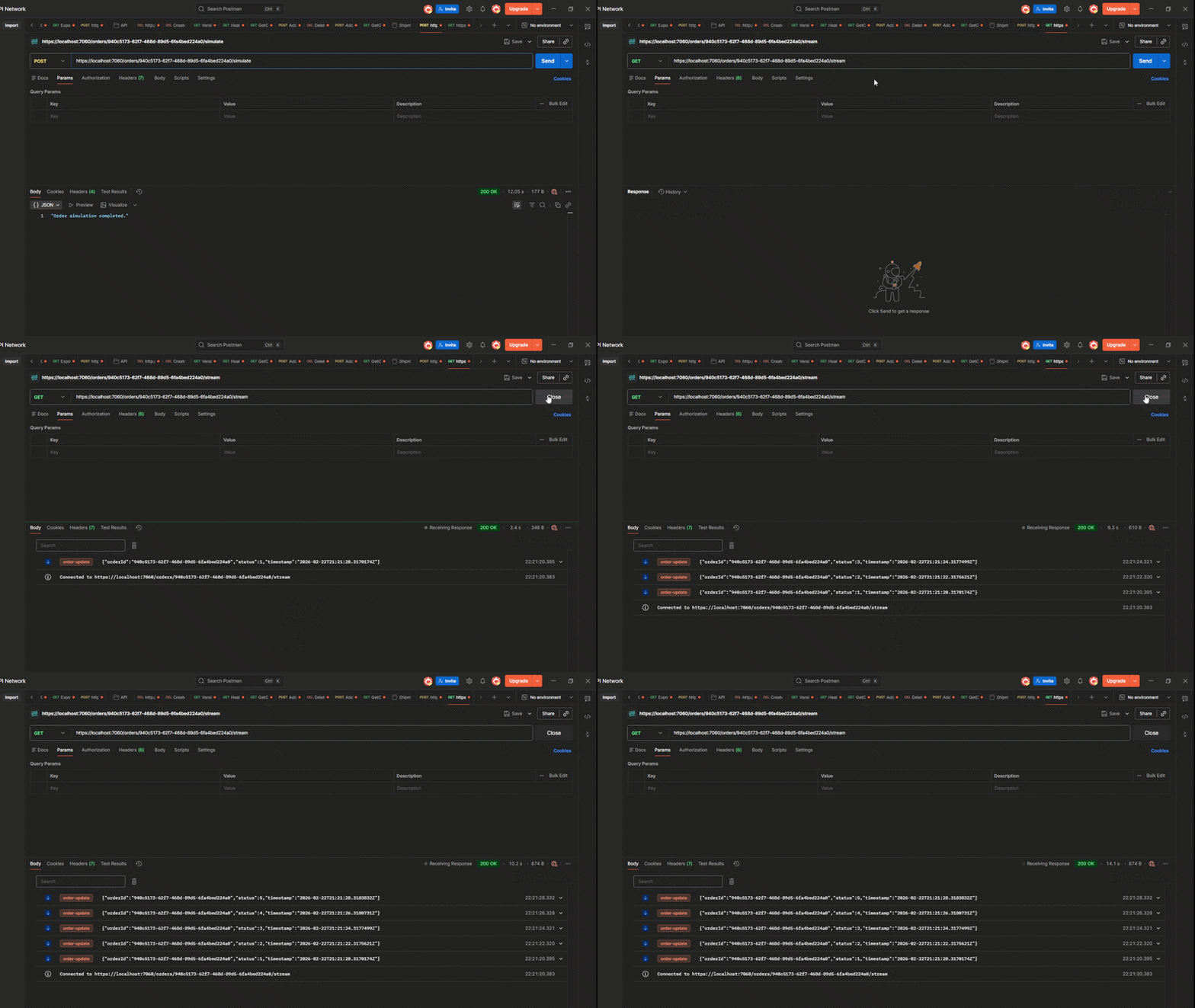
The request stays open while events are being pushed.
Production Considerations for Server-Sent Events in ASP.NET Core
When implementing Server-Sent Events in production, you must consider infrastructure behavior.
Reverse proxies such as Nginx, Traefik, or Azure Application Gateway may close idle connections if not configured properly. Ensuring appropriate timeout settings is critical.
In multi-instance deployments, each application instance must receive the same events.
In that scenario, a distributed event bus such as Redis pub/sub or a message broker should broadcast updates to all nodes.
Monitoring concurrent open connections is also important. Each SSE client maintains a persistent HTTP connection.
While lightweight compared to WebSockets, these connections still consume resources and must be monitored in high-traffic environments.
When Server-Sent Events Are Not the Right Choice
Server-Sent Events are not suitable when bidirectional communication is required. Real-time chat systems, multiplayer gaming, collaborative editing tools, or IoT command systems require two-way communication and are better served by WebSockets or SignalR. SSE excels when the server is the sole source of truth, pushing updates to clients.
For more real-time options, see SignalR in .NET and gRPC for high-performance apps.
Wrapping Up: Server-Sent Events in .NET 10 as a Pragmatic Engineering Choice
With the introduction of Results.ServerSentEvents, Server-Sent Events in .NET 10 have become a first-class feature in ASP.NET Core.
They offer a clean, HTTP-native solution for real-time streaming without the complexity of WebSockets. For systems that require live updates, order tracking, job progress streaming, or monitoring dashboards, SSE provides a pragmatic and production-ready approach.
Before adding WebSocket infrastructure for your next project, ask yourself whether you truly need bidirectional communication.
If not, Server-Sent Events in ASP.NET Core may be the most elegant and maintainable solution.
Real-time does not have to mean complex.
Sometimes, the simplest protocol is the most powerful one.
That's all from me today.
Would you like to record a YouTube video doing this?
Find the source code on the GitHub repo.
P.S. Follow me on YouTube.