Stefan Đokić
Sponsored
- If you have ever used Postman to debug and write tests for your REST APIs, guess what, those are the same concepts you need to know for writing tests for your gRPC requests in Postman. For more info about gRPC, they created a great beginner article here.
- Struggling with slow EF Core performance? Unlock up to 14x faster operations and cut execution time by 94% with high-performance library for EF Core. Seamlessly enhance your app with Bulk Insert, Update, Delete, and Merge—fully integrated into your existing EF Core workflows. Trusted by 5,000+ developers since 2014. Ready to boost your performance? Explore the solution
Many thanks to the sponsors who make it possible for this newsletter to be free for readers.
Want to reach thousands of .NET developers? Sponsor TheCodeMan →
The background
Compiled queries in .NET emerged as a response to the performance challenges faced in data retrieval operations, particularly in applications using ORMs like Entity Framework. Before the introduction of compiled queries, every data retrieval operation required the ORM to translate LINQ queries into SQL queries, a process that was both time-consuming and resource-intensive. This translation had to be done every time a query was executed, significantly impacting performance, especially in applications with high database interaction. Let's dive in...
How To Create Compiled Queries
Let's say we have a Domain class that represents a data model:
 How can we construct a basic query to retrieve a User using its Id?
Very simple...
How can we construct a basic query to retrieve a User using its Id?
Very simple...
 Now, how do we convert this query into a Complied Query?
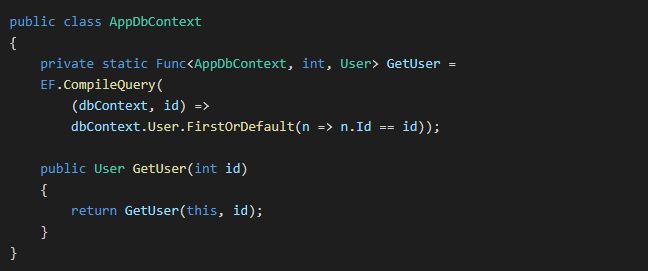
What we have done here?
- GetUser field: This is a static field of type Func< AppDbContext, int, User>. It's a compiled query using Entity Framework's EF.CompileQuery method.
- GetUser Method: his is a public instance method that takes an int id as a parameter. It uses the static GetUser field (the compiled query) to retrieve a User object from the database. It does so by passing this (the current instance of AppDbContext) and the provided id to the compiled query.
And now we can just call the method created within the our context:

Why to use Compiled Queries?
Improved Performance
The primary advantage is faster execution time, as the query translation from LINQ to SQL is done only once and reused, which is particularly beneficial for queries executed frequently.
Efficient Resource Utilization
Since the query is compiled once and cached, it reduces CPU usage and resource consumption associated with the query compilation process.
Automatic Caching
EF Core automatically compiles and caches the most common queries, reducing the need for manual intervention and simplifying development.
When Not to use Compiled Queries?
Highly Dynamic Queries
Avoid them if your queries change frequently or are dynamically constructed based on various conditions.
Infrequently Executed Queries
Not necessary for queries executed rarely, as the performance benefit may be negligible.
Limited Resource Environments
If memory usage is a concern, be cautious with the number of compiled queries.
For additional EF Core performance strategies, see 4 EF Core Tips to Improve Performance and Pre-Optimized EF Core Query Techniques.
Wrapping Up
Compiled queries in EF Core are a powerful feature for optimizing database access in specific scenarios. They are most beneficial for improving performance in scenarios with repetitive and frequent database queries. However, their use should be balanced against the potential drawbacks, such as increased memory usage and complexity, especially in applications with dynamic query patterns or limited resources. That's all from me for today.