Stefan Đokić
Sponsored
- If you have ever used Postman to debug and write tests for your REST APIs, guess what, those are the same concepts you need to know for writing tests for your gRPC requests in Postman For more info about gRPC, they created a great beginner article about gRPC .
Many thanks to the sponsors who make it possible for this newsletter to be free for readers.
Want to reach thousands of .NET developers? Sponsor TheCodeMan →
The Background
The GraphQL is a query language for our API that allows us to define the data structure we need, and the server will return only the requested data. Unlike REST, where the endpoints are fixed, in GraphQL the client can request exactly the data it needs . That allows for more efficient and flexible data fetching, reducing the need for multiple round trips to the server. It's important to notice that GraphQL is not a replacement for REST but a complementary technology that we can use to make the API more flexible and efficient. GraphQL allows us to request specific data, and the server will only return what we asked for, and we can make multiple requests and retrieve different data each time. That makes it an ideal solution for projects that require a high level of flexibility and scalability. Whether we're building a new application or looking to upgrade an existing one, GraphQL is worth considering as a powerful tool for our technical stack. Let's see how we can implement it in .NET (very easly)...
Setup the project
- Create your ASP.NET Web API project
- Add some packages for GraphQL:
csharp
dotnet add package HotChocolate.AspNetCore
dotnet add package HotChocolate.AspNetCore.Playground
Let's create some simple entity model
Part of almost every system in our applications is a user. Let's take the entity User as an example for demonstration purposes. We will create a User entity with the appropriate properties:
public class User{ public int Id { get; set; } public string FirstName { get; set; } public string LastName { get; set; } public DateTime BirthDate { get; set; }}
With a REST approach, you would now create some controller with a route or a minimal api endpoint to get the data. Let's say that we want to return a list of users, in GraphQL we will create a Query class for this purpose that will return the required values:
public class UserQuery{ private static List<User> users = new List<User>() { new User { Id = 1, FirstName = "Stefan", LastName = "Djokic", BirthDate = new DateTime(1995, 7, 4)}, new User { Id = 2, FirstName = "Dajana", LastName = "Milosevic", BirthDate = new DateTime(1996, 6, 22)}, }; public List<User> GetUsers() => users;}
Her Highness - Program.cs class
Of course we have to register everything in DI:
services .AddRouting() .AddGraphQLServer() .AddQueryType<UserQuery>();
And let's say the app what services to use:
app.UseRouting();app.MapGraphQL();app.UsePlayground();
And now...
Start the engine: dotnet run
That's it. You can start the application and run your first query. You can run your query in 3 possible ways:
- Open localhost:7075/graphql/ (use your own port). Here you'll access Banaca Cake Pop dashboard. Write your first query something like:
{ users { id firstName }}
With this query you'll get all the users but only with id and firstName fields. There is no any other field which will remain empty.
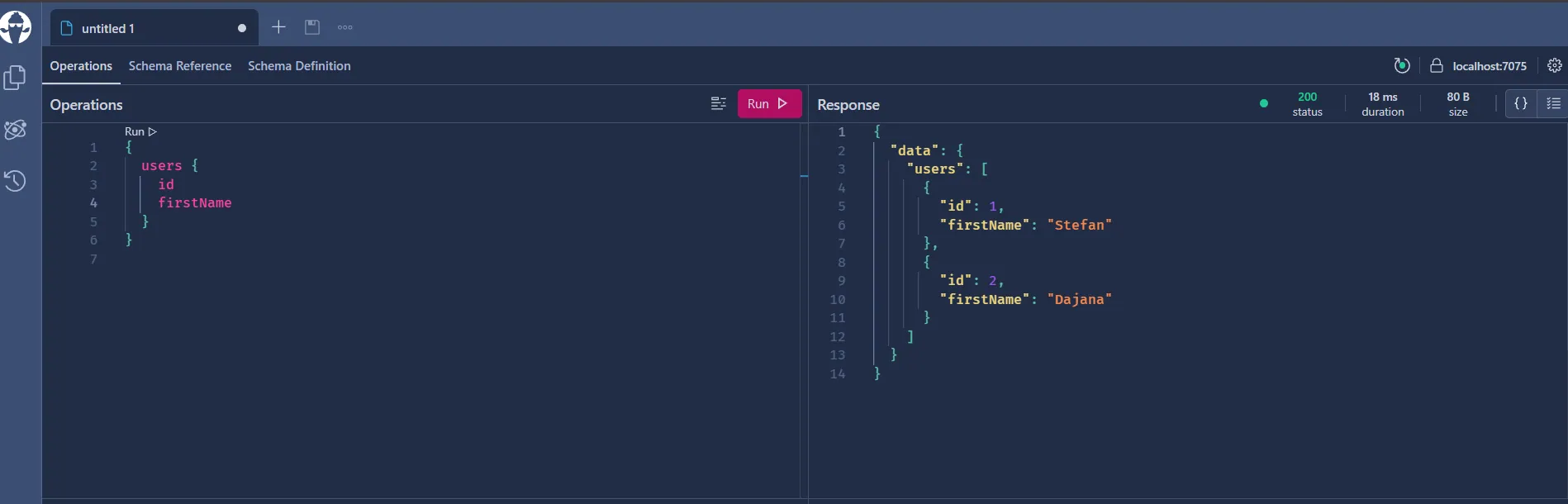
That's it. You can start the application and run your first query.
- Open localhost:7075/playground/ (use your own port). Here you'll access Hot Chocolate Playground. The process is really similiar.
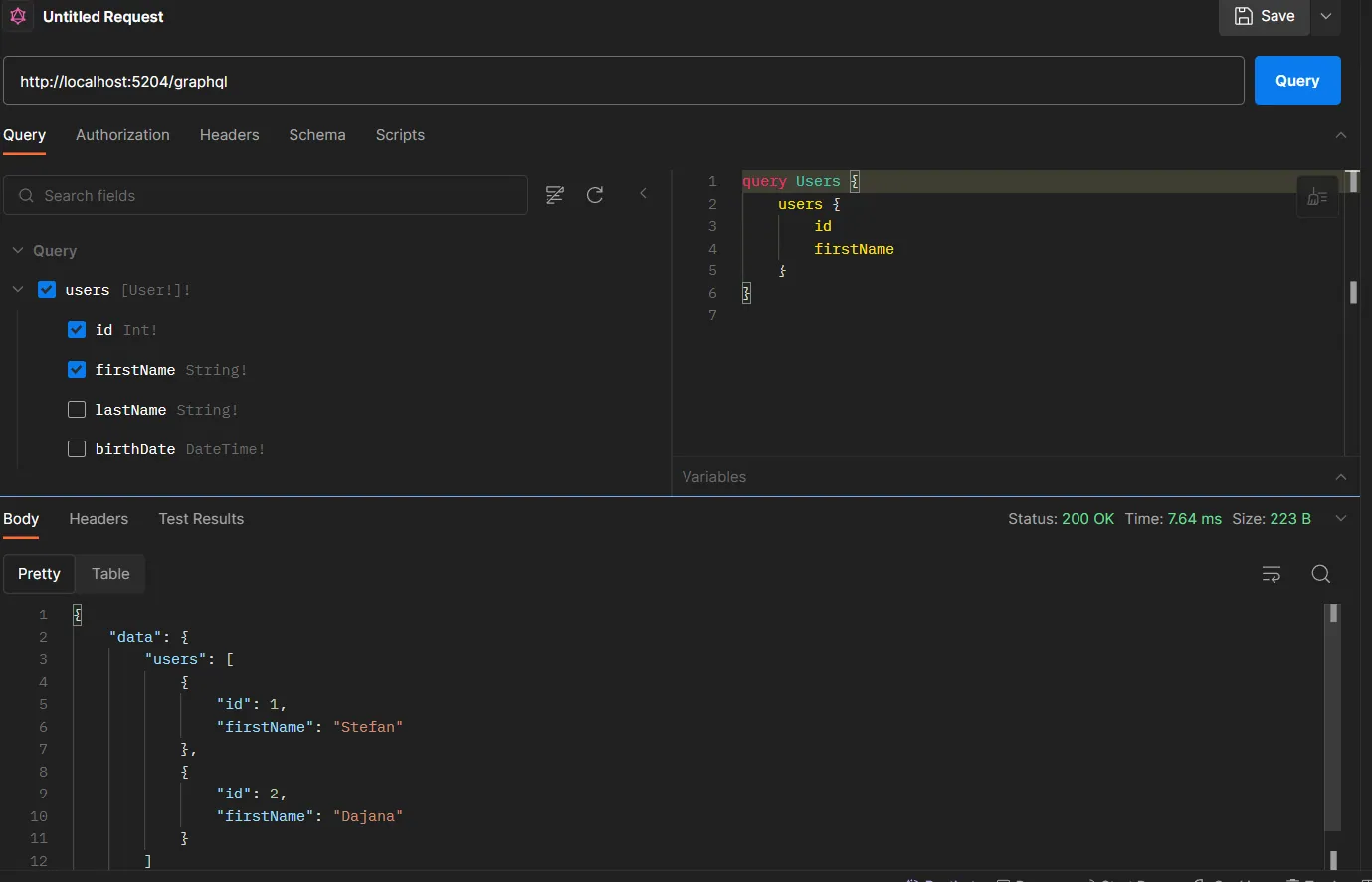
- Run your queries via Postman. This is my favourite way to go:
Wrapping up
And there you have it! You've successfully created a functional GraphQL API with .NET Core and C# in just a few simple steps. What's next? It's time to enhance your schema, connect with databases, incorporate mutations, add subscriptions, and beyond. Keep in mind, with increased capabilities comes increased accountability. As you enable your clients to request precisely what they require, make sure to manage their expectations and address any possible challenges. For more comprehensive insights, delve into the official Hot Chocolate documentation , which is an incredibly rich resource. Did you like this issue? Do you want to continue deeper with GraphQL in .NET? Write me. That's all from me today.