Stefan Đokić
Sponsored
- Accelerate your .NET web app development with ABP.IO! Access framework’s pre-built modules, startup templates and full-stack features - Black Friday prices start on 25th November so stay tuned! Stay tuned!
- Unlock Postman's latest features for seamless API management! Now with a centralized variable experience and secure secret storage via Postman Vault, your team can streamline workflows and safeguard sensitive data effortlessly. Learn more about Postman Vault.
Many thanks to the sponsors who make it possible for this newsletter to be free for readers.
Want to reach thousands of .NET developers? Sponsor TheCodeMan →
The Background
In today’s dynamic software landscape, agility and controlled releases are paramount. Feature Flags are one of the most powerful techniques to achieve this, enabling developers to toggle features on or off without deploying new code. Let’s dive into how .NET 8 and Azure Feature Management make feature flags seamless, efficient, and production-ready.
Why Use Azure Feature Management?
Azure Feature Management provides a centralized, scalable, and cloud-native approach to managing feature flags.
Here's why it stands out compared to basic configurations like appsettings.json:
Problems with Basic Configuration in appsettings.json
Lack of Centralization: Managing feature flags across environments (dev, staging, production) becomes cumbersome as each environment requires manual updates. Deployment Coupling: Changing a flag in appsettings.json requires redeployment, which defeats the purpose of feature toggling. Limited Targeting: No built-in support for audience targeting or percentage rollouts.
Why Azure Feature Management Is Better
Centralized Configuration: Store, update, and manage feature flags from the Azure portal or via APIs. Dynamic Updates: Change feature flags without redeploying the application. Targeting Options: Use feature filters to target users by region, percentage, or custom rules. Integration with Azure Pipelines: Seamlessly manage feature lifecycles in CI/CD workflows. Scalability: Perfect for distributed systems and microservices.
Why Are Feature Flags Important?
Feature flags offer several benefits for modern software development:
Controlled Rollouts:
- Enable or disable features for specific user groups.
- Gradually roll out features to minimize risk.
A/B Testing:
- Experiment with variations of features to optimize user experience.
Hotfixes Without Redeployment:
- Instantly disable buggy features without needing a redeployment.
Environment-Specific Features:
- Toggle features across environments like development, staging, and production.
Step-by-Step Implementation
Set Up Your Azure Feature Manager
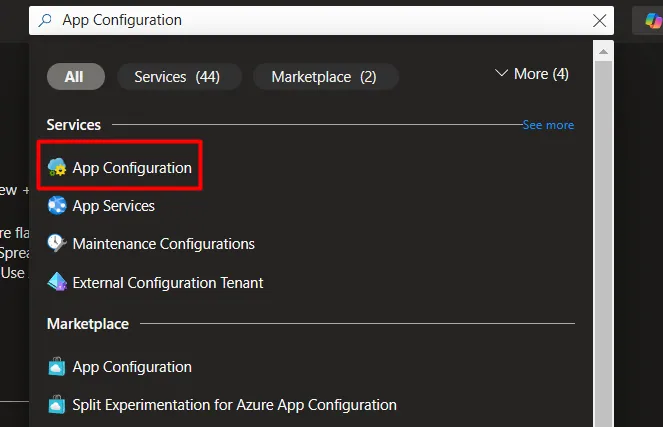
1. Create an Azure App Configuration Resource:
- Go to the Azure portal and search for "App Configuration."
- Create a new resource and name it.
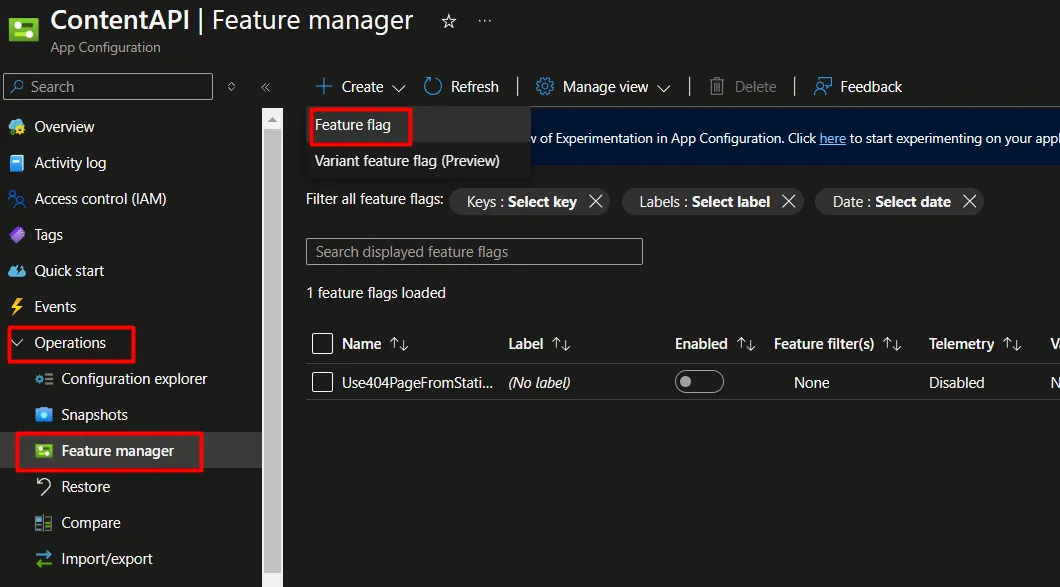
- Enable Azure Feature Management:
- In the resource settings, enable Feature Manager.
- Add your desired feature flags, e.g., FeatureX.
Configure .NET 8 Application 1. Install Required NuGet Packages Run the following commands to add Azure App Configuration and feature management dependencies:
dotnet add package Microsoft.FeatureManagement.AspNetCoredotnet add package Microsoft.Azure.AppConfiguration.AspNetCore
- Modify Program.cs
Add Azure App Configuration to your application configuration:
using Microsoft.FeatureManagement; var builder = WebApplication.CreateBuilder(args); // Add Azure App Configurationbuilder.Configuration.AddAzureAppConfiguration(options => options.Connect("<Your Connection String>") .UseFeatureFlags()); // Add Feature Management servicesbuilder.Services.AddFeatureManagement(); var app = builder.Build(); // Use Feature Management middlewareapp.UseAzureAppConfiguration();app.MapGet("/", async context =>{ var featureManager = context.RequestServices.GetRequiredService<IFeatureManager>(); if (await featureManager.IsEnabledAsync("FeatureX")) { await context.Response.WriteAsync("FeatureX is enabled!"); } else { await context.Response.WriteAsync("FeatureX is disabled."); }}); app.Run();
- Run and Test
- Start your application and test the feature toggling:
- Toggle FeatureX on/off from the Azure portal.
- Observe changes in real-time without redeployment.
Sample Use Case: Dark Mode Toggle
Let’s implement a Dark Mode toggle:
- Add a new feature flag DarkMode in Azure Feature Manager.
- Use IFeatureManager in your Razor page to check the feature:
@inject IFeatureManager FeatureManager @if (await FeatureManager.IsEnabledAsync("DarkMode")){ <link href="dark-theme.css" rel="stylesheet" />}else{ <link href="light-theme.css" rel="stylesheet" />}
- Toggle DarkMode from Azure and verify the styling updates dynamically.
Best Practices - Refactored code
Define a service to encapsulate the feature management logic. This allows you to reuse it across multiple parts of your application.
using System.Threading.Tasks; public interface IFeatureToggleService{ Task<bool> IsFeatureEnabledAsync(string featureName);}
Implementation:
using Microsoft.FeatureManagement; public class FeatureToggleService : IFeatureToggleService{ private readonly IFeatureManager _featureManager; public FeatureToggleService(IFeatureManager featureManager) { _featureManager = featureManager; } public async Task<bool> IsFeatureEnabledAsync(string featureName) { return await _featureManager.IsEnabledAsync(featureName); }}
Modify the Program.cs to register the service with the dependency injection container.
builder.Services.AddSingleton<IFeatureToggleService, FeatureToggleService>();
Simple use case - Using in service
public class MyBusinessService{ private readonly IFeatureToggleService _featureToggleService; public MyBusinessService(IFeatureToggleService featureToggleService) { _featureToggleService = featureToggleService; } public async Task<string> GetFeatureDependentMessageAsync() { //Note: Move magic string "FeatureX" in some constant. if (await _featureToggleService.IsFeatureEnabledAsync("FeatureX")) { return "FeatureX is enabled! Business logic for enabled feature."; } else { return "FeatureX is disabled. Business logic for disabled feature."; } }}
Benefits of This Approach
Separation of Concerns:
- The feature toggle logic is encapsulated in a dedicated service (FeatureToggleService).
- Business logic resides in MyBusinessService.
Reusability:
- IFeatureToggleService can be reused across different parts of the application.
Testability:
- The feature toggle logic and business logic can be unit-tested independently by mocking IFeatureToggleService.
Readability:
- The code is cleaner and more modular.
Unit Testing Example
using Moq;using Xunit; public class FeatureToggleServiceTests{ [Fact] public async Task IsFeatureEnabledAsync_Returns_True_When_Feature_Is_Enabled() { // Arrange var featureManagerMock = new Mock<IFeatureManager>(); featureManagerMock.Setup(fm => fm.IsEnabledAsync("FeatureX")).ReturnsAsync(true); var service = new FeatureToggleService(featureManagerMock.Object); // Act var result = await service.IsFeatureEnabledAsync("FeatureX"); // Assert Assert.True(result); }}
Wrapping Up
Azure Feature Management is a game-changer for implementing feature flags in .NET applications.
It addresses the limitations of basic configurations like appsettings.json and provides a robust, scalable solution. With dynamic updates, advanced targeting, and seamless Azure integration, you can confidently manage feature rollouts, A/B testing, and hotfixes.
Key Takeaways:
- Feature flags improve agility and reduce deployment risks.
- Azure Feature Management simplifies managing feature flags in real-time.
- With .NET 8, implementing feature flags is easier and more powerful than ever.
That's all from me today.
See ya on the next Monday coffee.