Stefan Đokić
A quick word from me
This issue isn't sponsored - I write these deep dives in my free time and keep them free for everyone. If your company sells AI tools, dev tools, courses, or services that .NET developers would actually use, sponsoring an issue is the most direct way to reach them.
Want to reach thousands of .NET developers? Sponsor TheCodeMan →🚀 Coming Soon: Enforcing Code Style A brand-new course is launching soon inside The CodeMan Community!
Join now to lock in early access when it drops - plus get everything else already inside the group.
Founding Member Offer:
- First 100 members get in for just $4/month
- 70 spots already taken!
- Or subscribe for 3 months ($12) or annually ($40) to unlock full access when the course goes live. Get ahead of the game - and make clean, consistent code your superpower. Join here
The Background
Modern APIs are all about flexibility - and that’s where GraphQL shines.
But when working with strongly typed languages like C#, constructing queries can become repetitive and error-prone.
Wouldn’t it be great if you could build reusable .graphql templates and dynamically inject variables?
Today, I’ll show you how to create a GraphQL Query Builder in .NET 9, wrap it up with Minimal APIs, and cleanly integrate it using dependency injection and GraphQL.Client. Let’s dive in.
The Idea
We’ll:
- Create .graphql query templates with placeholders like $userId.
- Load and inject values dynamically.
- Make it reusable using a GraphQLQueryBuilder.
- Use Minimal APIs to expose the functionality.
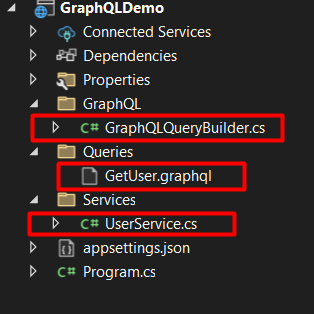
📁 Directory Structure
- Root: /GraphQLBuilderDemo/
This is your main project directory. It includes all source code and configuration files. The Program.cs file lives here because it's a Minimal API app and doesn’t use Controllers or Startup classes.
- /Queries/
Holds raw .graphql files. These are:
- Static query templates
- Contain placeholders like $userId or $status
- Used by the builder to generate final queries with real values
Example files:
- GetUser.graphql: Gets user details and posts
- GetOrders.graphql: Fetches orders, customers, line items
Benefits:
- Keeps queries clean and versionable
- Easy to tweak without recompiling code
- /GraphQL
Holds shared GraphQL utility code.
GraphQLQueryBuilder.cs
Your core utility that:
- Reads .graphql templates from the /Queries folder
- Replaces placeholder variables dynamically
- Returns a GraphQLRequest ready to be executed
.graphql files
{ user(id: "$userId") { id name email posts { title } }}
The Queries/GetUser.graphql file defines a GraphQL query that retrieves detailed information about a specific user by their Id.
It uses a placeholder variable $userId, which is dynamically replaced at runtime using the C# GraphQLQueryBuilder.
The query requests the user's basic information - id, name, and email - along with a list of their posts, fetching just the title of each post.
This structure allows you to request nested and precise data in one call, avoiding over-fetching.
By keeping the query in a separate file and using placeholders, you make your code more maintainable, reusable, and clean - especially when working with multiple queries and dynamic input values.
GraphQLQueryBuilder.cs
using GraphQL;using System.Reflection; namespace GraphQLDemo.GraphQL; public static class GraphQLQueryBuilder{ public static async Task<GraphQLRequest> BuildQuery(string fileName, Dictionary<string, string> variables) { string path = Path.Combine(AppContext.BaseDirectory, "Queries", fileName); string query = await File.ReadAllTextAsync(path); foreach (var variable in variables) { query = query.Replace($"{variable.Key}", variable.Value); } return new GraphQLRequest { Query = query }; }}
The GraphQLQueryBuilder.cs file contains a static utility class that simplifies how we build dynamic GraphQL requests in .NET.
Instead of hardcoding query strings in C# or manually concatenating values, this builder loads reusable .graphql files from the Queries/ folder and replaces placeholder variables like $userId or $status with real values at runtime.
The method BuildQuery takes a file name and a dictionary of variables, reads the query file as text, and performs string replacements for each placeholder.
It returns a GraphQLRequest object, ready to be sent using a GraphQL client.
This approach keeps your C# code clean, your queries versionable, and makes it easy to work with complex or frequently changing queries without modifying your compiled code.
UserService.cs
using GraphQL;using GraphQL.Client.Abstractions;using Newtonsoft.Json; namespace GraphQLDemo.Services; public class UserService{ private readonly IGraphQLClient _client; public UserService(IGraphQLClient client) { _client = client; } public async Task<string> GetUserWithPostsAsync(string userId) { var request = await GraphQLQueryBuilder.BuildQuery("GetUser.graphql", new() { { "userId", userId } }); var response = await _client.SendQueryAsync<dynamic>(request); return JsonConvert.SerializeObject(response.Data); }}
The UserService.cs file is where the logic for fetching user data from a GraphQL API lives.
It acts as a bridge between your Minimal API endpoint and the GraphQL backend.
This service takes care of building the GraphQL request using the GraphQLQueryBuilder, injecting the dynamic value for userId, and sending the request using the IGraphQLClient (from the GraphQL.Client library).
Once the response is received, it serializes the result into JSON so it can be easily returned to the API consumer.
By isolating this logic in a service class, you make your code modular, testable, and reusable - allowing you to keep your endpoint code clean and focused only on handling HTTP requests and responses.
Program.cs - DI and Minimal API
using GraphQL.Client.Http;using GraphQL.Client.Serializer.Newtonsoft;using GraphQLDemo.Services; var builder = WebApplication.CreateBuilder(args); // Register GraphQL clientbuilder.Services.AddSingleton<IGraphQLClient>(_ => new GraphQLHttpClient("https://your-graphql-endpoint.com/graphql", new NewtonsoftJsonSerializer())); // Register your servicebuilder.Services.AddScoped<UserService>(); var app = builder.Build(); app.MapGet("/user/{id}", async (string id, UserService userService) =>{ var result = await userService.GetUserWithPostsAsync(id); return Results.Json(JsonConvert.DeserializeObject(result));}); app.Run();
The Program.cs file is the entry point of your .NET 9 Minimal API application.
It sets up the app’s core components: dependency injection, GraphQL client configuration, and the API endpoints.
First, it registers an IGraphQLClient as a singleton, configuring it with your GraphQL endpoint and using NewtonsoftJsonSerializer for response handling.
Then, it adds your custom services like UserService and OrderService (read next chapter) to the DI container.
After that, it defines HTTP routes using app.MapGet, such as /user/{id} or /orders, which accept parameters from the request, call the appropriate service method, and return the response in JSON format.
Postman Testing
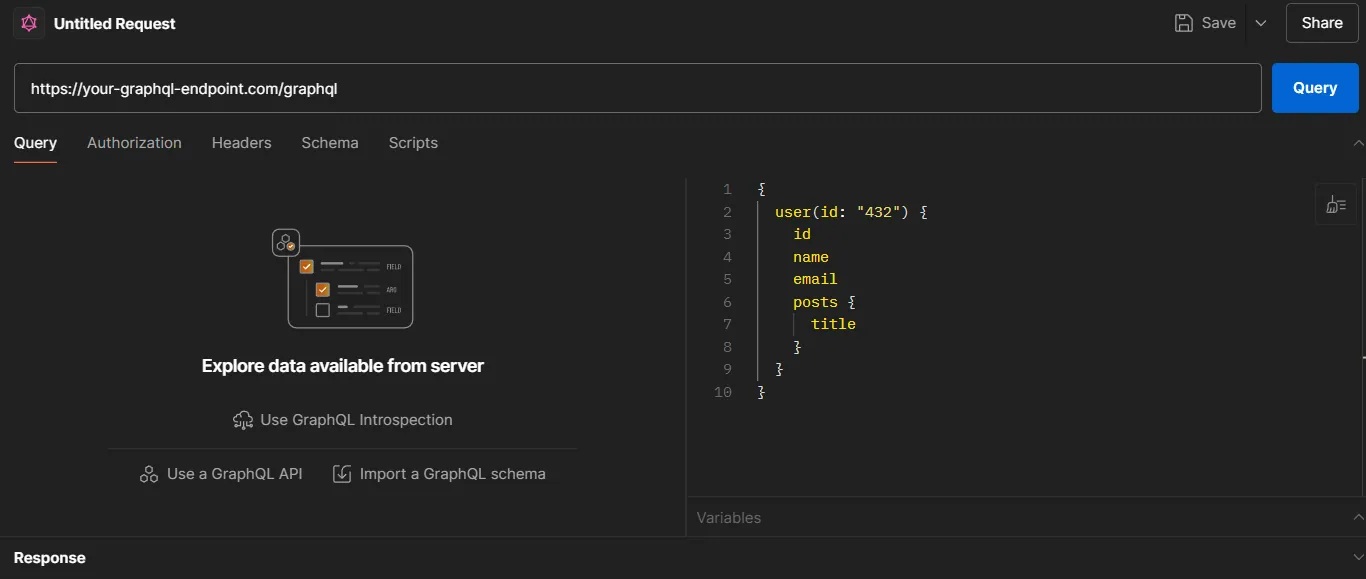
In Postman, instead of creating a basic HTTP request, you need to create GraphQL Request (New -> GraphQL).
Note: You will need GraphQL Server to test it. You can create your own in .NET - Learn here how to create it.
Or, you can use Fake Server online: GraphQLZero.
Advanced Example:
Fetching Orders with Line Items and Customer Info
Imagine you're building a dashboard for a commerce platform. You want to retrieve:
- A list of orders
- Each order's line items (products, quantity, price)
- The associated customer’s name and email
- With filters like status and date range
Queries/GetOrders.graphql
{ orders( filter: { status: "$status" dateRange: { from: "$dateFrom" to: "$dateTo" } } ) { id status createdAt customer { id name email } lineItems { product { id name price } quantity } }}
What’s different here?
- Variables for both simple ($status) and nested values ($dateFrom, $dateTo)
- Traversing multiple object levels (orders -> lineItems -> product)
- Shows how to handle filter blocks with multiple parameters
Updated GraphQLQueryBuilder.cs (same as before)
var request = await GraphQLQueryBuilder.BuildQuery("GetOrders.graphql", new(){ { "status", "SHIPPED" }, { "dateFrom", "2024-01-01" }, { "dateTo", "2024-12-31" }});
OrderService.cs changes:
public async Task<string> GetOrdersAsync(string status, string dateFrom, string dateTo){ var request = await GraphQLQueryBuilder.BuildQuery("GetOrders.graphql", new() { { "status", status }, { "dateFrom", dateFrom }, { "dateTo", dateTo } }); var response = await _client.SendQueryAsync<dynamic>(request); return JsonConvert.SerializeObject(response.Data);}
Adding a new Minimal API endpoint:
app.MapGet("/orders", async ( string status, string dateFrom, string dateTo, OrderService orderService) =>{ var result = await orderService.GetOrdersAsync(status, dateFrom, dateTo); return Results.Json(JsonConvert.DeserializeObject(result));});
Wrapping Up
By introducing a custom GraphQL Query Builder in .NET, we've created a clean, flexible, and maintainable way to manage your GraphQL operations.
You've seen how you can separate query definitions from C# logic, dynamically inject values into templates, and keep your services lightweight and testable.
This pattern works great for teams who want to maintain control over their queries without embedding long strings or deeply coupling to GraphQL libraries.
While there are trade-offs (like lack of compile-time validation or limited type safety), the balance of simplicity and maintainability makes it a solid approach for many real-world projects.
If you're building GraphQL clients in .NET and care about clean architecture, this is a great foundation. And as your needs grow, you can always extend this with support for real GraphQL variables, query caching, fragments, or even code-gen tools.
That's all from me today.