Stefan Đokić
Sponsored
- Streamline your API development with Postman's REST Client a powerful tool for sending requests, inspecting responses, and debugging REST APIs with ease. Discover a more efficient way to build and test APIs at link.
Many thanks to the sponsors who make it possible for this newsletter to be free for readers.
Want to reach thousands of .NET developers? Sponsor TheCodeMan →
Introduction
We work with strings every day in our applications.
We often don't see the mistakes we're making, or we don't see ways to potentially optimize the code. And there are many of them.
Today I'm going to show you 3 things you should know about working with strings as a .NET Developer.
Those are:
- Use StringBuilder for concatenation
- Use StringComparison for performance
- Leverage Span
for memory efficiency
Let's dive in...
1. Use StringBuilder for concatenation
In .NET, strings are immutable. This means once a string object is created, it cannot be modified.
If you need to change a string by appending another string to it, .NET doesn't actually append the new string to the existing string.
Instead, it creates a new string object that contains the combination of the two strings and then discards the old string.
This behavior is efficient and safe for small or a few manipulations but becomes a performance and memory issue when done repeatedly, such as in a loop.
How StringBuilder can help here?
StringBuilder is a dynamic object that allows you to expand the number of characters in the string it contains without creating a new object for every concatenation.
Under the hood, StringBuilder maintains an array of characters.
When you append a string to a StringBuilder instance, it simply copies the added characters to the end of the internal array.
If the array runs out of space, StringBuilder automatically allocates a new, larger array and copies the characters into it.
This happens far less frequently than string immutability would force, making StringBuilder much more efficient for concatenation operations, particularly in loops. Let's see an example:
// Using string concatenationstring result = "";for (int i = 0; i < 1000; i++){ result += "a"; // Creates a new string object in each iteration} // Using StringBuildervar builder = new StringBuilder();for (int i = 0; i < 1000; i++){ builder.Append("a"); // Appends to the existing character array}string result = builder.ToString(); // Converts to string once at the end
And if we check the performances:
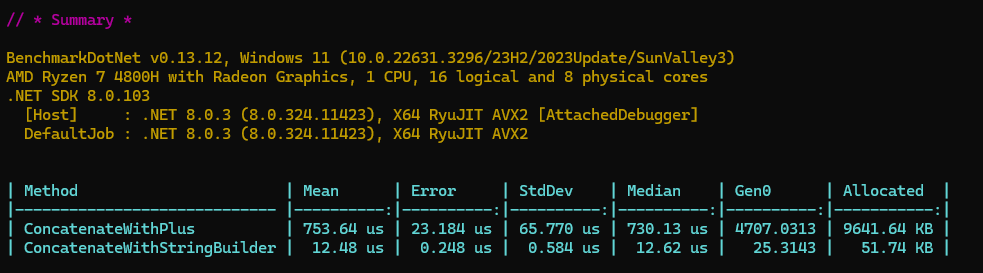
StringBuilder is essential for optimizing memory usage and improving performance in applications that perform extensive string manipulation.
2. Use StringComparison for performance
.NET provides several ways to compare strings, including simple equality checks (==), string.Equals, string.Compare, and methods like string.StartsWith or string.Contains.
Each of these methods can optionally take a StringComparison enumeration as a parameter, which specifies how the comparison should be conducted.
The StringComparison options include:
Ordinal comparisons (Ordinal, OrdinalIgnoreCase): These comparisons are based on the binary values of the characters in the strings and are the fastest type of comparison. They are culture-insensitive, making them ideal for comparing strings for internal processing, file paths, machine-readable strings (like XML tags), and when performance is crucial.
Culture-sensitive comparisons (CurrentCulture, CurrentCultureIgnoreCase, InvariantCulture, InvariantCultureIgnoreCase): These comparisons consider the cultural context of the strings, which is essential when comparing strings that are displayed to the user or when the comparison results depend on specific cultural rules (like sorting in a user interface).
Ordinal comparisons are faster than culture-sensitive comparisons because they directly compare the numeric Unicode value of each character in the strings.
There's no need to apply cultural rules, which can vary widely and involve complex logic like handling special characters, accent marks, or case conversions based on specific cultures.
Let's see a practical example:
string string1 = "hello world";string string2 = "Hello World"; bool areEqual = string.Equals(string1, string2, StringComparison.OrdinalIgnoreCase);// areEqual is true because the comparison is case-insensitive.
3. Leverage Span
Span
It provides the ability to work with a slice of data without allocating new memory for that slice.
This is particularly useful for strings because, as previously mentioned, strings are immutable in .NET.
Key Advantages of Span
Reduced Allocations:
Since Span
Memory Efficiency:
Span
Versatility:
Span
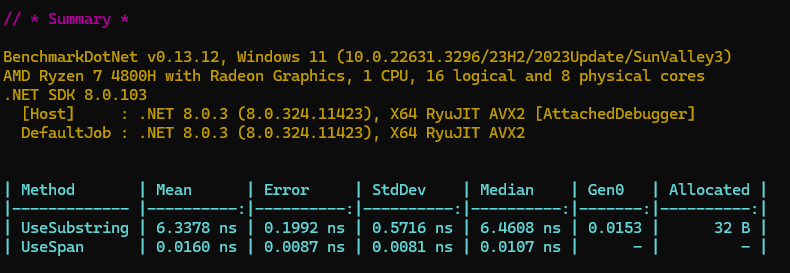
Let's compare it with a basic Substring mehod:
This opens the JSON configuration where you can define your Rate Limiting Policy in detail.
public class SpanVsSubstring{ private const string testString = "This is a longer test string for demonstration."; [Benchmark] public string UseSubstring() { return testString.Substring(10, 5); // Extracts "longer" } [Benchmark] public ReadOnlySpan<char> UseSpan() { ReadOnlySpan<char> span = testString.AsSpan(10, 5); return span; // "longer" }}
And benchmark results:
Wrapping Up
Incorporating these techniques into your .NET applications can significantly improve string handling performance, both in terms of speed and memory efficiency.
Always test these approaches in the context of your specific application to measure their impact.
What next?
Check what are 5 new cool features in C# 12 here: Link
That's all from me today.
Preparing for a .NET interview? My free Pass Your .NET Interview kit has 250 questions with answers, clean C# code, and full complexity analysis - updated to .NET 10.